I've fully adapted to Zorin and I want to remove Windows 10 from my PC. It's in a dual boot configuration. Can I simply format the SSD where it's installed? What would the boot process be like?
Are you dual booting off the same SSD or do you have two SSDs on the system. First suggestion, no matter the answer, is to clone your drives so you can get back to the current state. Macriuum Reflect has a free version that has a 30 day trial period. Get a spare drive to make the clone.
I had a second slot with my Lenovo M700 mini, so I have Windows 10 Enterprise running off one SSD (I needed two programs I have yet to find an equal for) and Zorin 18 on the other. Once you have everything cloned you can overwrite the Windows partition. But make sure you have every box checked. Originally I deleted my Windows 10 from my main SSD, without cloning anything, and had to get a new (2nd) SATA M2 SSD to reinstall it. Not fun and a big timesuck. Good luck.
IF you want a nice disk cloning program for linux i would suggest rescuezilla i use it all the time does has 1 thing tho you can clone a smaller drive to a larger one but not a larger to a smaller
Before I would write a little Guides for this, could You please install GParted with sudo apt install gparted and make a Screenshot from Your Partitions? So, there would be an Overview. Also it would be good to answer @Douglas5026DFX's Question if You have installed zorin on a seperate Drive or on the same Drive like Windows.
Diferent SSDs....both with 480GB and 1 HD 1GB with steam games.
Okay, can You make a Screenshot of the Partitions of the Windows Disk please? When You installed this did You created for Zorin a seperate EFI-Parition on the Zorin Drive or did you use the EFI-Partition on the Windows Drive?
How i can make a screenshot from my disks?
When Your are in Zorin, simply press the Prnt-Key on Your Keyboard. Then the Screenshot Tool gets activated. the Screenshots are saved in ~/Pictures/Screenshots
I installed GParted and ran it. But is there somewhere in its menu that I need to open to display all partitions at once on a single screen?
No, not directly. When GParted is open, you can see in the top right a Field where You can choose the Drive:
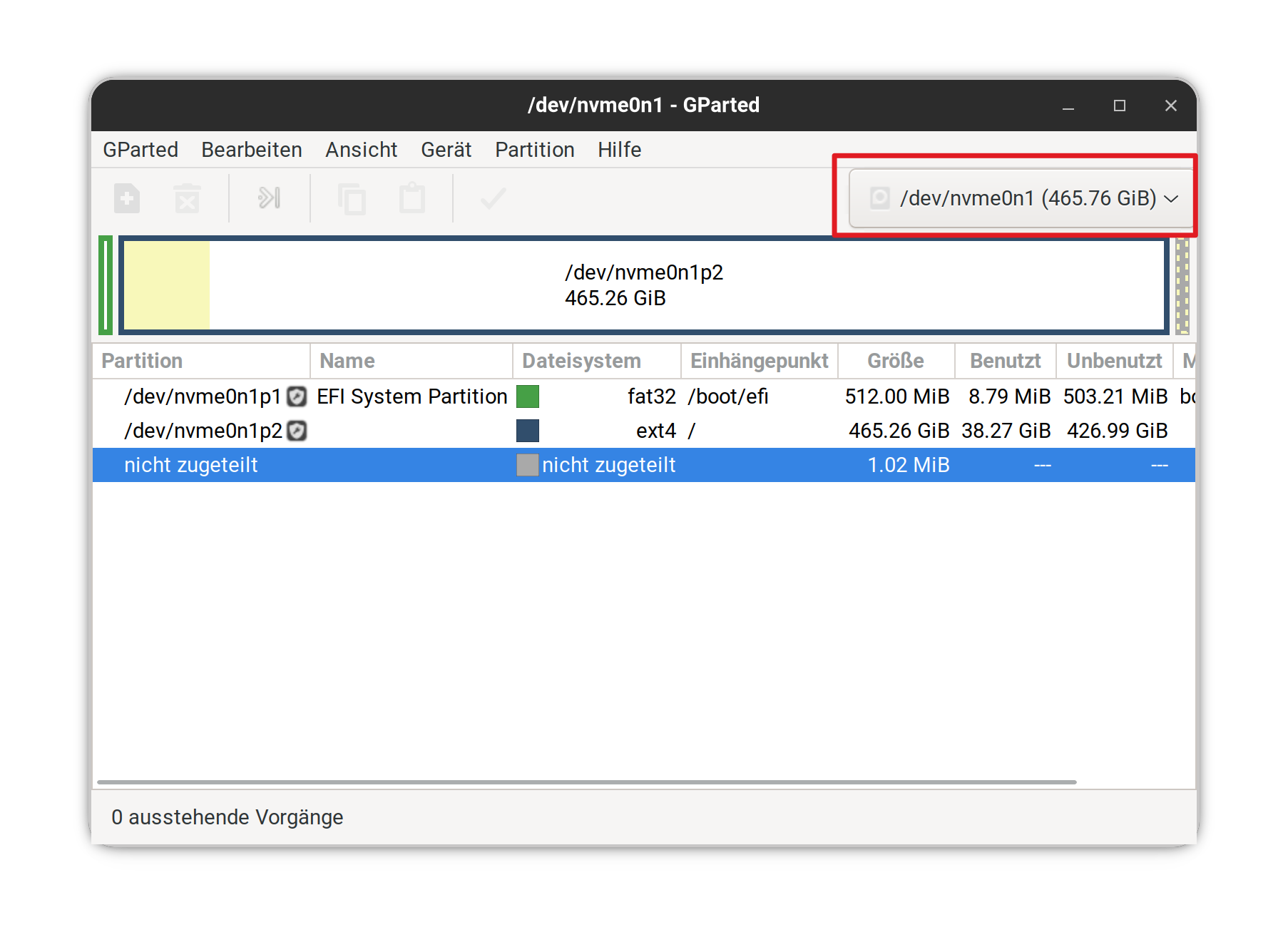
When You choose there the Drive, the Partitions appear under it.
1 Like
Sorry for the delay in replying. What should I do? I have several drives: 2 SSDs and one HDD. I installed Zorin on the most recent SSD I bought, an ADATA SU 650 480GB.
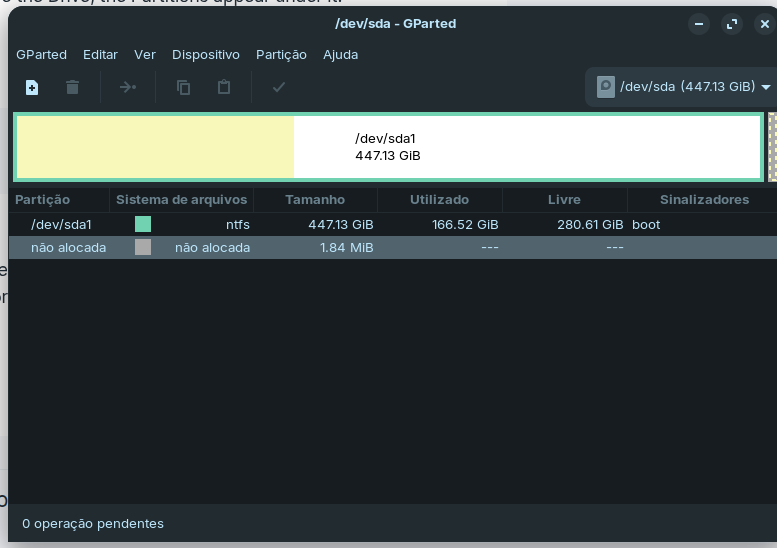
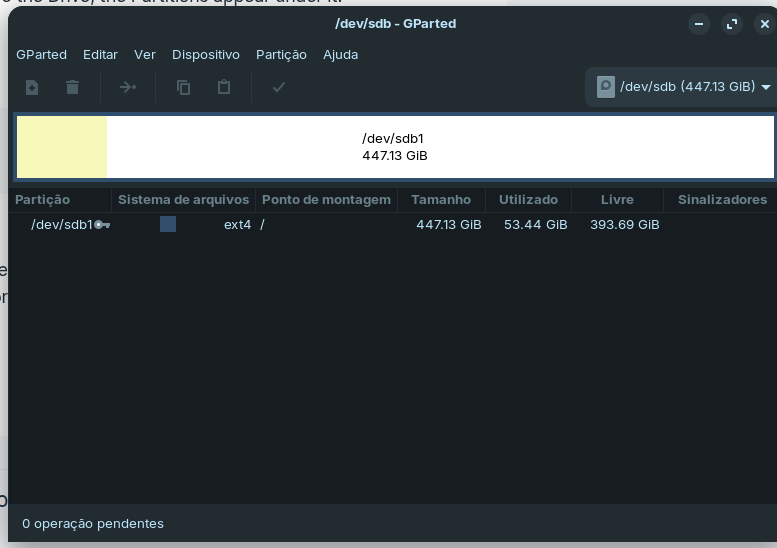
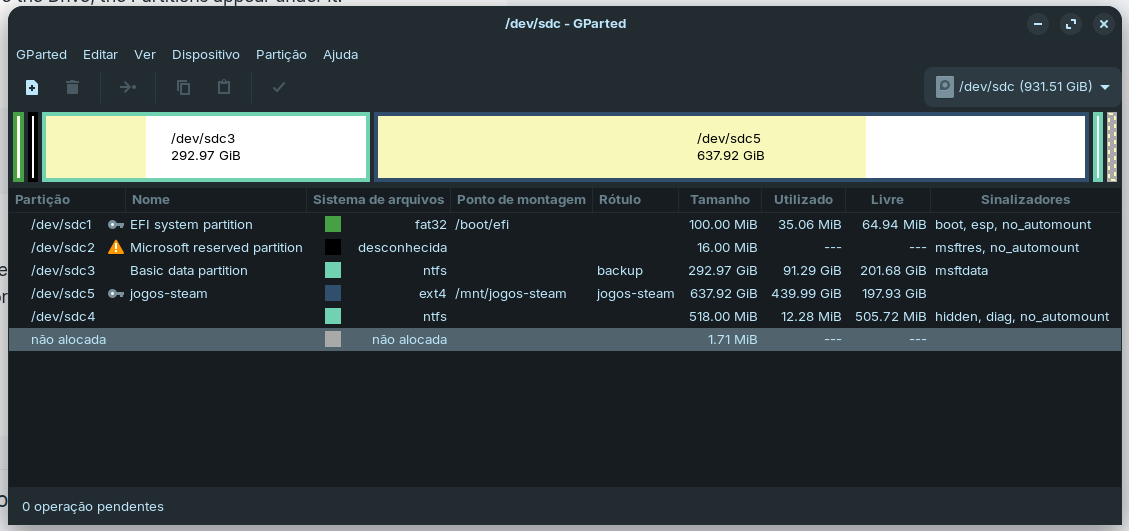
Okay, thanke for the Overview. That is helpful. I have one Question because I don't see it on Your Partition Tables. I guess this is Your Zorin Drive:
becuase of the ext4 Format and the / Mount Point. When You installed Zorin, You would have to create an EFI Partition or using the existing Windows EFI Partition under the Option ''Device for boot loader installation''. Because I don't see a seperate EFI-Partition, did you have chosen the Windows Boot Manager on ''device for boot loader installation''? This isn't Critism. I only have to know that because of the Steps You have to do.
What I did was buy a new SSD and install it in my PC. I installed Zorin on it. I don't remember exactly what I did during the installation. Before installing this new SSD, Windows 10 was installed on the first SSD with NTFS file formatting, and the second HDD is solely for installing Steam games and personal files. I'm considering reinstalling Zorin again to format the SSD where Windows 10 was installed. Using the bootable Zorin installer, would I be able to format this SSD with Windows to ext4 and simultaneously proceed with the Zorin installation on the newer SSD?
When You start up Your PC, do You have a GRUB Menu where You choose if to start in Zorin or Windows? When in Zorin, could You open the Terminal and type efibootmgr and post the Output please?
1 Like
Looks like the /boot/efi is on sdc (and too small, it should be 300 Mb or rather,
300 MB = 286.102294922 MiB)
I saw that. This is from Microsoft. I had the same Size for this in the Past when I had a Dual-Boot System. And because there is no other EFI-Partition I asked if this is used as Target for Bootloader Installation.
1 Like
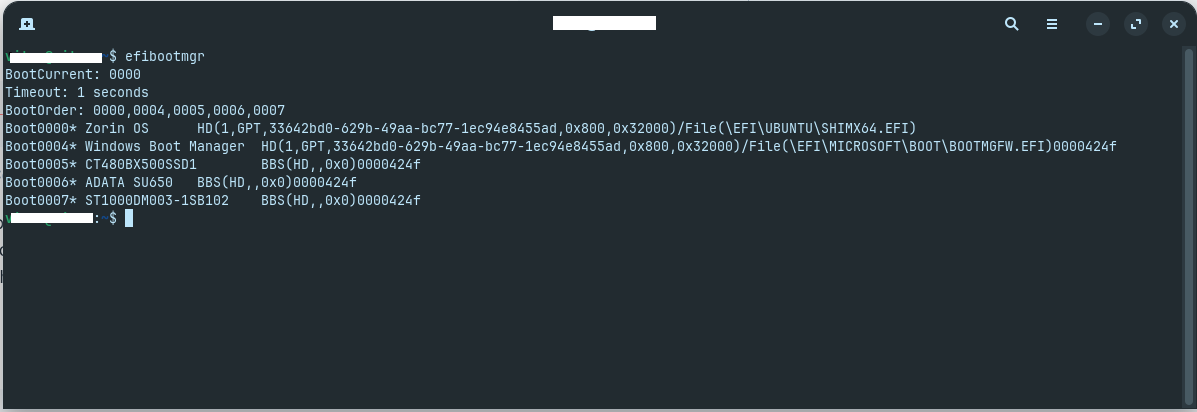
Okay, thanks. Then let's see ...
Here You can delete everything except sdc1 and sdc5 because these are the EFI-Partitions and the one where Your Steam Games are.
Then open in Zorin the File Manager and click on ''Other Places'' on the left Side. Then click on Your Zorin Drive and then go to boot/efi/EFI/ and there You should find 3 Folders:
- BOOT
- ubuntu
- Microsoft
Here You delete the Microsoft Folder - only the Microsoft Folder! Don't touch anything else.
If done, close the File Manager and open the Terminal and type sudo update-grub and when done, reboot Your Machine and You should get the GRUB Menu with on Zorin Entries.
Then, You have to decide if You want keep the GRUB Menu or not. You can disable it if You wish. But first, You should do the above.
1 Like
Thanks for the help! I'll be doing that procedure here soon.
I need to disable secure boot?