Dual monitor settings missing

System Details Report


Report details

  • Date generated: 2026-03-29 01:06:43

Hardware Information:

  • Hardware Model: Micro-Star International Co., Ltd. MS-7D75
  • Memory: 64.0 GiB
  • Processor: AMD Ryzen™ 7 7700X × 16
  • Graphics: AMD Radeon™ RX 6600
  • Disk Capacity: 7.0 TB

Software Information:

  • Firmware Version: 1.P5
  • OS Name: Zorin OS 18 Pro
  • OS Build: (null)
  • OS Type: 64-bit
  • Windowing System: Wayland
  • Kernel Version: Linux 6.17.0-19-generic

Welcome to the Forum!

Could You provide more Details? Because of the Thread Title I guess, You have 2 Monitors. How they are connected? Are both the same? Are both plugged in into the Graphics Card or is one in the Mainboard?

I have tried 7 monitor combinations. 1 hdmi main. 1 HDMI gpu. Both work singularily. I have Googled for days and still can't find it. Even using zorin search came back blank.

Okay, could You say how Your current Setup is? Are these Monitors are 2 Times the same or are they different Monitors with different Resulutions and Refresh Rate? And how is each Monitor connected?

1 kvm monitor hdmi 60htz
1 27" HD security monitor HDMI. Gpu 60 htz
System running as nvr
Access kvm for maintenance
Have to unplug monitor to have kvm show after reboot


2026-03-30T04:00:00Z-Computer-
Processor : AMD Ryzen 7 7700X 8-Core Processor
Memory : 64915MB (5538MB used)
Machine Type : Desktop
Operating System : Zorin OS 18
User Name : widener (Widener)
Date/Time : Mon 30 Mar 2026 11:29:29 AM EDT
-Display-
Resolution : 1712x963 pixels
OpenGL Renderer : AMD Radeon RX 6600 (radeonsi, navi23, LLVM 20.1.2, DRM 3.64, 6.17.0-19-generic)
X11 Vendor : The X.Org Foundation
-Audio Devices-
Audio Adapter : HDA-Intel - HDA ATI HDMI
Audio Adapter : USB-Audio - USB Audio
Audio Adapter : HDA-Intel - HD-Audio Generic
-Input Devices-
Power Button
Video Bus
Corsair Corsair Gaming RGB
MSI MYSTIC LIGHT
HD-Audio Generic HDMI/DP,pcm:3
HD-Audio Generic HDMI/DP,pcm:7
HDA ATI HDMI HDMI/DP,pcm:3
HD-Audio Generic HDMI/DP,pcm:8
HD-Audio Generic HDMI/DP,pcm:9
HDA ATI HDMI HDMI/DP,pcm:7
HDA ATI HDMI HDMI/DP,pcm:8
HDA ATI HDMI HDMI/DP,pcm:9
HDA ATI HDMI HDMI/DP,pcm:10
ClickLock Virtual Mouse
-Printers-
No printers found
-SCSI Disks-
ATA WDC WDBNCE0010P
ATA WDC WDS200T2B0A
FIKWOT FP80
H/W RAID 1
Lexar USB Flash Drive
H/W RAID 1
ASUS BW-16D1X-U
Corsair Flash Drive
Corsair Optical Drive
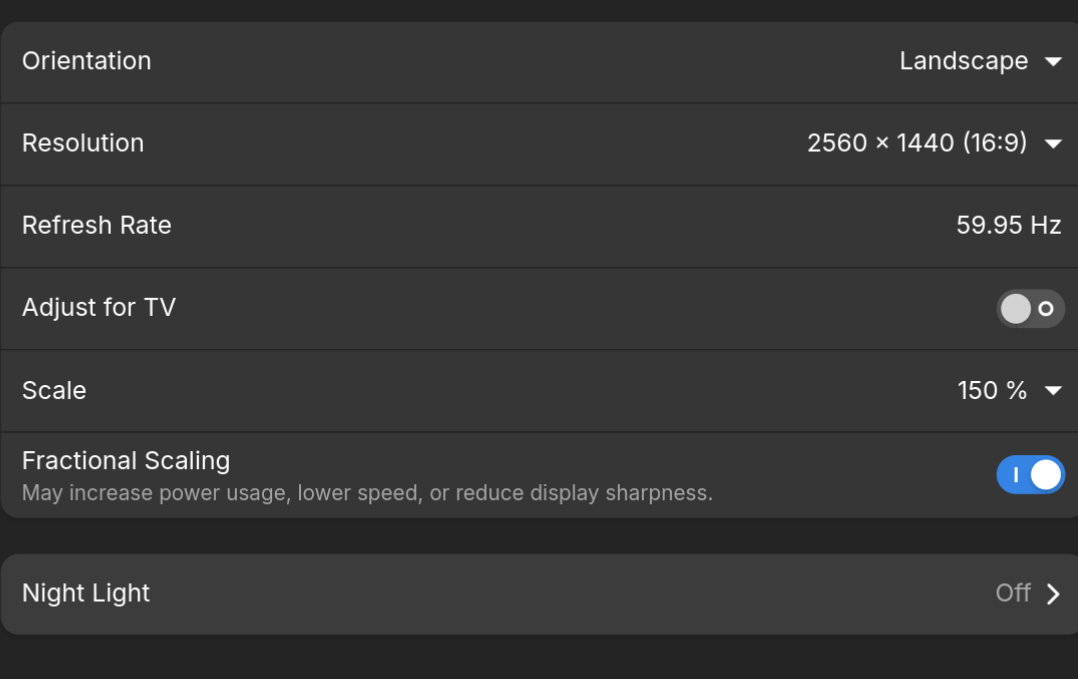
Could You try it with disabled Fractional Scaling please?

Same results

And the Monitors are plugged in as HDMI>HDMI or DP>DP or do You use any Adapters or Dock's?

[quote="Ponce-De-Leon, post:8, topic:61181"]
HDMI>HDMI

Okay, let's try the Following: Go to the Login Screen. Click there on Your Profile so that the Password Field appears. When it is appeared, You should see a Gear Icon in the bottom right Corner. Click on it and choose the Option ''Zorin Desktop on Xorg'' and then log in and check if it works.

same result
I give up and get a splitter and be done with it
FYI
CAME ACROSS THIS

Official Linux drivers are not provided by MSI for the MAG B650 TOMAHAWK WIFI, as the manufacturer does not offer dedicated support for Linux. The motherboard's wireless and Bluetooth components rely on kernel-native drivers included in standard Linux distributions rather than proprietary binaries.

If this my main system I'd be down to troubleshoot but the splitter works :slightly_smiling_face:

1 Like