This is a problem that I solved before but am unable to solve after new installation.
I have 2 NVME drives in USB caddies, a 500GB & a 4TB. For reasons I don't understand the 500GB randomly creates a duplicate mount point as shown in the screenshot. When I unmount one entry it works fine, but leaves the second still there, and when I try to unmount this spurious duplicate Zorin says "nothing to unmount". Annoying. A reboot solves it, of course, but I know (and infuriatingly can't remember) that there is a solution. Can someone please remind me? Thank you.
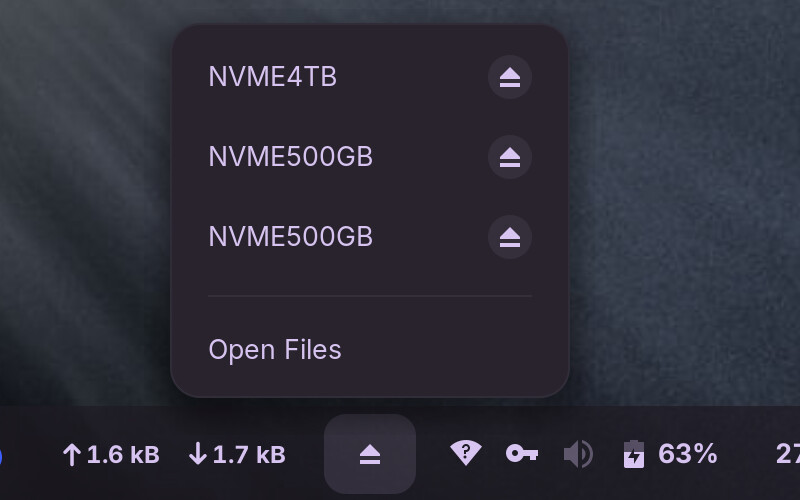
The "fix" i can think of is to add the drive to fstab, bypassing the buggy action of gvfs entirely.
Thanks, Aravisian. I fixed it a month or so ago with unchecking a box. I have never ever edited any Linux config file, so I know that the solution is in a setting somewhere, or maybe a sudo command, that I can't find again despite several hours of searching... 
Unchecking a box...
Well, that could be in Nautilus (Files)
Preferences > Behavior
Uncheck
“Automatically mount removable media”
“Automatically mount media when inserted”
OR... in Disks app - unchecking the Automount option for the drive in question...
Ah no. My Nautilus ("Files", confusingly the same as Nemo - why...?) doesn't have such an option. However, I've changed the settings in Disks (small cog under the disk properties) to "User session defaults off", "Mount on startup" and "Show in user interface", and on a couple of reboots I have a single mount for both disks. The 4TB has never displayed this problem, but perhaps I had them set differently - I've done so much tweaking that I've lost track... 
If that is the solution, and the problem doesn't recur, I'll add an update in case it happens to anyone else.
Thanks, as always, for the help. Much appreciated.
1 Like
This topic was automatically closed 90 days after the last reply. New replies are no longer allowed.