ELAN Fingerprint Fails to Enroll on Zorin OS 18 (fprintd “Device reported an error”)

Hello everyone,

I’m using Zorin OS 18 (based on Ubuntu 24.04) on a Lenovo IdeaPad 5 14ITL05, and I’m having persistent issues with the built-in ELAN fingerprint sensor.

$ lsusb
Bus 001 Device 001: ID 1d6b:0002 Linux Foundation 2.0 root hub
Bus 002 Device 001: ID 1d6b:0003 Linux Foundation 3.0 root hub
Bus 003 Device 001: ID 1d6b:0002 Linux Foundation 2.0 root hub
Bus 003 Device 002: ID 13d3:56ff IMC Networks Integrated Camera
Bus 003 Device 003: ID 04f3:0c4d Elan Microelectronics Corp. ELAN:Fingerprint
Bus 003 Device 004: ID 8087:0aaa Intel Corp. Bluetooth 9460/9560 Jefferson Peak (JfP)
Bus 004 Device 001: ID 1d6b:0003 Linux Foundation 3.0 root hub

The device is detected by the system, and fprintd starts correctly, but fingerprint enrollment always fails with repeated errors.

When running fprintd-enroll, I get messages like:

GDBus.Error:net.reactivated.Fprint.Error.AlreadyInUse
Authorization denied ... Device was already claimed

After several failed attempts, the fprintd service stops by itself.

I’ve already verified that:

  • No unsafe kernel parameters are being used (no pci=nocrs)
  • Touchpad and other I2C devices are working correctly
  • The fingerprint device is listed as an ELAN USB device by the kernel

From what I understand, this might be a limitation or incomplete support of ELAN fingerprint sensors in libfprint on Linux.

My questions are:

  1. Is this a known limitation with ELAN fingerprint sensors on Zorin OS / Ubuntu 24.04?
  2. Is there any recommended workaround, firmware update, or testing branch of libfprint that I could try?
  3. Or is disabling fingerprint authentication currently the best and most stable option?

Any insight from Zorin or Ubuntu users with similar Lenovo devices would be greatly appreciated.

Thank you in advance.

" libfprint-2-tod1-elan is the recommended driver for ELAN fingerprint readers on Ubuntu 24.04 with GNOME 46.

  • Install the driver via the official PPA:
sudo add-apt-repository ppa:libfprint-tod1-group/ppa
sudo apt update
sudo apt install libfprint-2-tod1-elan
  • After installation, enable the driver through Software & Updates > Additional Drivers and select the ELAN option.
  • Ensure the fprintd daemon is running:
sudo systemctl enable fprintd
sudo systemctl start fprintd
  • Enroll your fingerprint using:
fprintd-enroll
  • For login authentication, install the PAM module:
sudo apt install libpam-fprintd

:warning: Note : While the driver enables basic fingerprint recognition, enrollment and authentication reliability can vary depending on the specific ELAN model. Some users report success with 04f3:0c4c and 04f3:0c4b devices, but results may differ. If issues persist, check the libfprint upstream project or community forums for model-specific patches.

AI-generated answer. Please verify critical facts."

You will then face the issue of third party repos being blocked by default so:

" Ubuntu 24.04 automatically disables third-party PPAs and repositories during a release upgrade to prevent upgrade failures due to incompatible or outdated packages. If you want to suspend this blocking and keep a specific PPA enabled during the upgrade, you can configure it using the update-manager system.

Method 1: Keep All Third-Party Repositories Enabled (Not Recommended)

To allow all third-party repositories to remain enabled during the upgrade:

  • Create a configuration file in /etc/update-manager/release-upgrades.d/ :
sudo nano /etc/update-manager/release-upgrades.d/keep-ppas.cfg
  • Add the following content:
[Sources]
AllowThirdParty = yes
  • Save and exit. This will prevent the upgrade tool from disabling any third-party sources.

:warning: Warning : This method is risky . It can cause upgrade failures if the PPA does not support Ubuntu 24.04 or if package dependencies conflict.

Method 2: Keep Only Specific PPAs Enabled (Recommended)

For safer control, only enable the PPAs you trust and know are compatible:

  • In the same directory, create a .cfg file (e.g., myppa.cfg ):
sudo nano /etc/update-manager/release-upgrades.d/myppa.cfg
  • Add:
[ThirdPartyMirrors]
myppa = http://ppa.launchpad.net/your-ppa-name/ubuntu/
  • Replace myppa with a unique name and http://ppa.launchpad.net/your-ppa-name/ubuntu/ with the actual PPA URL (found in /etc/apt/sources.list.d/ ).

:white_check_mark: This method ensures only the specified PPA remains active during the upgrade, reducing the risk of breakage.

After Upgrade

After the upgrade completes:

  • Review your PPAs. If the PPA doesn’t support 24.04, remove it to avoid future issues.
  • Use sudo add-apt-repository --remove ppa:your-ppa-name to remove unwanted PPAs.
  • Run sudo apt update to refresh package lists.

:pushpin: Best Practice : Only keep PPAs that are actively maintained for Ubuntu 24.04. Many older PPAs are no longer supported and can cause problems.
AI-generated answer. Please verify critical facts."

I have followed this instruction but stopped when:

$ fprintd-enroll
Using device /net/reactivated/Fprint/Device/0
Enrolling right-index-finger finger.
Enroll result: enroll-unknown-error

Did you swipe and not tap:

" The 04f3:0c4d Elan fingerprint sensor is supported in modern Linux distributions via the libfprint project, which is the standard open-source driver framework for fingerprint readers.

  • Official Support : This device ID is supported in libfprint 1.90.6-1 and later versions, which are included in recent Linux distributions like Ubuntu 24.04+, Debian 12+, and Fedora 38+.
  • Installation :
    • On Ubuntu/Debian : Ensure libfprint-2-tod1-elan is installed via the official package manager:
sudo apt update
sudo apt install libfprint-2-tod1-elan
  • On Arch Linux : Install from the AUR using libfprint-tod1-elan :
yay -S libfprint-tod1-elan
  • Enrollment & Use :
    • Enroll your fingerprint using:
fprintd-enroll
  • Verify it works with:
fprintd-verify
  • Note : The sensor may require a swipe (not just a tap) for reliable detection, as the driver uses image assembly from multiple frames. Some users report inconsistent results due to small sensor size and low image quality.
  • Troubleshooting :
    • If not detected, check with lsusb and fprintd-list .
    • Ensure fprintd service is running: sudo systemctl restart fprintd .
    • For older systems, consider using the PPA from libfprint-tod1-group (e.g., Ubuntu 22.04).

:white_check_mark: Bottom line : The driver is available and functional in modern Linux systems. Use libfprint-2-tod1-elan for best results.

AI-generated answer. Please verify critical facts."

Just to add was it working before any updates to the system? I am wondering if this has caused the issue.

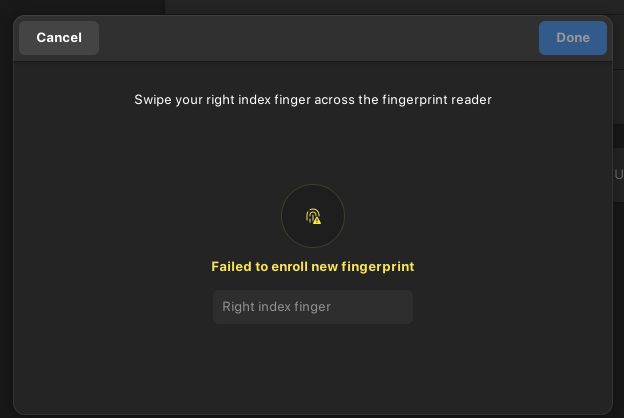
When i register my figerprint, there is always show warn Failed to enroll new fingerprints

When i follow your guidence:

$ sudo apt install libfprint-2-tod1-elan
[sudo] password for mahmuddin:           
Reading package lists... Done
Building dependency tree... Done
Reading state information... Done
libfprint-2-tod1-elan is already the newest version (0.1.0+2404-0ubuntu1).
The following package was automatically installed and is no longer required:
  folder-color
Use 'sudo apt autoremove' to remove it.
0 upgraded, 0 newly installed, 0 to remove and 0 not upgraded.
$ fprintd-enroll
Using device /net/reactivated/Fprint/Device/0
Enrolling right-index-finger finger.
Enroll result: enroll-stage-passed
Enroll result: enroll-unknown-error
$ fprintd-verify
Using device /net/reactivated/Fprint/Device/0
ListEnrolledFingers failed: GDBus.Error:net.reactivated.Fprint.Error.NoEnrolledPrints: Failed to discover prints
$ lsusb
Bus 001 Device 001: ID 1d6b:0002 Linux Foundation 2.0 root hub
Bus 002 Device 001: ID 1d6b:0003 Linux Foundation 3.0 root hub
Bus 003 Device 001: ID 1d6b:0002 Linux Foundation 2.0 root hub
Bus 003 Device 003: ID 13d3:56ff IMC Networks Integrated Camera
Bus 003 Device 004: ID 04f3:0c4d Elan Microelectronics Corp. ELAN:Fingerprint
Bus 003 Device 005: ID 8087:0aaa Intel Corp. Bluetooth 9460/9560 Jefferson Peak (JfP)
Bus 003 Device 006: ID 2717:ff80 Xiaomi Inc. Mi/Redmi series (RNDIS)
Bus 004 Device 001: ID 1d6b:0003 Linux Foundation 3.0 root hub
Bus 004 Device 002: ID 0bc2:ab24 Seagate RSS LLC Backup Plus Portable Drive
$ fprintd-list .
found 1 devices
Device at /net/reactivated/Fprint/Device/0
Using device /net/reactivated/Fprint/Device/0
User . has no fingers enrolled for ElanTech Fingerprint Sensor.

" Device at /net/reactivated/Fprint/Device/0 indicates that your system recognizes the ElanTech fingerprint sensor, but no fingerprints are enrolled for the current user.

  • No fingerprints enrolled : The message confirms that the user has no registered fingerprints on the device.
  • Next step : Run fprintd-enroll to begin the enrollment process. Follow the prompts to scan your finger multiple times (typically 8 scans).
  • Troubleshooting tip : If enrollment fails with "enroll-disconnected" or "already claimed", another process may be using the device. Check with sudo lsof /dev/input/event* or sudo fuser /dev/input/event* to identify and stop conflicting processes (e.g., libinput or a previous fprintd instance). Restarting the fprintd daemon may also help: sudo systemctl restart fprintd .

AI-generated answer. Please verify critical facts."