Hello everyone, I'm pretty new to Linux and recently switched to Zorin OS. I have had a pretty ok experience with a couple of hiccups - mainly had some issues getting Steam and Slack to work after downloading from the Software app (got Steam to work, mostly, after downloading with the terminal).
However, at some point I noticed an error message on the lower right side of my dock, I've attached a screenshot, and it has remained there since it first popped up a few days ago. I've tried looking up a solution for it in the forums, but I haven't found one yet.
Any tips/info on how to fix the issue?
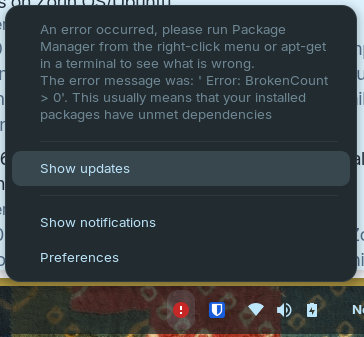
Hi and welcome.
I would open a terminal by entering Terminal in the menu search bar and then type:
sudo apt-get update
If something is wrong, then it should list the application/s that have dependency issues.
It usually means one of two things:
-
You have attempted to install a package that relies on newer libraries that are only present in Ubuntu 26.04 (Zorin 18.1 is based on Ubuntu 24.04, or
-
You have attempted to install something that relies on deprecated libraries that won't get installed because they don't meet curren library requirements.
This is when it is useful to use Timeshift to revert to a previous time.
You can also run in terminal:
sudo apt --fix-broken install
If it is an APT supplied package.
1 Like
Welcome to the Forum!
Open the Terminal and type sudo apt update && sudo apt upgrade and post the Output here please. The Output should offer more Info's about this.
Thanks for the help! Here's what I got at the end after plugging that in:
E: dpkg was interrupted, you must manually run 'sudo dpkg --configure -a' to correct the problem.
After running >sudo dpkg --configure -a> I got this:
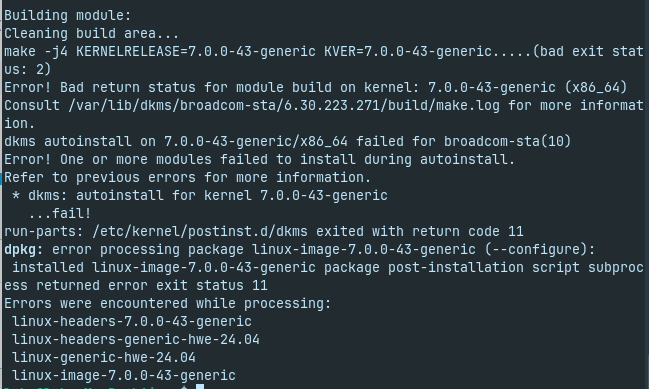
Any advice?
Thanks for the help! I tried this out as well and got another error message:
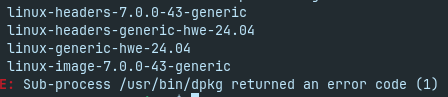
Also tried out what @swarfendor437 recommended and got a list of packages with no error messages. Could you refer me to any resources on how to use Timeshift?
Broadcom drivers are proprietary, so that is likely what is causing it to fail to build on the later kernel.
You do not need to revert a Timeshift or anything.
Just reboot, tap tab or esc to access the Grub Menu, select Advanced Options for Zorin, then arrow key down to the earlier kernel before ...-43 and select it - hit enter key.
Once booted, remove the later kernel.
sudo apt remove linux-image-7.0.0-43 linux-headers-7.0.0-43 linux-modules-7.0.0-43