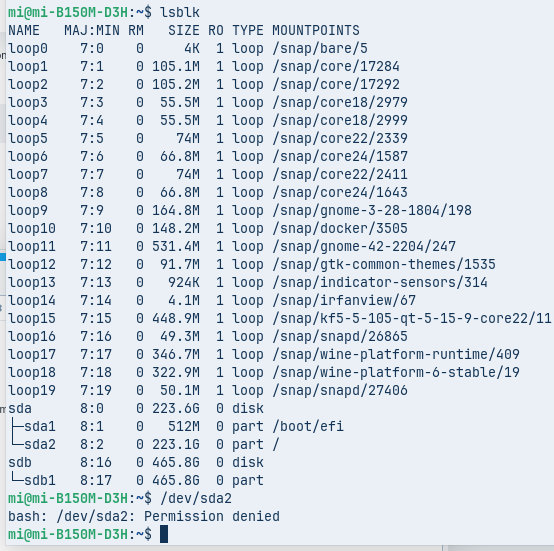
Suddenly I am getting this message. I have replaced the SATA cable and that makes no difference.
Does anyone have any suggestions?
TIA
Mi
Suddenly I am getting this message. I have replaced the SATA cable and that makes no difference.
Does anyone have any suggestions?
TIA
Mi
Can you please post the error message?
What happens when you remove colons from the directories where you are mounting?
E.G. /media/mi/H and not /media/me/H:
The screenshot is showing a path that doesn't exist. To remove the colons from the path, first unmount, change the mountpoint to remove colons, then mount again.
However, I tested this on a (NTFS) mountpoint myself, and the colon did automatically escape itself, but did not require escaping when I removed it.
The errors all indicate the paths/mounts are not working. Could you run mount -l | grep -E "D:|F:|H:" ? Then if nothing is found use mount -av and see if there are errors or mounts that are ignored. If so check lsblk to see if the disks are detected at all.
Windows OS uses drive letters like H, D, E, etc. Linux does not.
You must specify the Device I.D. not a Letter.
For example, /dev/sda2 or an external USB connected /dev/sdb1
Those are examples, not the Device ID's you need.
To find your, use
lsblk
in terminal with the devices mounted.
Thank you @kilo and @Aravisian
I tried all that and got no response to the first suggestions from @kilo
The final solutions from both of you resulted in the following:
Any suggestions for the next try?
Many thanks
Mi
Your permission denied message has occurred because you omitted the sudo command, which elevates you to root and you would be asked for your login password to elevate you to 'root' (think of it as "Run as ... Administrator" in that other OS).
Perhaps this tutorial video might help:
Thanks @swarfendor437
I watched the video but it was too far above me for me to make sense of and appeared to relate only to a new disk where you name the disk yourself. As I did not see how to determine the existing disk name from that video I am unable/unwilling to experiment and possibly do damage. That is what 40 years of windows does to a dinosaur.
I tried the previous commands with sudo added and still got no password prompt when looking for both sda2 and sdb1 so am still totally confused (which is not that unusual at my age).
Any other suggestions?
Thanks
Mi
Hi. What happens with:
sudo mount /dev/sda2
?
mi@mi-B150M-D3H:~$ sudo mount /dev/sda2
[sudo] password for mi:
mount: /: /dev/sda2 already mounted on /.
dmesg(1) may have more information after failed mount system call.
mi@mi-B150M-D3H:~$
I have two updates and the first is relevant, with the second maybe more so. Note this is a Windows box upgraded to Zorin.
On a facetime a young (45) friend suggested trying sudo mount /dev/sdb1 /media/mi/D:
That replied
$MFTMirr does not match $MFT (record 0).
Failed to mount '/dev/sdb1': Input/output error
NTFS is either inconsistent, or there is a hardware fault, or it's a
SoftRAID/FakeRAID hardware. In the first case run chkdsk /f on Windows
then reboot into Windows twice. The usage of the /f parameter is very
important! If the device is a SoftRAID/FakeRAID then first activate
it and mount a different device under the /dev/mapper/ directory, (e.g.
/dev/mapper/nvidia_eahaabcc1). Please see the 'dmraid' documentation
for more details.
mi@mi-B15
He uses Debian strictly from the command line and says that the above error suggests the only fix is to fit the disc to a Windows box, extract all the data, reformat on the linux box is ext4 then reload the data.
Is he correct?
The second issue that may be the root cause of the problem is that a much younger offspring had an error message about when the problems started and took a photo but forgot to tell me about it.
Does this suggest an impending total failure of the computer?
I have a couple of NUC options and will start a new thread on whether they are viable Zorin computers.
Thank you
Mi
That is important, yes. The more details we can get about that, the better.
Life has a great talent for distracting us when multi-tasking and trying to not forget important things.
As you are in your 80's, take joy in every example of the youngsters forgetting things to use back at them like a rubber band when they comment on the old folks forgetting things.
I have been an expert at forgetting things since I was young, way back when... when...
I don't remember.
(I am in my forties).
From everything you have described, I would run a S.M.A.R.T. test on affected drives and prepare to do data recovery and full reinstall.
Thanks @Aravisian
The problem sorted itself today with another Kernal Panic warning that returned on reboot. I put the Zonin SSD in an enclosure and connected that to two different Windows computers. Both said it was an empty enclosure so I now have to get a new disc for Zorin.
I think the polite word is Bother.
I also put the drive that would not open into the same enclosure and it opened correctly both times so the question now What do I need to do to ensure this does not happen again? From my earlier post He uses Debian strictly from the command line and says that the above error suggests the only fix is to fit the disc to a Windows box, extract all the data, reformat the disc on the linux box to ext4 then reload the data. Is he correct?
Cheers
M
This is accurate...
Hard Drive failure is a lot like car failure. Happens at the worst moment.
This is a perfectly viable method. I would not bother with hesitating to do it. Trying to avoid it often only adds work without success and you end up needing to reinstall, anyway.
This is harder to answer. I cannot say (or know about) any specific thing you did that triggered it - but also find it not likely that you did something to trigger it.
With SSD's, you can limit read/write cycles to prolong the life of the drive; but read/write cycles are necessary to use the drive. The purpose is to use it.
Hard Drives need to be viewed as consumable items.
My preventative care includes - Making and save back ups often.
Keeping back ups clutter free, which eases saving backups.
Thanks @Aravisian
My backup until very recently was a windows program called Syncredible that automatically copied all changes on disc D to disk E, E to F etc overnight. When the power supply problem started every time the arms hit the disks and killed a file this auto deleted the same file from the backup and I had not got around to finding another way to do auto backups. The Zorin drive was the latest drive to die so I guess I must now replace all drives and do some sort of incremental backups using Zorin. Ironically two of the old 5.25 drives are the only ones to survive.
Do you have any suggestions?
Note that cloud is a bad option as Australia's fixed wireless nbn internet outside of major cities is often slower than the old 56k modems.
Cheers
Mi
There are several points you can examine for this:
On each of these, minimizing complexity is what helps the most.
A back up drive does not need to be cutting edge or even fast. It only needs to reliably hold data. It may seem strange, but I would still recommend a solid state drive for this task. It has no moving parts to fail. And, backups actually will produce less read and write cycles than daily use would.
Automation has many points of failure, so reducing it as much as possible (I eliminate it entirely) often saves both headaches and mysteries.
Automated tasks also often lack oversight or monitoring, so a failure can slip by unnoticed until it escalates into a catastrophe.
Data amounts also should preferably be as minimal as possible. The less you are making changes or overwriting existing good data, the more stable and reliable it is.
Instead of creating a Full Disk Snapshot, which sounds convenient but is actually heavy and risky, save only critically made changes or additions to data.
There is also an app I use called Qdiskinfo tells you the health of drives connected to the computer. it may be in the software store if not search how to install it on ubuntu 24.04
It sound interwsting. For ubuntu 24 qdiskinfo is available as appimage or as ppa from ubuntuhandbook.
https://github.com/edisionnano/QDiskInfo/releases/download/0.4/QDiskInfo-x86_64.AppImage
I prefer gsmartcontrol as it is in the repository and is more thorough with its hooks into SMART.