Error Message Trying To Upgrade from 17 to 18/18.1

Former Windows 10 user here. I'm quite a novice with Linux and I'm issues. I was able to solve one issue (not being able to install updates to OS 17) by changing the server. But my other main issue is not being able to upgrade to 18/18.1. When I select 18 Core for the upgrade option, the computer scans and delivers this message:

[CHECKING] Started

[CHECKING:Validating Upgrade Attempt] Started

[CHECKING:Validating Upgrade Attempt] Completed

[CHECKING:Checking Filesystem] Started

[CHECKING:Checking Filesystem] Completed

[CHECKING:Restarting Apt] Started

[CHECKING:Restarting Apt] Completed

[CHECKING:Simulating Flatpak Transaction] Started

[CHECKING:Simulating Flatpak Transaction] Completed

[CHECKING:Processing Apt Repos] Started

[CHECKING:Processing Apt Repos] Completed

[CHECKING:Updating Apt Repos] Started

[CHECKING:Updating Apt Repos] Retrying

[CHECKING:Updating Apt Repos] Retrying

[CHECKING:Updating Apt Repos] Retrying

[CHECKING:Updating Apt Repos] Retrying

[CHECKING:Updating Apt Repos] Retrying

[CHECKING:Updating Apt Repos] Retrying

[CHECKING:Updating Apt Repos] Retrying

[CHECKING:Updating Apt Repos] Retrying

[CHECKING:Updating Apt Repos] Retrying

[CHECKING:Updating Apt Repos] Retrying

[CHECKING:Updating Apt Repos] Fatal Error: { error-repo-download-failed: E:The repository 'Index of /ubuntu noble Release' does not have a Release file., W:Updating from such a repository can't be done securely, and is therefore disabled by default., W:See apt-secure(8) manpage for repository creation and user configuration details., E:The repository 'Index of /ubuntu noble-updates Release' does not have a Release file., W:Updating from such a repository can't be done securely, and is therefore disabled by default., W:See apt-secure(8) manpage for repository creation and user configuration details., E:The repository 'Index of /ubuntu noble-backports Release' does not have a Release file., W:Updating from such a repository can't be done securely, and is therefore disabled by default., W:See apt-secure(8) manpage for repository creation and user configuration details., E:The repository 'Index of /ubuntu noble-security Release' does not have a Release file. }

[CHECKING:Updating Apt Repos] Failed

[CHECKING] Failed

[CHECKING:Restoring System] Started

[CHECKING:Restoring System] Completed

I don't know how to proceed. (I thought maybe the change in server location that solved my previous issue mentioned above would resolve this one, too, but it didn't.) Thank you for any feedback!
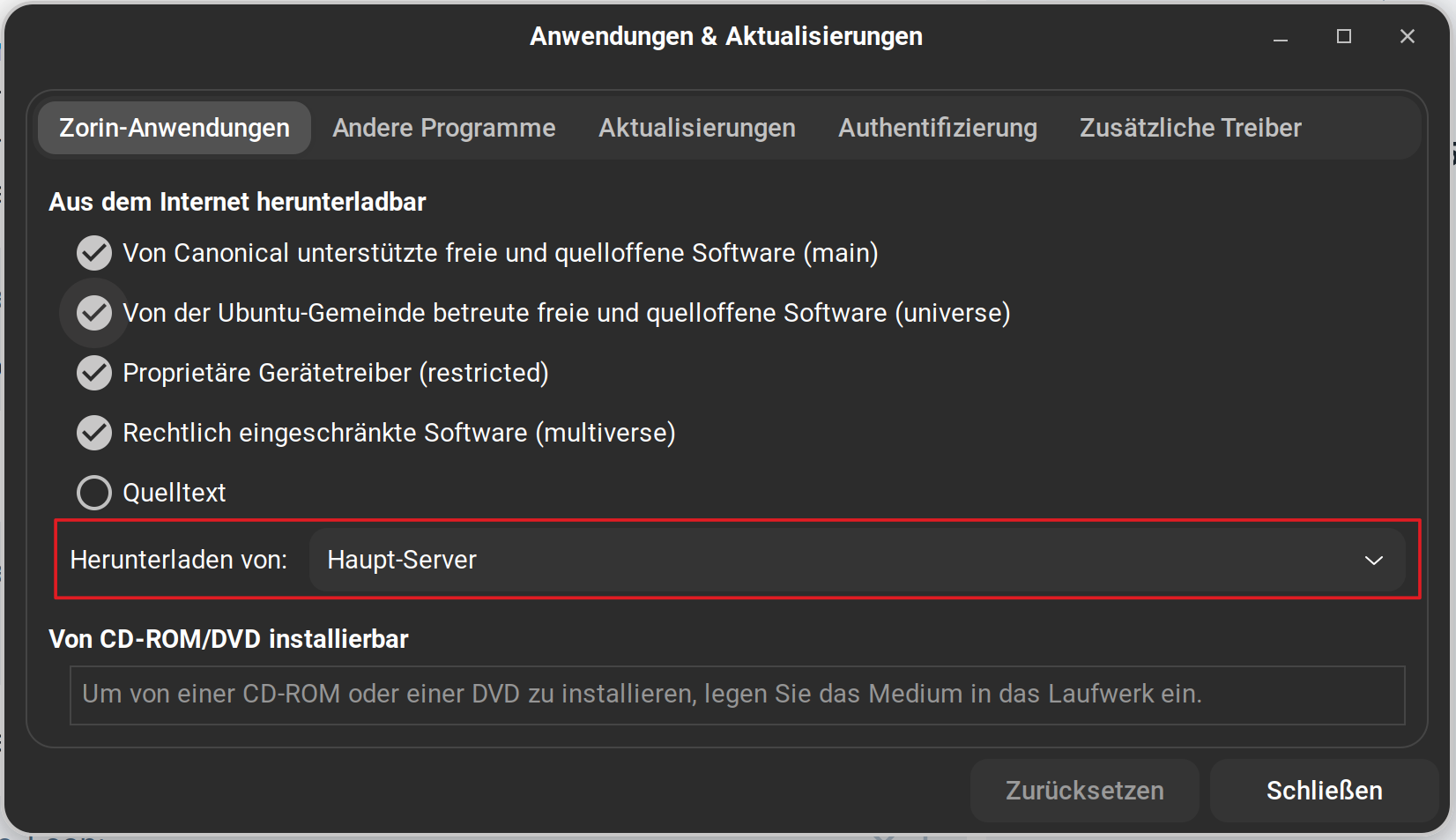
Did You set the Source to ''Main Server''? If not, try that. For this go to Software & Updates and there on th first Tab, You can find that:

When done, open the Terminal and type sudo apt update && sudo apt upgrade and check if You get any Errors. If not, try the Upgrade Process again.

Well, I had changed it from Main Server to "Best Server" (based on what I read in another thread) to get my other issue fixed. But I switched it back to Main Server as you suggested. I typed the command you gave me into the terminal and got the following (The Xs at the beginning and end are mine, removing info that I wasn't sure was a security risk or not to show):

To run a command as administrator (user "root"), use "sudo ".
See "man sudo_root" for details.

XXXXXXX@XXXXXXX-XXXXXX:~$ sudo apt update && sudo apt upgrade
[sudo] password for barbara:
Hit:1 https://brave-browser-apt-release.s3.brave.com stable InRelease
Ign:2 Index of /stable/deb/ stable InRelease
Hit:3 Index of /ubuntu jammy InRelease
Hit:4 Index of /stable/deb/ stable Release
Hit:5 Index of /ubuntu jammy-updates InRelease
Hit:6 Index of /ubuntu jammy-backports InRelease
Hit:7 Index of /ubuntu jammy-security InRelease
Hit:9 Index of /stable/ jammy InRelease
Hit:10 Index of /patches/ jammy InRelease
Hit:11 Index of /apps/ jammy InRelease
Hit:12 Index of /drivers/ jammy InRelease
Hit:13 https://packages.mozilla.org/apt mozilla InRelease
Hit:14 Index of /zorinos/apps/ubuntu jammy InRelease
Hit:15 Index of /zorinos/drivers/ubuntu jammy InRelease
Hit:16 Index of /zorinos/patches/ubuntu jammy InRelease
Hit:17 Index of /zorinos/stable/ubuntu jammy InRelease
Reading package lists... Done
Building dependency tree... Done
Reading state information... Done
38 packages can be upgraded. Run 'apt list --upgradable' to see them.
Reading package lists... Done
Building dependency tree... Done
Reading state information... Done
Calculating upgrade... Done
The following packages were automatically installed and are no longer required:
libfwupdplugin5 libgcab-1.0-0 libsmbios-c2
Use 'sudo apt autoremove' to remove them.
The following NEW packages will be installed:
aptkit gir1.2-xapp-1.0 netplan-generator python3-netplan
The following packages have been kept back:
snapd
The following packages will be upgraded:
gir1.2-gdkpixbuf-2.0 gir1.2-nm-1.0 gir1.2-polkit-1.0 libgdk-pixbuf-2.0-0
libgdk-pixbuf2.0-bin libgdk-pixbuf2.0-common libnetplan0 libnm0
libnss-systemd libpam-systemd libpolkit-agent-1-0 libpolkit-gobject-1-0
libssl3 libssl3:i386 libsystemd0 libsystemd0:i386 libudev1
libxml-parser-perl linux-firmware linux-tools-common lshw netplan.io
network-manager openssl pkexec policykit-1 polkitd systemd systemd-oomd
systemd-sysv systemd-timesyncd udev vim-common vim-tiny xdg-dbus-proxy xxd
zorin-os-upgrader
37 upgraded, 4 newly installed, 0 to remove and 1 not upgraded.
Need to get 317 MB/335 MB of archives.
After this operation, 4,054 kB of additional disk space will be used.
Do you want to continue? [Y/n] Y
Get:1 Index of /ubuntu jammy/universe amd64 gir1.2-xapp-1.0 amd64 2.2.8-1 [9,652 B]
Ign:2 Index of /ubuntu jammy-updates/main amd64 linux-firmware all 20220329.git681281e4-0ubuntu3.42
Get:3 Index of /zorinos/stable/ubuntu jammy/main amd64 aptkit all 1.0.8-zorin1~zorinos17 [466 kB]
Get:4 Index of /zorinos/stable/ubuntu jammy/main amd64 zorin-os-upgrader amd64 1.3.9~zorinos17 [495 kB]
Ign:2 Index of /ubuntu jammy-updates/main amd64 linux-firmware all 20220329.git681281e4-0ubuntu3.42
Err:2 Index of /ubuntu jammy-updates/main amd64 linux-firmware all 20220329.git681281e4-0ubuntu3.42
429 Too Many Requests [IP: 185.125.190.82 80]
Fetched 971 kB in 8s (126 kB/s)
E: Failed to fetch http://archive.ubuntu.com/ubuntu/pool/main/l/linux-firmware/linux-firmware_20220329.git681281e4-0ubuntu3.42_all.deb 429 Too Many Requests [IP: 185.125.190.82 80]
E: Unable to fetch some archives, maybe run apt-get update or try with --fix-missing?
XXXXXXX@XXXXXXX-XXXXXX:~$

Did you remove or rename third party repos before upgrading?

This command from an old thread should work

find /etc/apt/sources.list.d -type f -not -name "zorin*" -exec grep -li jammy {} + | sudo xargs -I "{}" mv {} {}.bak

It's all one line in terminal

1 Like

This shows a server is down.

2 Likes

Okay, that looks fine so far. Like @Aravisian already wrote: There seems to be a Server Issue. Wait a Day or 2 and then try it again. And when everything is updated, try the Upgrade Process again.

Ok. I'll wait a few days and try again. (I did try once this morning and, although I was able to do updates for 17, it wouldn't upgrade to 18. I'll give it more time.)

To Nick: I X-ed out the info only for this forum, since I wasn't sure about how sensitive it would be security-wise. I didn't try your terminal command yet. I'll see if waiting does the trick first, then try yours. Thanks!

I have finally managed to get the desktop to upgrade to 18.1 (after several more attempts). Using the Main Server and the command: sudo apt update && sudo apt upgrade did the trick after all. Thanks for the help!