Hi everyone. I have a big problem with my secondary internal NTFS hard disk. Linux no longer mounts it. It says Error mounting /dev/sda1
at MYMOUNTINGPOINT: /dev/sda1 already mounted or mount point busy (udisks-error-quark, 0). I am in this situation after trying to mount an external drive that didn't work via terminal and surely i did not do things right. Now the internal NTFS disk works only with Windows. Just tried to do Chkdsk and Windows says everything is correct. What can i do?
Do you recall which commands you used? You can run history at the command line to see previous commands (be careful sharing this if you've entered sensitive details like passwords).
Aside from that, we can start by taking a look at the current layout:
lsblk -f
No history here because i'm running Linux from Usb: I had to reinstall Windows because I needed files from that disk.
However after launching lsblk - f i see loop 0 squash 4.0 and then
Sda1 ntfs disk with the problem
Sdb1 is the Linux distro on the usb
Nvme0n1p1 fat32
Nvme0n1p2 EMPTY
Nvme0n1p3 ntfs
Nvme0n1p4 ntfs
And if you try to mount it right now while running from the Zorin OS USB?
sudo mount /dev/sda1 /mnt
If you see no error, you should be able to navigate to /mnt and see the files from your Windows drive.
When You open ''Disks'', choose the Drive and click on the Settings Button:
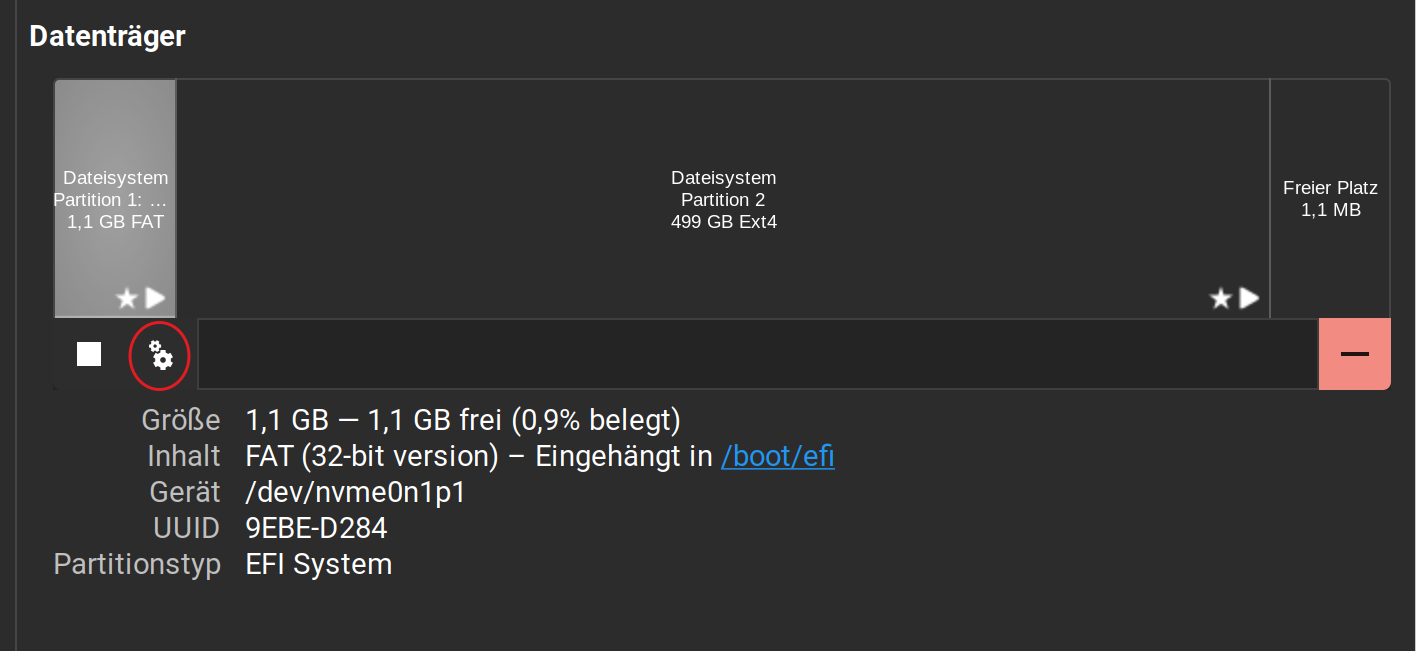
You should see a Settings Overview. And there is a Mark of Mount on Start-Up. Is this active?
Sorry how can i navigate? I gave the command and saw no errors
If i go in Edit mount options User session defaults is On
Ok now i can access the disk. But if i restart? Well i will try, nothing to lose
No errors is good. You can first confirm that it's actually worked by running lsblk -f again. At the mountpoint column, it should say /mnt.
To navigate there, launch the file manager and press Ctrl+L to focus on the address bar, and enter /mnt. This will take you there directly.
Nothing will happen, it will restart normally but you'll have to mount the drive again if you want to access it. You can worry about setting this up permanently when you re-install Zorin OS, so no worries there.
Thank you apparently i solved. Once i mounted on mnt i restarted Linux and i mounted it normally from Thunar (i am on Linux Mint xfce with this usb), the last thing is trying with another iso
1 Like
No it doesn't work with another iso. But i understand that the mounting point of that disk is occupied. And this time i'm not able to mount on /mnt or anything else
Also booting from a live USB? What's the error message? And the output of lsblk -f again?
Only booting from a live Usb. And the output after the command is the same
How are you doing the mounting, and what is the error message exactly? Try another location, like /media or your own Documents folder, even, it's not important..
I'm doing the mounting with sudo mount but every location is occupied or it says that doesn't exist. If i try to mount from Disks it says that the path is already mounted or mount point busy. But if i try to mount on the same path with sumo mount it says ntfs-3g-mount: failed to access mountpoint THATPATH: file or directory non existent. It seems like this hard drive is marked in some way. Or there is something else? Pheraps something with the usb port i used with the external drive? I don't understand.
I don't think it's the USB port, otherwise you'd get the same error also while on Zorin OS. Can you show the actual output of lsblk -f and the command you used, along with the error?
The last column shows whether that partition is already mounted, and where:
NAME         FSTYPE FSVER LABEL UUID                                 FSAVAIL FSUSE% MOUNTPOINTS
mmcblk1
├─mmcblk1p1  vfat   FAT32       5384-D13C                             505.1M     1% /boot/efi
├─mmcblk1p2  ext4   1.0         63e87289-d476-4040-b307-981c16adda6b   19.1G    24% /
└─mmcblk1p3  swap   1           b39b270d-6290-4d97-8b6b-fc6b3dbc642b                [SWAP]
mmcblk1boot0
mmcblk1boot1
If there's nothing showing up, it's not mounted. If it is, you might want to unmount it first with:
sudo umount /dev/sda1
Changing /dev/sda1 with whatever the nomenclature is for your case. Keep in mind that you cannot unmount the drive if you're using it.
Although this error suggests an error with the NTFS driver... might be the mountpoint itself. 
zorin@zorin:~$ sudo unmount /dev/sda1
sudo: unmount: comando non trovato
zorin@zorin:~$ lsblk -f
NAME FSTYPE FSVER LABEL UUID FSAVAIL FSUSE% MOUNTPOINTS
loop0 squashfs 4.0 0 100% /rofs
sda
└─sda1 ntfs DATA 20C632AFC63284D6
├─ventoy 0 100% /cdrom
└─sda1
sdb
├─sdb1 exfat 1.0 Ventoy 3177-0664
└─sdb2 iso9660 Joliet Extension Zorin OS 17.3 Lite 64bit 2025-04-10-13-29-48-00
sr0
nvme0n1
├─nvme0n1p1 vfat FAT32 E4A9-1680
├─nvme0n1p2
├─nvme0n1p3 ntfs 7038AADC38AAA098
└─nvme0n1p4 ntfs 6CDEFD4BDEFD0E58
zorin@zorin:~$ mount /dev/sda1 mnt
mount: mnt: mount point does not exist.
zorin@zorin:~$ mount /dev/sda1 /mnt
mount: /mnt: must be superuser to use mount.
zorin@zorin:~$ sudo mount /dev/sda1 /media
ntfs-3g-mount: mount failed: Dispositivo o risorsa occupata
zorin@zorin:~$ sudo mount /dev/sda1 /mnt
ntfs-3g-mount: mount failed: Dispositivo o risorsa occupata
zorin@zorin:~$ sudo unmount /dev/sda1
sudo: unmount: comando non trovato
zorin@zorin:~$ sudo umount /dev/sda1
umount: /dev/sda1: not mounted.
zorin@zorin:~$ sudo mount /dev/sda1 /media
ntfs-3g-mount: mount failed: Dispositivo o risorsa occupata
zorin@zorin:~$ sudo mount /dev/sda1 /mnt
ntfs-3g-mount: mount failed: Dispositivo o risorsa occupata
zorin@zorin:~$ sudo mount /dev/sda1 /home
ntfs-3g-mount: mount failed: Dispositivo o risorsa occupata
zorin@zorin:~$
These are all the things (with some errors) that i tried
So, you have two drives and one external USB drive? It looks like the drive at /dev/nvme0n1 is where Windows is installed, and then you have /dev/sdb which looks like the Ventoy one... But the remaining one, /dev/sda looks suspicious as its also showing traces of ventoy, and it's at 100% usage.
Anyway, you can see that it's mounted at /cdrom. Are you actually using it like that? I'm just asking to confirm, it makes no difference if you're using a CD or USB drive.
You can then try:
sudo umount /cdrom
Note that's "umount" not "unmount", without the n — I know, weird ...
zorin@zorin:~$ sudo umount /cdrom
umount: /cdrom: target is busy.
It's only because i'm using Ventoy but the problem remains also without Ventoy
"Note that's "umount" not "un mount", without the n — I know, weird ..."Yes 
All right that was a long shot... so, could you show how the lsblk command looks like when you boot from the Zorin OS ISO? That worked before when you mounted it into /mnt right?