I get no grub installed. Hoping to insert error message below.

Locked NVRAM ordinarily means your BIOS is locked down to prevent alterations from what I understand. Have you set BIOS to require a password or anything of the sort?
I do not remember if I have a pw installed but I will check. Thank you.
I was told when I had the same problem with bootrepair to do a CMOS reset (but I don't know if it would have helped, I made a fresh install instead).
After the CMOS reset, adjust the BIOS settings as they were before (if you had made changes), reboot from the Live Stick and run boot repair again.
1 Like
CMOS reset is what I read as well, but I'm inclined to recommend something less destructive first. There's no risk of data loss from a CMOS reset, but it's SUCH a pain restoring BIOS settings, and if you have to short the jumper because your motherboard has no reset button... ugh. I can't believe they still make motherboards without the button.
1 Like
Yes, that's right, I really miss a function that allows me to save/export and restore my BIOS settings (e.g. as a specific profile) or to print out all bios settings in an overview list.
Since a CMOS reset can lead to the OS no longer booting if you have made important changes (e.g. switched from legacy to UEFI or from RAID to AHCI), it can easily lead to nasty surprises if you are not familiar with it.
1 Like
Disable secure boot in your BIOS.
This looks like You already used Boot Repair.
Do you have a Dual-Boot System or is this a Zorin-only System? Because when it is Zorin-only, You have to active the GRUB Menu because it is disabled by default.
What is your problem? You can't boot after a fresh Zorin install?
Is there a message shown at boot?
Can you choose ubuntu in your BIOS? If yes, is it set to first position of boot order?
What brand/model is your computer?
Do you have legacy or UEFI BIOS enabled?
You could boot from Zorin live bootstick, run gparted and post a screenshot of your partitions here.
I don't know what a CMOS reset is. This hardware is a NUC. Isn't CMOS the battery to keep BIOS in memory?
It is already disabled, I checked today. There is no set admin or user passwords either.
This is Zorin only, total wipe over Windows10.
I will do that tomorrow and post results hopefully.
Okay, when it is Zorin-only, You don't have a GRUB Menu by default. But You can activate it. Open the Terminal and type sudo nano /etc/default/grub and then opening Window should look like this:
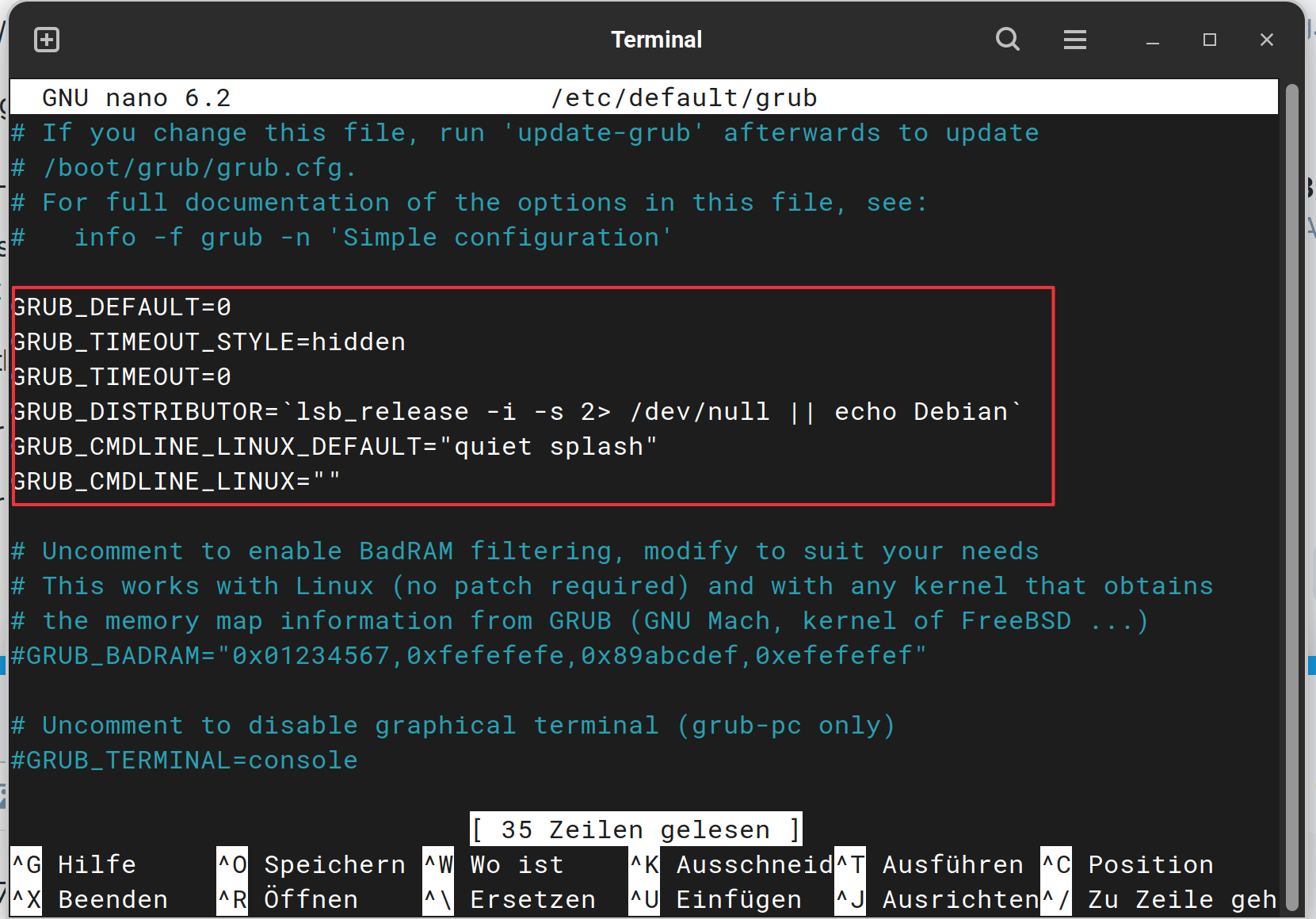
Look in the white Text Block. There are 2 Lines who are important here:
GRUB_TIMEOUT_STYLE=hidden
GRUB_TIMEOUT=0
These Values, You have to change. Replace hidden with menu and the 0 with a 10 or 20 for Example. The Numbe is the Seconds that the GRUB Menu appears before it starts in the default Choice. So the Lines should be:
GRUB_TIMEOUT_STYLE=menu
GRUB_TIMEOUT=10
When You have changed it, press ctrl+o to save the Change, Enter to confirm and ctrl+x to exit. Back in the normal Terminal Overview type sudo update-grub to make the Changes affect. This is important! Without that, it will not work!
Yes, CMOS battery is a battery for your BIOS. You can look on your manufacturers site how to make a
CMOS reset on your system.
Let's clarify beforehand what the problem might be - perhaps you don't need to do a CMOS reset.
Weird, I went into BIOS and had a look around again today, and disabled a couple of unknown security protocols to try them before anything else. Save and restart, and then up jumps grub with the login!!! So then I go get what i wrote down for the password and LOL it doesn't work. Talk about gremlins.
Is your problem solved now? You wrote it doesn't work but marked it as solution, so I'm not sure if you need further help.
Could it be you had capslock on when you set your login password? If not the case you can reset your password but if you have a fully functioning GRUB menu at boot you need to choose 'Advanced options for Zorin and choose Recovery mode. Once there choose the Terminal with root permissions.
Next enter the following commands:
mount -n -o remount,rw /
then press enter.
Next:
passwd your_username
then enter new password, shut down and reboot.
I advise you download the unofficial manual for Zorin 17 Core I wrote from here:
Yes, solved but not quite sure how?
1 Like
Maybe the Ghost in the Machine.