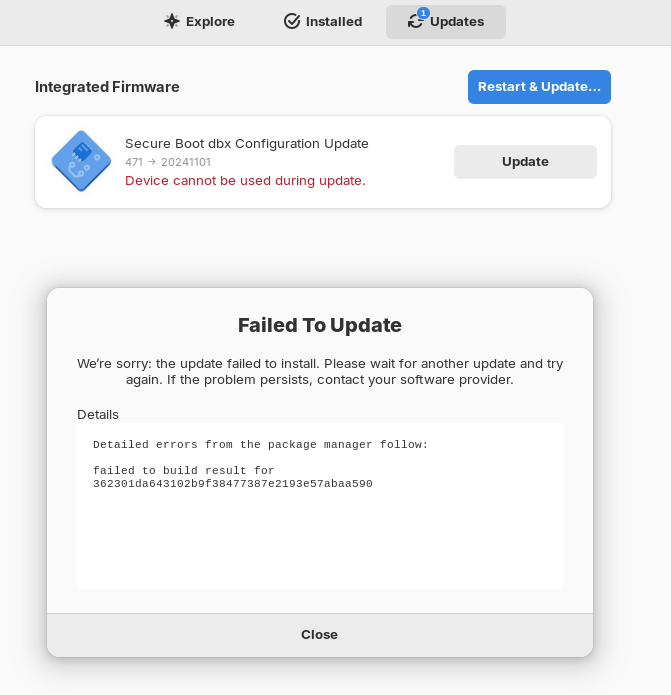
Thank you, I will try today.
Please, note I try again the @Ponce-De-Leon solution and I did this error message
Update failure is a known issue, visit this URL for more information: LVFS Triaged Issue: Failed to run update on reboot · fwupd/fwupd Wiki · GitHub
failed to execute prepared statement: attempt to write a readonly database
All the process
jrd10@jrd10-G3-3500:~$ sudo rm /var/lib/fwupd/pending.db
[sudo] password for jrd10:
jrd10@jrd10-G3-3500:~$
jrd10@jrd10-G3-3500:~$ sudo fwupdmgr refresh
Updating lvfs
Downloading…             [***************************************]
Downloading…             [***************************************]
Downloading…             [***************************************]
Successfully downloaded new metadata: 4 local devices supported
jrd10@jrd10-G3-3500:~$
jrd10@jrd10-G3-3500:~$ sudo fwupdmgr get-updates
Devices with no available firmware updates:
 • DELL09E1:00 04F3:30CB
 • 0000:00:1f.5
 • UEFI Device Firmware
 • UEFI Device Firmware
Devices with the latest available firmware version:
 • KBG40ZNS256G NVMe KIOXIA 256GB
 • System Firmware
 • Unifying Receiver
________________________________________________

Devices that were not updated correctly:

 • UEFI dbx (471 → 20241101)

Uploading firmware reports helps hardware vendors to quickly identify failing and successful updates on real devices.
Upload report now? (Requires internet connection) [Y|n]:
Y
Target:                  https://fwupd.org/lvfs/firmware/report
Payload:                 {
                           "ReportVersion" : 2,
                           "MachineId" : "1417cdf9e1f9b368fcc8b5d31ccc410388c2940b02f8fa38528828a6844f733f",
                           "Metadata" : {
                             "DistroId" : "zorin",
                             "DistroVersion" : "17"
                           },
                           "Reports" : [
                             {
                               "Checksum" : "71f794d9f171a2aaa6c2da356a1e450c777f3d08",
                               "ReleaseId" : null,
                               "UpdateState" : 3,
                               "UpdateError" : "failed to run update on reboot",
                               "Guid" : [
                                 "00fe3755-a4d8-5ef7-ba5f-47979fbb3423"
                               ],
                               "Plugin" : "uefi_dbx",
                               "VersionOld" : "471",
                               "VersionNew" : "20241101",
                               "Flags" : 4194595,
                               "Created" : 1750924446,
                               "Modified" : 1750924519,
                               "Metadata" : {
                                 "HostSku" : "9E1",
                                 "DistroVersion" : "17",
                                 "RuntimeVersion(org.freedesktop.gusb)" : "0.3.10",
                                 "FwupdSupported" : "True",
                                 "CompileVersion(org.freedesktop.fwupd)" : "1.7.9",
                                 "SecureBoot" : "Disabled",
                                 "HostFamily" : "GSeries",
                                 "UEFIUXCapsule" : "Enabled",
                                 "KernelName" : "Linux",
                                 "RuntimeVersion(org.kernel)" : "6.8.0-60-generic",
                                 "CompileVersion(com.hughsie.libjcat)" : "0.1.9",
                                 "RuntimeVersion(com.dell.libsmbios)" : "2.4",
                                 "CompileVersion(org.freedesktop.gusb)" : "0.3.10",
                                 "DistroId" : "zorin",
                                 "CpuArchitecture" : "x86_64",
                                 "BootTime" : "1750924360",
                                 "HostVendor" : "Dell Inc.",
                                 "EfivarNvramUsed" : "80181",
                                 "HostProduct" : "G3 3500",
                                 "FwupdTainted" : "False",
                                 "RuntimeVersion(org.freedesktop.fwupd)" : "1.7.9",
                                 "KernelVersion" : "6.8.0-60-generic"
                               }
                             }
                           ]
                         }
Proceed with upload? [Y|n]: Y
Idle…                    [***************************************]
Update failure is a known issue, visit this URL for more information: https://github.com/fwupd/fwupd/wiki/LVFS-Triaged-Issue:-Failed-to-run-update-on-reboot
failed to execute prepared statement: attempt to write a readonly database
jrd10@jrd10-G3-3500:~$ ^C
jrd10@jrd10-G3-3500:~$