Firmware / BIOS updates appear to never finish

Hello, :waving_hand:

I have encountered a recurring issue with firmware / BIOS updates offered through Zorin OS’s Update application.

The updates are correctly detected and installation begins normally, but the process does not always complete properly from the user interface. I have experienced two different cases:

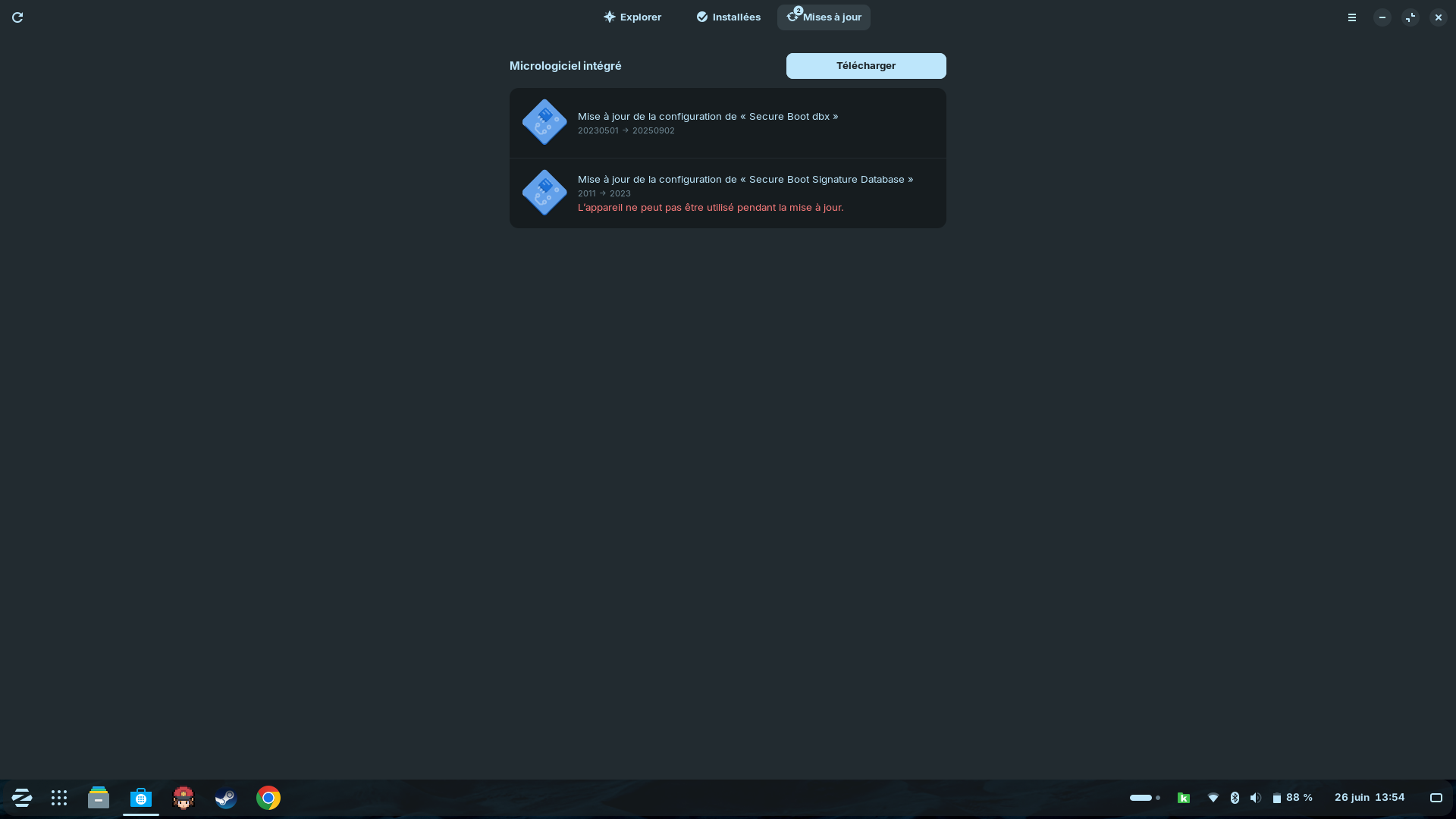
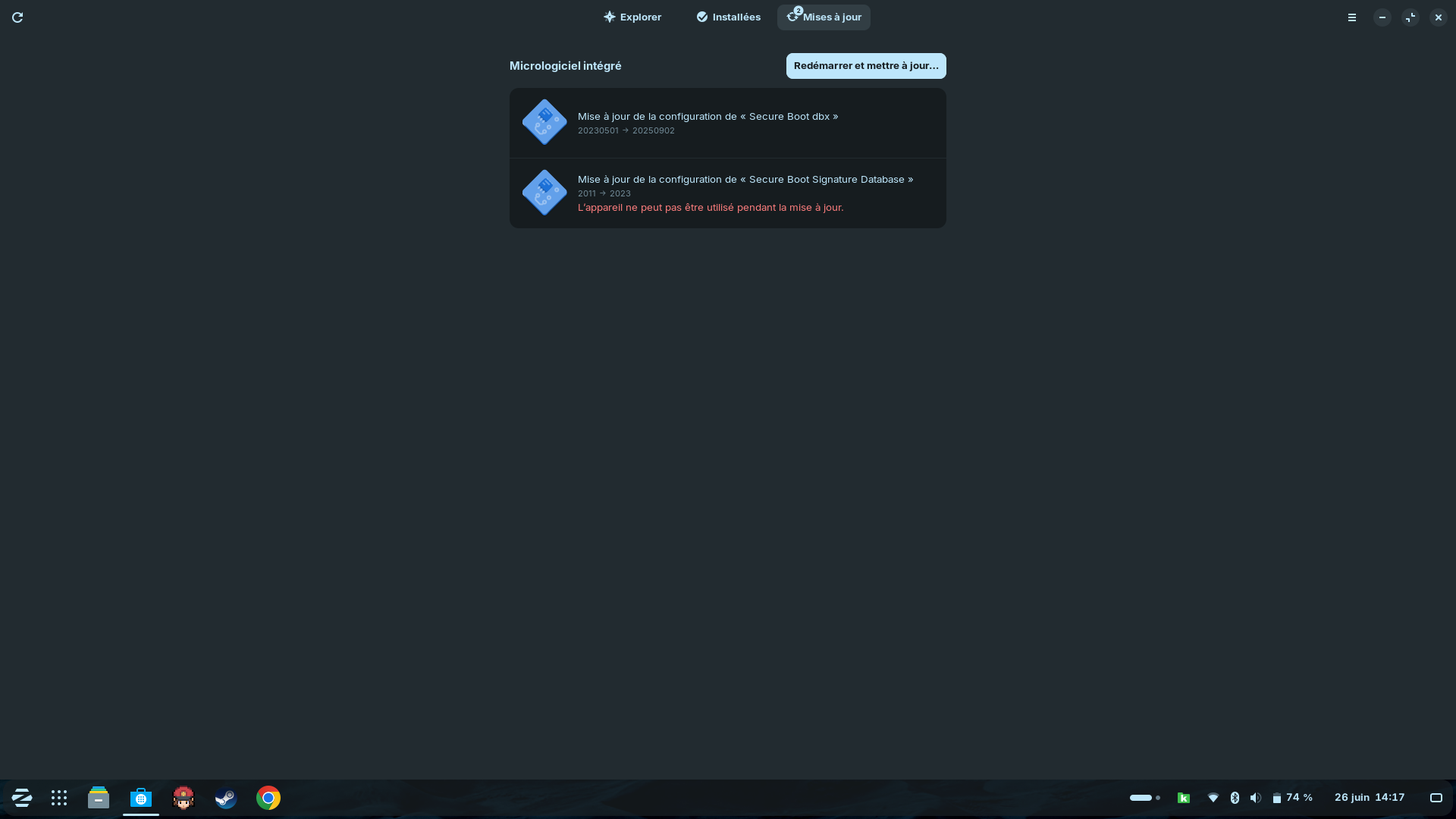
Example 1 — Screenshots 1-1 and 1-2
“20250902 Secure Boot dbx”
“2023 → Secure Boot Signature Database”
IMAGES


The updates appeared to download successfully.

At the end of the process, the Update application asked whether I wanted to restart the computer. I selected “Yes,” but nothing happened: the computer did not restart, and the application remained stuck. I eventually had to restart the computer manually.

After the manual restart, the updates appeared to have been installed successfully.

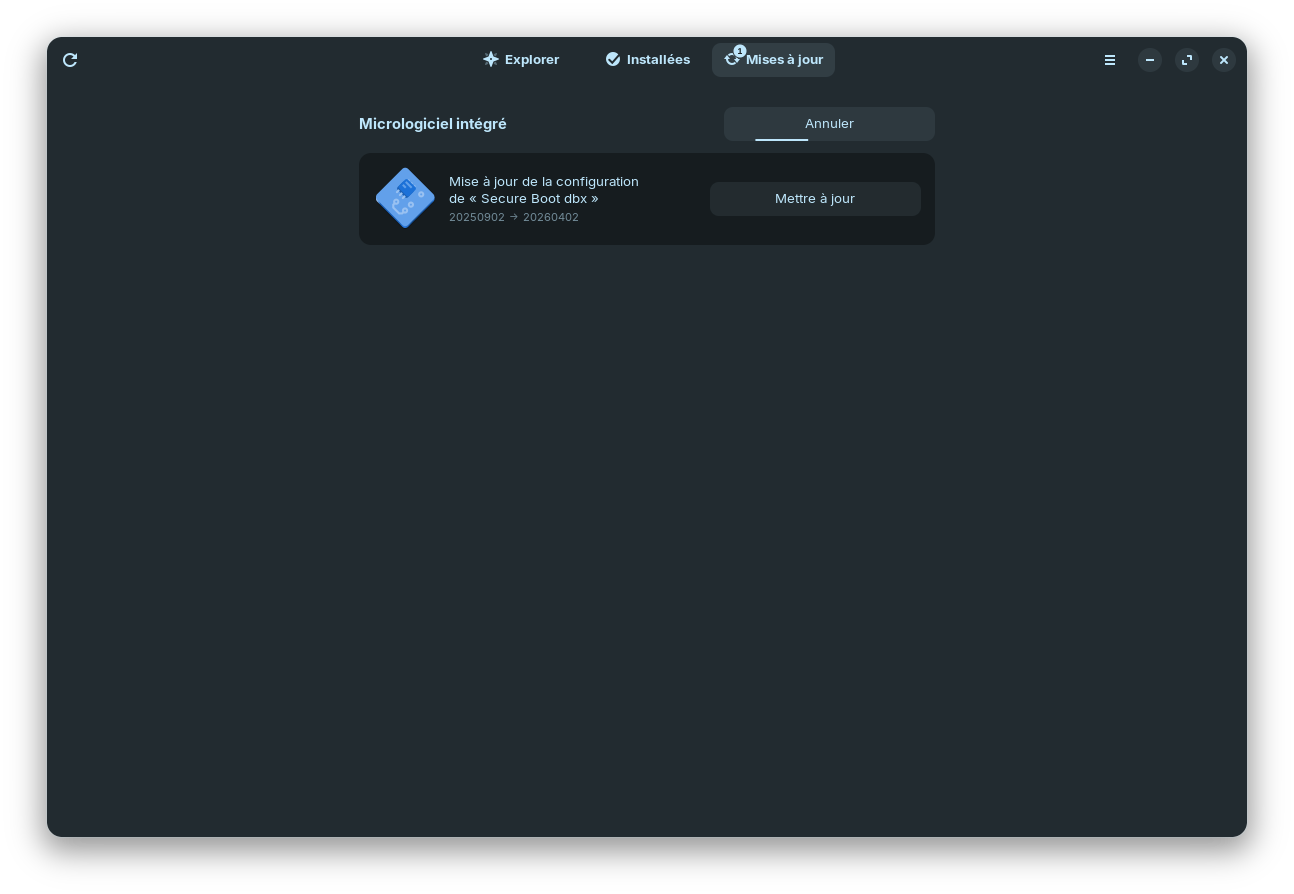
Example 2 — Screenshot 2-1
“20260402 - Secure Boot dbx”
IMAGES

In this case, the Update application remained indefinitely stuck on the installation screen, with no completion message and no restart prompt.

After waiting for approximately 20 minutes, I force-restarted the computer. Once the system had restarted, the update appeared to have been installed successfully.

However, because the Update application never clearly confirms that the process has completed, I cannot determine whether the firmware update was fully applied before restarting the computer.

These kinds of issues has occurred with all firmware updates I have installed through the Update application.

Is this a known thing ?

Thank you.

Some technical details :

cat /etc/os-release

PRETTY_NAME="Zorin OS 18.1"
NAME="Zorin OS"
VERSION_ID="18"
VERSION="18.1"
VERSION_CODENAME=noble
ID=zorin
ID_LIKE="ubuntu debian"
HOME_URL="Zorin OS - Make your computer better."
SUPPORT_URL="https://help.zorin.com/"
BUG_REPORT_URL="Send Feedback - Zorin OS"
PRIVACY_POLICY_URL="Privacy Policy - Zorin"
UBUNTU_CODENAME=noble
LOGO=zorin-logo

uname -r

6.17.0-35-generic

fwupdmgr --version

compile info.libusb 1.0.27
compile com.hughsie.libxmlb 0.3.24
compile com.hughsie.libjcat 0.2.3
compile org.freedesktop.fwupd 2.0.20
runtime org.freedesktop.fwupd-efi 1.4
runtime com.hughsie.libxmlb 0.3.24
runtime com.hughsie.libjcat 0.2.3
runtime org.kernel 6.17.0-35-generic
runtime org.freedesktop.fwupd 2.0.20

fwupdmgr get-devices

Dell Inc. Inspiron 3505

├─Touch Controller Sensor:
│ Identifiant de l'appareil: 84a961dce41e3073b2f4ff08fa1c982546c322e3
│ Résumé: Touchpad
│ Version actuelle: 0x00050f14
│ Fournisseur: Goodix (HIDRAW:0x27C6)
│ GUID: 2bb0b5d5-f2a7-5a8e-87ff-64d8a26bde05 ← HIDRAW\VEN_27C6&DEV_01E0
│ Drapeaux de périphérique: • Périphérique interne
│ • Mise à jour possible
│ • Unsigned Payload
│ • Can tag for emulation

├─PC SN530 NVMe WDC 256GB:
│ Identifiant de l'appareil: 71b677ca0f1bc2c5b804fa1d59e52064ce589293
│ Résumé: NVM Express solid state drive
│ Version actuelle: 21113012
│ Fournisseur: Sandisk (PCI:0x15B7)
│ Numéro de série: 21035A809873
│ GUIDs: 7ced5eeb-4f45-56f5-9004-74e8ac93cb96 ← NVME\VEN_15B7&DEV_5007
│ 1a368f44-8002-58b2-9f48-6d61a96debc2 ← NVME\VEN_15B7&DEV_5007&SUBSYS_15B75007
│ 84ebf8f2-1346-5712-acc7-c2feeed50e44 ← STORAGE-DELL-109153
│ b0e59891-8629-46c3-8151-cbf85ab13ae0
│ 790357f0-d540-5520-9121-9e8fa4875b8c ← PC SN530 NVMe WDC 256GB
│ Drapeaux de périphérique: • Périphérique interne
│ • Mise à jour possible
│ • Le système nécessite une source d'alimentation externe
│ • Doit redémarrer après une mise à jour
│ • Le périphérique est utilisable pendant la durée de la mise à jour
│ • Can tag for emulation

├─Ryzen 5 3450U with Radeon Vega Mobile Gfx:
│ │ Identifiant de l'appareil: 4bde70ba4e39b28f9eab1628f9dd6e6244c03027
│ │ Version actuelle: 0x0810810e
│ │ Fournisseur: AMD
│ │ GUIDs: 38cd08d3-c885-5730-bff8-fdf71774a4a2 ← CPUID\PRO_0&FAM_17&MOD_18
│ │ cbe5ceff-2b79-5935-9e79-ad728587b62f ← CPUID\PRO_0&FAM_17&MOD_18&STP_1
│ │ Drapeaux de périphérique: • Périphérique interne
│ │
│ ├─Radeon Vega 8 Graphics:
│ │ Identifiant de l'appareil: 04e17fcf7d3de91da49a163ffe4907855c3648be
│ │ Résumé: PICASSO Generic VBIOS
│ │ Version actuelle: 117
│ │ Fournisseur: AMD (PCI:0x1002)
│ │ GUID: 7395c969-f756-5077-8243-18a4ec584050 ← AMD\113-PICASS
│ │ Drapeaux de périphérique: • Périphérique interne
│ │ • Can tag for emulation
│ │
│ └─Secure Processor:
│ Identifiant de l'appareil: c54ab0237d7a8db8c717b68e0be78e4374a2a079
│ Version actuelle: 00.08.00.9a
│ Version du chargeur d’amorçage: 00.08.00.9a
│ Fournisseur: AMD (PCI:0x1022)
│ GUID: 0e8dc554-a0a2-51fb-b439-1eb72b14ec38 ← PCI\VEN_1022&DEV_15DF
│ Drapeaux de périphérique: • Périphérique interne
│ • Can tag for emulation

├─System Firmware:
│ │ Identifiant de l'appareil: 9e496144e3f7ba3eddd1ed1a0a1383b975457247
│ │ Résumé: UEFI System Resource Table device (updated via NVRAM)
│ │ Version actuelle: 1.36.0
│ │ Version minimum: 0.1.0
│ │ Fournisseur: Dell (DMI:Dell Inc.)
│ │ État de mise à jour: Succès
│ │ GUID: 64f781fc-422b-5e1a-adea-8e828ae92634
│ │ Drapeaux de périphérique: • Périphérique interne
│ │ • Mise à jour possible
│ │ • Le système nécessite une source d'alimentation externe
│ │ • Supported on remote server
│ │ • Doit redémarrer après une mise à jour
│ │ • Cryptographic hash verification is available
│ │ • Le périphérique est utilisable pendant la durée de la mise à jour
│ │ Device Requests: • Message
│ │
│ ├─Platform Key:
│ │ Identifiant de l'appareil: 6924110cde4fa051bfdc600a60620dc7aa9d3c6a
│ │ Résumé: UEFI Platform Key
│ │ Version actuelle: 2016
│ │ Fournisseur: Dell
│ │ GUIDs: 8affd5b3-c498-5a17-84b5-29d2c5728e6f ← UEFI\VENDOR_Dell&NAME_Dell-Platform-Key
│ │ ca4b602c-3c2f-5ccf-9757-ad471c465b41 ← UEFI\CRT_DB84CBBE71B3B1F045F98D4E3DA19F18F834A43A
│ │ Drapeaux de périphérique: • Périphérique interne
│ │
│ ├─UEFI Key Exchange Key:
│ │ │ Identifiant de l'appareil: 2a4c23bfb79b5dabe474cb7b1b3e604645d6f9c6
│ │ │ Drapeaux de périphérique: • Périphérique interne
│ │ │
│ │ └─KEK CA:
│ │ Identifiant de l'appareil: b7a1d3d90faa1f6275d9a98da4fb3be7118e61c7
│ │ Version actuelle: 2011
│ │ Fournisseur: Microsoft (UEFI:Microsoft)
│ │ GUIDs: 814e950f-1449-566a-a190-42c9d3a3a2df ← UEFI\VENDOR_Microsoft&NAME_Microsoft-KEK-CA
│ │ dfa66406-6568-5bdf-bb8e-b53ddb4be4cf ← UEFI\CRT_9F402B1CC0243CBEDC58A525789816CCCA7687A9
│ │ Drapeaux de périphérique: • Périphérique interne
│ │ • Mise à jour possible
│ │ • Doit redémarrer après une mise à jour
│ │ • Le périphérique est utilisable pendant la durée de la mise à jour
│ │ • Signed Payload
│ │ • Can tag for emulation
│ │
│ ├─UEFI Signature Database:
│ │ │ Identifiant de l'appareil: 0352a8acc949c7df21fec16e566ba9a74e797a97
│ │ │ Drapeaux de périphérique: • Périphérique interne
│ │ │
│ │ ├─CompalA31CSMB:
│ │ │ Identifiant de l'appareil: ab8e835910673f02c1f0b99123142942cc8b24ac
│ │ │ Version actuelle: 2012
│ │ │ Erreur de mise à jour: No vendor ID set
│ │ │ GUID: 9c4f0ac0-760e-55bd-a0b1-325d7ee518fd ← UEFI\CRT_37C0B47C14E541C866797E381FA139299E755940
│ │ │ Drapeaux de périphérique: • Périphérique interne
│ │ │ • Doit redémarrer après une mise à jour
│ │ │ • Mise à jour possible
│ │ │ • Signed Payload
│ │ │ • Can tag for emulation
│ │ │
│ │ ├─Option ROM UEFI CA:
│ │ │ Identifiant de l'appareil: 92120fc1a625f725901333cbfec152b8d6e42d43
│ │ │ Version actuelle: 2023
│ │ │ Fournisseur: Microsoft (UEFI:Microsoft)
│ │ │ GUIDs: ca4668d9-734f-5b2b-aae8-8120b196f659 ← UEFI\VENDOR_Microsoft&NAME_Microsoft-Option-ROM-UEFI-CA
│ │ │ 965d1919-0e18-5b63-9ebd-e5d122cd11df ← UEFI\CRT_F45B559FC1C60F31B3071021298D5ED7D77280B0
│ │ │ Drapeaux de périphérique: • Périphérique interne
│ │ │ • Mise à jour possible
│ │ │ • Doit redémarrer après une mise à jour
│ │ │ • Signed Payload
│ │ │ • Can tag for emulation
│ │ │
│ │ ├─UEFI CA:
│ │ │ Identifiant de l'appareil: 5bc922b7bd1adb5b6f99592611404036bd9f42d0
│ │ │ Version actuelle: 2023
│ │ │ Fournisseur: Microsoft (UEFI:Microsoft)
│ │ │ GUIDs: 26f42cba-9bf6-5365-802b-e250eb757e96 ← UEFI\VENDOR_Microsoft&NAME_Microsoft-UEFI-CA
│ │ │ 308281c7-d0c5-52e0-8c1a-810540de03df ← UEFI\CRT_7CD7437C555F89E7C2B50E21937E420C4E583E80
│ │ │ Drapeaux de périphérique: • Périphérique interne
│ │ │ • Mise à jour possible
│ │ │ • Supported on remote server
│ │ │ • Doit redémarrer après une mise à jour
│ │ │ • Signed Payload
│ │ │ • Can tag for emulation
│ │ │
│ │ └─Windows Production PCA:
│ │ Identifiant de l'appareil: ad7e00ec37f005ae10492bdb7f73aef0d2e20488
│ │ Version actuelle: 2011
│ │ Fournisseur: Microsoft (UEFI:Microsoft)
│ │ GUIDs: 675d2184-6c9a-59f1-a6f1-3c229b5dbb79 ← UEFI\VENDOR_Microsoft&NAME_Microsoft-Windows-Production-PCA
│ │ 0611d85d-99a4-5c50-8c17-fc5196226f85 ← UEFI\CRT_1A8B6903D64CC9AD09D12FCB355663A458A09EF0
│ │ Drapeaux de périphérique: • Périphérique interne
│ │ • Mise à jour possible
│ │ • Doit redémarrer après une mise à jour
│ │ • Signed Payload
│ │ • Can tag for emulation
│ │
│ └─UEFI dbx:
│ Identifiant de l'appareil: 362301da643102b9f38477387e2193e57abaa590
│ Résumé: UEFI revocation database
│ Version actuelle: 20250902
│ Version minimum: 20250902
│ Fournisseur: Microsoft (UEFI:Microsoft)
│ Durée d'installation: 1 seconde
│ GUID: f8ba2887-9411-5c36-9cee-88995bb39731 ← UEFI\CRT_A1117F516A32CEFCBA3F2D1ACE10A87972FD6BBE8FE0D0B996E09E65D802A503&ARCH_X64
│ Drapeaux de périphérique: • Périphérique interne
│ • Mise à jour possible
│ • Supported on remote server
│ • Doit redémarrer après une mise à jour
│ • Le périphérique est utilisable pendant la durée de la mise à jour
│ • Seules les mises à jour de version sont autorisées
│ • Signed Payload
│ • Can tag for emulation

└─TPM:
Identifiant de l'appareil: 1d8d50a4dbc65618f5c399c2ae827b632b3ccc11
Version actuelle: 3.94.0.4
Fournisseur: AMD (TPM:AMD)
GUIDs: 9305de1c-1e12-5665-81c4-37f8e51219b8 ← TPM\VEN_AMD&DEV_0001
78a291ae-b499-5b0f-8f1d-74e1fefd0b1c ← TPM\VEN_AMD&MOD_AMD
65a3fced-b423-563f-8098-bf5c329fc063 ← TPM\VEN_AMD&DEV_0001&VER_2.0
5e704f0d-83cb-5364-8384-f46d725a23b8 ← TPM\VEN_AMD&MOD_AMD&VER_2.0
fbe782c5-f1b7-5050-bcd8-294632d96673 ← 0a12-2.0
Drapeaux de périphérique: • Périphérique interne
• Mise à jour possible
• Le système nécessite une source d'alimentation externe
• Doit redémarrer après une mise à jour
• Device can recover flash failures
• Signed Payload
• Can tag for emulation

────────────────────────────────────────────────
Devices that have been updated successfully:
• System Firmware (1.35.1 → 1.36.0)
• UEFI CA (2011 → 2023)
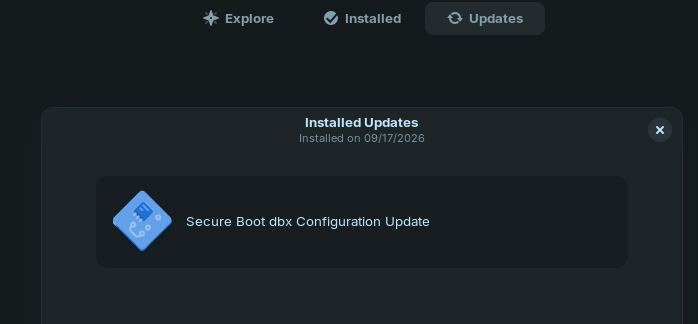
• UEFI dbx (20230501 → 20250902)
Uploading firmware reports helps hardware vendors to quickly identify failing and successful updates on real devices.

So, You made that over Gnome Software. Did You tried to update it with sudo apt update && sudo apt upgrade via Terminal? It would show further Output when there are Errors.

1 Like

I was looking for a answer and a solution because I too have the same issue. I updated my bios with the manufacturer bios update which got the secure boot update. I'm not too tech savy with this secure boot nonsense, I have not followed the advice in the link I'm posting below. Let us know if that worked out for you!

A solution:

2 Likes

Hello, :waving_hand:

For some unknown reason, the 20260402 update is being offered to me again.

In addition, please find the terminal output below:

Sudo apt update
Atteint :1 http://fr.archive.ubuntu.com/ubuntu noble InRelease
Atteint :2 http://security.ubuntu.com/ubuntu noble-security InRelease          
Atteint :3 http://fr.archive.ubuntu.com/ubuntu noble-updates InRelease         
Atteint :4 http://fr.archive.ubuntu.com/ubuntu noble-backports InRelease       
Atteint :5 https://download.docker.com/linux/ubuntu noble InRelease            
Atteint :6 https://brave-browser-apt-release.s3.brave.com stable InRelease     
Atteint :7 https://ppa.launchpadcontent.net/zorinos/apps/ubuntu noble InRelease
Atteint :8 https://ppa.launchpadcontent.net/zorinos/drivers/ubuntu noble InRelease
Atteint :9 https://ppa.launchpadcontent.net/zorinos/patches/ubuntu noble InRelease
Atteint :10 https://ppa.launchpadcontent.net/zorinos/stable/ubuntu noble InRelease
Atteint :11 https://packages.zorinos.com/stable noble InRelease                
Atteint :12 https://packages.zorinos.com/patches noble InRelease
Atteint :13 https://packages.zorinos.com/apps noble InRelease
Atteint :14 https://packages.zorinos.com/drivers noble InRelease
Lecture des listes de paquets... Fait
Construction de l'arbre des dépendances... Fait
Lecture des informations d'état... Fait      
16 paquets peuvent être mis à jour. Exécutez « apt list --upgradable » pour les voir.
apt list --upgradable
En train de lister... Fait
curl/noble-updates,noble-security 8.5.0-2ubuntu10.10 amd64 [pouvant être mis à jour depuis : 8.5.0-2ubuntu10.9]
hplip-data/noble-updates,noble-updates,noble-security,noble-security 3.23.12+dfsg0-0ubuntu5.1 all [pouvant être mis à jour depuis : 3.23.12+dfsg0-0ubuntu5]
hplip/noble-updates,noble-security 3.23.12+dfsg0-0ubuntu5.1 amd64 [pouvant être mis à jour depuis : 3.23.12+dfsg0-0ubuntu5]
libcurl3t64-gnutls/noble-updates,noble-security 8.5.0-2ubuntu10.10 amd64 [pouvant être mis à jour depuis : 8.5.0-2ubuntu10.9]
libcurl3t64-gnutls/noble-updates,noble-security 8.5.0-2ubuntu10.10 i386 [pouvant être mis à jour depuis : 8.5.0-2ubuntu10.9]
libcurl4t64/noble-updates,noble-security 8.5.0-2ubuntu10.10 amd64 [pouvant être mis à jour depuis : 8.5.0-2ubuntu10.9]
libcurl4t64/noble-updates,noble-security 8.5.0-2ubuntu10.10 i386 [pouvant être mis à jour depuis : 8.5.0-2ubuntu10.9]
libhpmud0/noble-updates,noble-security 3.23.12+dfsg0-0ubuntu5.1 amd64 [pouvant être mis à jour depuis : 3.23.12+dfsg0-0ubuntu5]
libnss3/noble-updates,noble-security 2:3.98-1ubuntu0.2 amd64 [pouvant être mis à jour depuis : 2:3.98-1ubuntu0.1]
libsane-hpaio/noble-updates,noble-security 3.23.12+dfsg0-0ubuntu5.1 amd64 [pouvant être mis à jour depuis : 3.23.12+dfsg0-0ubuntu5]
libsqlite3-0/noble-updates,noble-security 3.45.1-1ubuntu2.6 amd64 [pouvant être mis à jour depuis : 3.45.1-1ubuntu2.5]
libsqlite3-0/noble-updates,noble-security 3.45.1-1ubuntu2.6 i386 [pouvant être mis à jour depuis : 3.45.1-1ubuntu2.5]
linux-libc-dev/noble-updates 6.8.0-134.134 amd64 [pouvant être mis à jour depuis : 6.8.0-124.124]
linux-tools-common/noble-updates,noble-updates 6.8.0-134.134 all [pouvant être mis à jour depuis : 6.8.0-124.124]
printer-driver-hpcups/noble-updates,noble-security 3.23.12+dfsg0-0ubuntu5.1 amd64 [pouvant être mis à jour depuis : 3.23.12+dfsg0-0ubuntu5]
printer-driver-postscript-hp/noble-updates,noble-security 3.23.12+dfsg0-0ubuntu5.1 amd64 [pouvant être mis à jour depuis : 3.23.12+dfsg0-0ubuntu5]
Sudo apt upgrade
Lecture des listes de paquets... Fait
Construction de l'arbre des dépendances... Fait
Lecture des informations d'état... Fait      
Calcul de la mise à jour... Fait
Les paquets suivants ont été installés automatiquement et ne sont plus nécessaires :
  folder-color libetonyek-0.1-1 libfwupd2 libwayland-server0:i386 libwoff1 zorin-os-feedback
Veuillez utiliser « sudo apt autoremove » pour les supprimer.
Les paquets suivants seront mis à jour :
  curl hplip hplip-data libcurl3t64-gnutls libcurl3t64-gnutls:i386 libcurl4t64 libcurl4t64:i386 libhpmud0 libnss3 libsane-hpaio libsqlite3-0 libsqlite3-0:i386 linux-libc-dev linux-tools-common printer-driver-hpcups
  printer-driver-postscript-hp
16 mis à jour, 0 nouvellement installés, 0 à enlever et 0 non mis à jour.
Il est nécessaire de prendre 14,7 Mo dans les archives.
Après cette opération, 51,2 ko d'espace disque supplémentaires seront utilisés.
Souhaitez-vous continuer ? [O/n] o
Réception de :1 http://fr.archive.ubuntu.com/ubuntu noble-updates/main i386 libsqlite3-0 i386 3.45.1-1ubuntu2.6 [776 kB]
Réception de :2 http://fr.archive.ubuntu.com/ubuntu noble-updates/main amd64 libsqlite3-0 amd64 3.45.1-1ubuntu2.6 [701 kB]
Réception de :3 http://fr.archive.ubuntu.com/ubuntu noble-updates/main amd64 curl amd64 8.5.0-2ubuntu10.10 [227 kB]
Réception de :4 http://fr.archive.ubuntu.com/ubuntu noble-updates/main i386 libcurl4t64 i386 8.5.0-2ubuntu10.10 [379 kB]
Réception de :5 http://fr.archive.ubuntu.com/ubuntu noble-updates/main amd64 libcurl4t64 amd64 8.5.0-2ubuntu10.10 [343 kB]
Réception de :6 http://fr.archive.ubuntu.com/ubuntu noble-updates/main amd64 printer-driver-postscript-hp amd64 3.23.12+dfsg0-0ubuntu5.1 [1 222 kB]
Réception de :7 http://fr.archive.ubuntu.com/ubuntu noble-updates/main amd64 libsane-hpaio amd64 3.23.12+dfsg0-0ubuntu5.1 [134 kB]
Réception de :8 http://fr.archive.ubuntu.com/ubuntu noble-updates/main amd64 hplip amd64 3.23.12+dfsg0-0ubuntu5.1 [205 kB]
Réception de :9 http://fr.archive.ubuntu.com/ubuntu noble-updates/main amd64 libhpmud0 amd64 3.23.12+dfsg0-0ubuntu5.1 [126 kB]
Réception de :10 http://fr.archive.ubuntu.com/ubuntu noble-updates/main amd64 hplip-data all 3.23.12+dfsg0-0ubuntu5.1 [6 469 kB]
Réception de :11 http://fr.archive.ubuntu.com/ubuntu noble-updates/main amd64 printer-driver-hpcups amd64 3.23.12+dfsg0-0ubuntu5.1 [247 kB]
Réception de :12 http://fr.archive.ubuntu.com/ubuntu noble-updates/main i386 libcurl3t64-gnutls i386 8.5.0-2ubuntu10.10 [370 kB]
Réception de :13 http://fr.archive.ubuntu.com/ubuntu noble-updates/main amd64 libcurl3t64-gnutls amd64 8.5.0-2ubuntu10.10 [335 kB]
Réception de :14 http://fr.archive.ubuntu.com/ubuntu noble-updates/main amd64 libnss3 amd64 2:3.98-1ubuntu0.2 [1 445 kB]
Réception de :15 http://fr.archive.ubuntu.com/ubuntu noble-updates/main amd64 linux-libc-dev amd64 6.8.0-134.134 [1 464 kB]
Réception de :16 http://fr.archive.ubuntu.com/ubuntu noble-updates/main amd64 linux-tools-common all 6.8.0-134.134 [304 kB]
14,7 Mo réceptionnés en 1s (19,4 Mo/s)        
(Lecture de la base de données... 305331 fichiers et répertoires déjà installés.)
Préparation du dépaquetage de .../00-libsqlite3-0_3.45.1-1ubuntu2.6_i386.deb ...
Déconfiguration de libsqlite3-0:amd64 (3.45.1-1ubuntu2.5), pour permettre la configuration de libsqlite3-0:i386 (3.45.1-1ubuntu2.6) ...
Dépaquetage de libsqlite3-0:i386 (3.45.1-1ubuntu2.6) sur (3.45.1-1ubuntu2.5) ...
Préparation du dépaquetage de .../01-libsqlite3-0_3.45.1-1ubuntu2.6_amd64.deb ...
Dépaquetage de libsqlite3-0:amd64 (3.45.1-1ubuntu2.6) sur (3.45.1-1ubuntu2.5) ...
Préparation du dépaquetage de .../02-curl_8.5.0-2ubuntu10.10_amd64.deb ...
Dépaquetage de curl (8.5.0-2ubuntu10.10) sur (8.5.0-2ubuntu10.9) ...
Préparation du dépaquetage de .../03-libcurl4t64_8.5.0-2ubuntu10.10_amd64.deb ...
Déconfiguration de libcurl4t64:i386 (8.5.0-2ubuntu10.9), pour permettre la configuration de libcurl4t64:amd64 (8.5.0-2ubuntu10.10) ...
Dépaquetage de libcurl4t64:amd64 (8.5.0-2ubuntu10.10) sur (8.5.0-2ubuntu10.9) ...
Préparation du dépaquetage de .../04-libcurl4t64_8.5.0-2ubuntu10.10_i386.deb ...
Dépaquetage de libcurl4t64:i386 (8.5.0-2ubuntu10.10) sur (8.5.0-2ubuntu10.9) ...
Préparation du dépaquetage de .../05-printer-driver-postscript-hp_3.23.12+dfsg0-0ubuntu5.1_amd64.deb ...
Dépaquetage de printer-driver-postscript-hp (3.23.12+dfsg0-0ubuntu5.1) sur (3.23.12+dfsg0-0ubuntu5) ...
Préparation du dépaquetage de .../06-libsane-hpaio_3.23.12+dfsg0-0ubuntu5.1_amd64.deb ...
Ajout de « détournement de /lib/udev/rules.d/56-hpmud.rules en /lib/udev/rules.d/56-hpmud.rules.usr-is-merged par usr-is-merged »
Dépaquetage de libsane-hpaio:amd64 (3.23.12+dfsg0-0ubuntu5.1) sur (3.23.12+dfsg0-0ubuntu5) ...
Préparation du dépaquetage de .../07-hplip_3.23.12+dfsg0-0ubuntu5.1_amd64.deb ...
Dépaquetage de hplip (3.23.12+dfsg0-0ubuntu5.1) sur (3.23.12+dfsg0-0ubuntu5) ...
Préparation du dépaquetage de .../08-libhpmud0_3.23.12+dfsg0-0ubuntu5.1_amd64.deb ...
Dépaquetage de libhpmud0:amd64 (3.23.12+dfsg0-0ubuntu5.1) sur (3.23.12+dfsg0-0ubuntu5) ...
Préparation du dépaquetage de .../09-hplip-data_3.23.12+dfsg0-0ubuntu5.1_all.deb ...
Dépaquetage de hplip-data (3.23.12+dfsg0-0ubuntu5.1) sur (3.23.12+dfsg0-0ubuntu5) ...
Préparation du dépaquetage de .../10-printer-driver-hpcups_3.23.12+dfsg0-0ubuntu5.1_amd64.deb ...
Dépaquetage de printer-driver-hpcups (3.23.12+dfsg0-0ubuntu5.1) sur (3.23.12+dfsg0-0ubuntu5) ...
Préparation du dépaquetage de .../11-libcurl3t64-gnutls_8.5.0-2ubuntu10.10_i386.deb ...
Déconfiguration de libcurl3t64-gnutls:amd64 (8.5.0-2ubuntu10.9), pour permettre la configuration de libcurl3t64-gnutls:i386 (8.5.0-2ubuntu10.10) ...
Dépaquetage de libcurl3t64-gnutls:i386 (8.5.0-2ubuntu10.10) sur (8.5.0-2ubuntu10.9) ...
Préparation du dépaquetage de .../12-libcurl3t64-gnutls_8.5.0-2ubuntu10.10_amd64.deb ...
Dépaquetage de libcurl3t64-gnutls:amd64 (8.5.0-2ubuntu10.10) sur (8.5.0-2ubuntu10.9) ...
Préparation du dépaquetage de .../13-libnss3_2%3a3.98-1ubuntu0.2_amd64.deb ...
Dépaquetage de libnss3:amd64 (2:3.98-1ubuntu0.2) sur (2:3.98-1ubuntu0.1) ...
Préparation du dépaquetage de .../14-linux-libc-dev_6.8.0-134.134_amd64.deb ...
Dépaquetage de linux-libc-dev:amd64 (6.8.0-134.134) sur (6.8.0-124.124) ...
Préparation du dépaquetage de .../15-linux-tools-common_6.8.0-134.134_all.deb ...
Dépaquetage de linux-tools-common (6.8.0-134.134) sur (6.8.0-124.124) ...
Paramétrage de libcurl4t64:amd64 (8.5.0-2ubuntu10.10) ...
Paramétrage de libcurl4t64:i386 (8.5.0-2ubuntu10.10) ...
Paramétrage de libsqlite3-0:amd64 (3.45.1-1ubuntu2.6) ...
Paramétrage de libsqlite3-0:i386 (3.45.1-1ubuntu2.6) ...
Paramétrage de hplip-data (3.23.12+dfsg0-0ubuntu5.1) ...
/usr/share/hplip/base/imagesize.py:186: SyntaxWarning: invalid escape sequence '\#'
  re.compile('\#define\s+\S+\s+\d+')     : ('image/x-xbitmap', xbmsize),
/usr/share/hplip/base/imagesize.py:187: SyntaxWarning: invalid escape sequence '\/'
  re.compile('\/\* XPM \*\/')            : ('image/x-xpixmap', xpmsize),
/usr/share/hplip/base/imagesize.py:189: SyntaxWarning: invalid escape sequence '\*'
  re.compile('^II\*\x00')                : ('image/tiff', tiffsize),
/usr/share/hplip/fax/ledmfax.py:46: SyntaxWarning: invalid escape sequence '\d'
  http_result_pat = re.compile(b"""HTTP/\d.\d\s(\d+)""", re.I)
Paramétrage de libcurl3t64-gnutls:amd64 (8.5.0-2ubuntu10.10) ...
Paramétrage de libcurl3t64-gnutls:i386 (8.5.0-2ubuntu10.10) ...
Paramétrage de linux-libc-dev:amd64 (6.8.0-134.134) ...
Paramétrage de libnss3:amd64 (2:3.98-1ubuntu0.2) ...
Paramétrage de printer-driver-postscript-hp (3.23.12+dfsg0-0ubuntu5.1) ...
Paramétrage de curl (8.5.0-2ubuntu10.10) ...
Paramétrage de linux-tools-common (6.8.0-134.134) ...
Paramétrage de libhpmud0:amd64 (3.23.12+dfsg0-0ubuntu5.1) ...
Paramétrage de libsane-hpaio:amd64 (3.23.12+dfsg0-0ubuntu5.1) ...
Suppression de « détournement de /lib/udev/rules.d/56-hpmud.rules en /lib/udev/rules.d/56-hpmud.rules.usr-is-merged par usr-is-merged »
Paramétrage de printer-driver-hpcups (3.23.12+dfsg0-0ubuntu5.1) ...
Paramétrage de hplip (3.23.12+dfsg0-0ubuntu5.1) ...
Creating/updating hplip user account...
Traitement des actions différées (« triggers ») pour libc-bin (2.39-0ubuntu8.7) ...
Traitement des actions différées (« triggers ») pour man-db (2.12.0-4build2) ...
Traitement des actions différées (« triggers ») pour dbus (1.14.10-4ubuntu4.1) ...
Traitement des actions différées (« triggers ») pour cups (2.4.7-1.2ubuntu7.14) ...

Hello, :waving_hand:

I looked into your suggested solution !

It appears that the user in the referenced thread resolved the issue by clearing the Secure Boot keys, after which the error no longer occurred.

Maybe I should try this as well.

Amigo si actualizas tu firmware de otras paginas que no coresponden a tu PC puedes dejar inutilizado mejor deja de actualizar tu bios si no sabe hacerla mejor llevalo a un informatico cualificado en eso el firmware es el alma de tu PC es el cordinador y decir al procesador lo que ha de hacer primero es la esencia de la vida de una computadora si tu lo actualizas mal o la interumpes esos datos se corompen mejor no toques eso y si lo has echo normalmente las PCs nuevos tienen un segundo BIOS en caso de fallo primario este vovlera a copiar el antiguo Bios en el primario para evitar un desastre mayor per ootra vez te digo en la pagina del fabricante o introduce tu modelo exacto de tu PC y entra en el sitio web de tu laptop o ordenador y bajas del sitio oficial olvidate de sitios raros puede no funccionar bien. y si no hay Bios por medio pues toca esperar.. peor aun cuando tu PC es nueva los fabricantes tardan un tiempo en parchear el primer BIOS y corejirlos etc..suerte..

I know the Arch wiki documented some ThinkPad BIOS versions where trying to clear boot keys bricks the laptop motherboard so that is a pain in the butt. Be sure to check there isn't a good reason why the dbx install fails or aborts before trying too hard fixing something that probably isn't too much of a hindrance. I get it is annoying to see it in the software updater all the time and I would feel nicer about my machine not having long published security holes but I like it better to not brick it when I don't feel confident about undoing my tinkering.

Lenovo ThinkPad T14s (AMD) Gen 1 - ArchWiki as an example (the ThinkPad I ended up getting doesn't seem to have this problem but the dbx updates stall out all the same lol.) Also some models alow you to replace the firmware with Coreboot or Libreboot which can be a good way to un-screw-up secureboot. Be sure to check your specific motherboard/laptop model by searching everywhere online before touching secureboot when you are already booting into your desired OS.