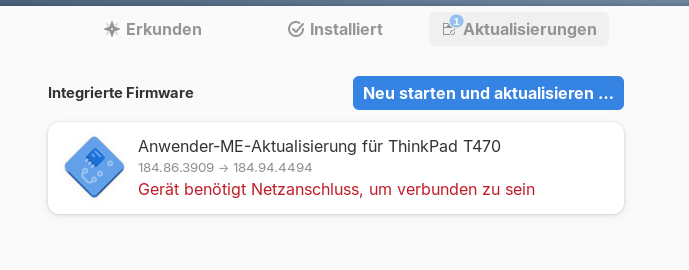
this keeps showing up. after install and reboot.
what can i do? any suggestionens ?
Welcome to the Forum!
Did You made what the red Text says You?
yeah of course. it says "device needs do be plugged in"
i did that
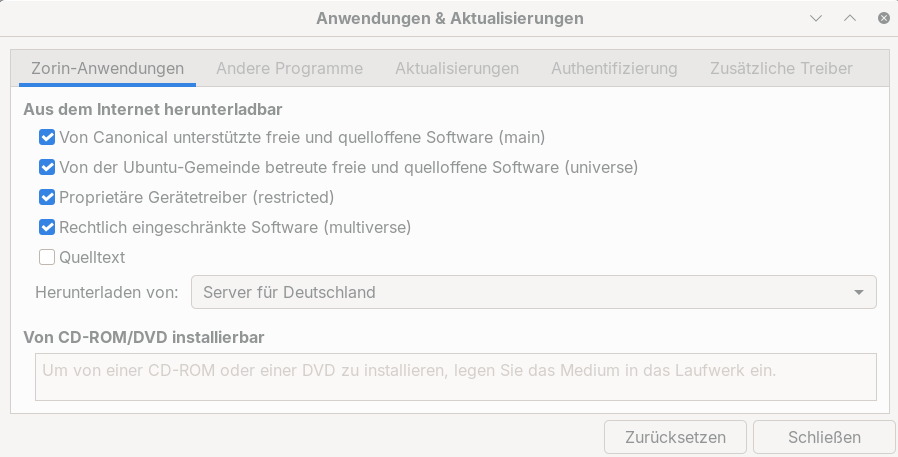
Are Secure Boot and Fast Boot in BIOS disabled? When You type in Terminal sudo apt update && sudo apt update does this work? When You go to Software & Updates and there on the first Tab is there the Source set to ''Main Server''?
Try it with switching here:

to Main Server (Haupt-Server). Also: Do You have Plasma installed?
done that. sorry, i'm kinda zorin (linux) noob ... what is plasma? I dont really know if i have plasma.
I mean the KDE Plasma Desktop Environment. I asked because I saw Your Icon Style here:

This looks like Breeze Theme. And that is from Plsama Desktop.
Ok i see.And this can cause the problem? Should i deinstall plasma and go for something else?
Just for clarity, did you install KDE (Kool Desktop Environment) which uses Plasma.
Historically, KDE has a more windows-like feel than Gnome and when KDE released version 4, it became kmnown as KDE Plasma. Currently Plasma is at 6.3.6, but Zorin 18 is only up to KDE 5.27.
I honestly can't see how a DE can affect software installation issues, kernel issues possibly as software does have some requirements in respect of the kernel version installed.
I also find it hard to believe that Plasma is installed because @alex_zorin 's screenshot showing Software Updater settings is not accessible if you are on the Plasma DE.
Hello and welcome on this forum 
We can try to clean with these commands in a terminal and sudo
sudo dpkg --configure -a && sudo apt-get -f install && sudo apt update && sudo apt dist-upgrade -y && sudo apt autoremove --purge -y && sudo apt clean
(enter password and press enter)
reboot
then
snap refresh
then
flatpak update
Tell us if terminal says anything.
That is a bad Idea in my Opinion. When You do a sudo apt autoremove You should definetely check the List before removing the Packages. I wouldn't recommend to run it with -y at all.
No, not directly. I would have the Idea that it might be interfere with Discover but for now, I would agree that it would be good to know if You have this Desktop Environment installed or not. Also: Did the Switch to Main Server has an Effect?
Thanks Ponce-De-Leon.
Of course i checked and tried on my machine without issue, but you definitely right, different users, different machines ...
Some documentation / forums can give this option, but it is better to stay cautious and make sure to knowledge what we're doing. 
so then a safer way to "clean up" could be :
sudo apt update && sudo apt dist-upgrade
then post here result or screenshot.
Hello alex_zorin,
I had a similar issue on my laptop and basically could not install firmware updates from the Software store. I would click on install and it would be stuck doing nothing
I had to use the LVFS command line to install those via the terminal (Following my laptop manufacturer recommendation)
fwupdmgr refresh --force
then
fwupdmgr get-updates
then
fwupdmgr update
Then restarted the laptop. This applied the firmware update and it was then gone from the Software store
More information here: https://www.cyberciti.biz/faq/thinkpad-update-firmware-on-linux-x1-extreme-p1-gen2/