Do you know how to uninstall gogh if no longer wanted? There is no note in readme. I have installed it in interactive mode and also installed dconf-cli and uuid-runtime before.
1 Like
Go in the Profile Settings and choose the default one.
1 Like
When I use nano, I have nice colors, but in gnome terminal, when I write commands, there is no syntax highlighting, everything is written in white color on black background except my user-info which is green. Can gogh be enabled in terminal, too? In profiles, Idle Toes is set.
It should work in the Terminal; it is made for that. But You have to set it up for every Terminal extra.
Another Option would be Bash Customization. There You can set Up Colors - even Symbols if You want. It is a bit ... tricky. I used Starship because I find it relatively okay to set up - especially with the offered Presets. If You want take a look at it:
When You use that and You use a Preset with Symbols, You will need a Nerdfont to see the Symbols:
I'll take a look at it tomorrow. It worked once, as far as I know, but only briefly. I have colours in micro and nano – these are also opened via the terminal and use the same color profile settings. I had set it up for gnome terminal so I don't know why it doesn't work now. I'll try to switch back to default and then turn one of the profiles on again.
Do you have an idea why syntax highlighting doesn't work in gnome terminal, e.g. when I enter sudo apt install... and what I could try? That are the color settings for the profile Idle Toes which is selected as profile:
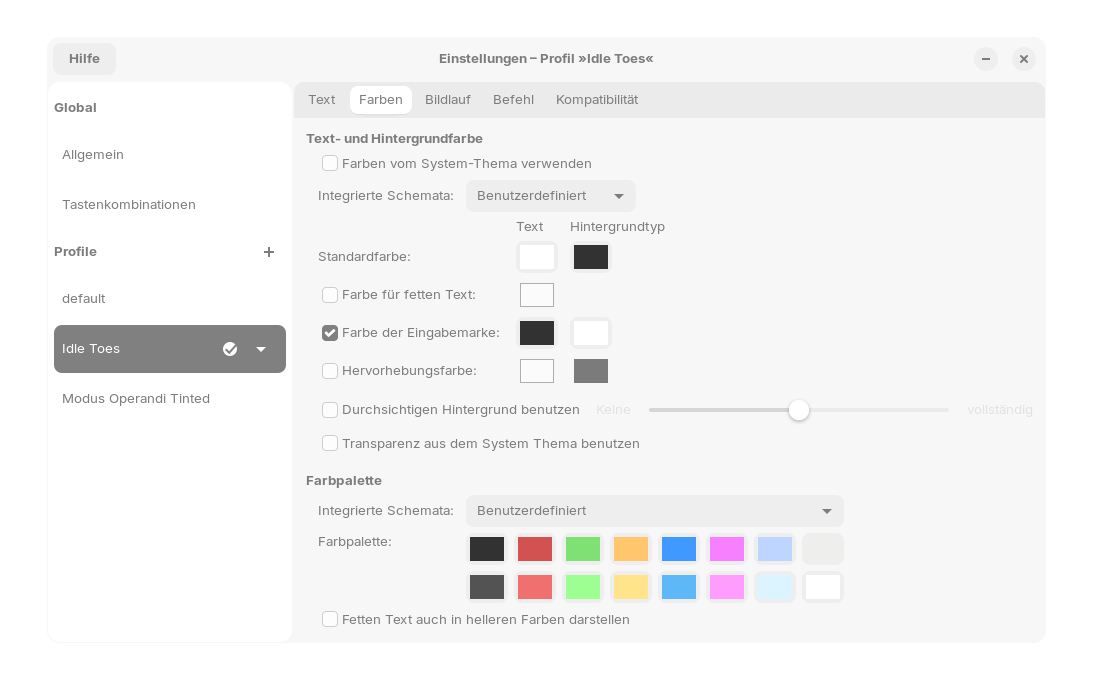
Do I have to set up something special at the default profile?
You could try it here:
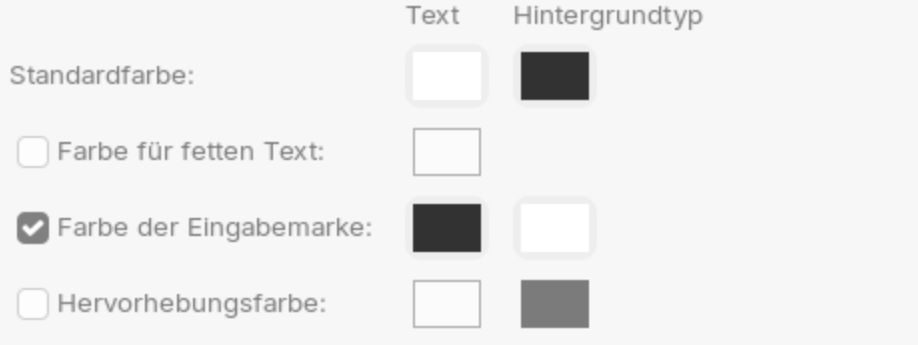
Maybe ''Hervorhebungsfarbe'' could help here.
I'm not entirely sure here but if I remember correctly Syntax Highlighting for commands when You type in it, isn't available in Bash. For this, You would have to use another Shell. zsh offers that I guess. Maybe fish, too.
Yes, I use ZSH as it is more stable than FiSH.
I have installed zsh this morning and want to set it as default. What do I have to enter for this command exactly
sudo chsh -s $(which zsh) $USER
It doesn't work with
sudo chsh -s $zsh 5.8.1 $myusername
The Zsh version is zsh 5.8.1 (x86_64-ubuntu-linux-gnu)
I followed this guide:
You can use
chsh -s $(which zsh)
There always appears a password request but it is not possible to enter a password.
hmm? Does your password use numbers - with numlock off? I do not understand what you mean otherwise...
No, my password doesn't have numbers. I can't type there as if the command chsh is blocked for my user.
When I enter
"sudo chsh -s $(which zsh) $myusername"
I get:
[sudo] password for user:
I enter it
Then in the next row again is shown password:
I enter it.
Then appears chsh: PAM: legitimationerror
Is this all still in the VM?
Yes, it is in the VM.
What about
chsh -s /usr/bin/zsh
password appears, but I can't enter it
Well... you could change /etc/pam.d/chsh from required to sufficient... Then try running the command to change your shell.
Okay, now there was no password request. But how can I start ZSH? When I enter terminal in searchfield, bash opens, also with ctrl+ALT+T. There is no zsh in start menu.
Reboot or refresh the entire shell.