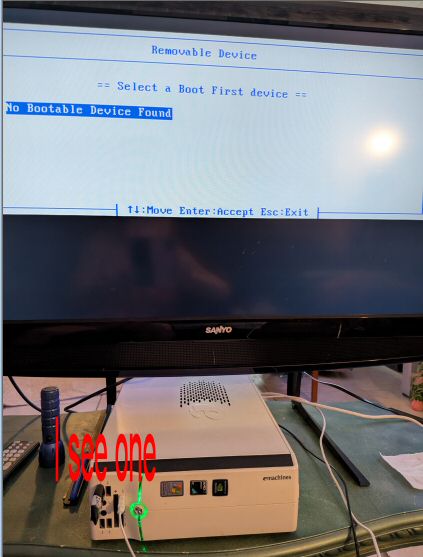
Thank you for your wisdom regarding the usb stick.... I actually made 3 different usb sticks and all three should be bootable. Testing all three in different ports will be my first project cause that would be the quickest solution if one works.
Thank You for being a part of my world!
I'm curious... did the snow get far enough south in "T" to get to you?
It has been below freezing here in south FL two mornings in a row.
It did, got frozen in, actually. Then... the heater failed.
Because of course that was when it would.
I took the panel off and discovered that the electrical connectors had turned brittle with age and and spent most of the day cutting and replacing wiring... had the heat back on before it got below 50 degrees F inside the house. Then... it went out again during the night when the drainline froze over and it could not drain condensed water...
Spent the next morning rooting ice out of it.
Nothing major, though. Inconvenient.
You also can boot, then jump right into your BIOS Settings and Check the Boot Order listed there - ensure that USB is enabled in the BIOS settings.
If it is not, it may disallow all USB booting.
It should be in the security tab if present.
And Secure Boot should be disabled.
So sorry to hear that you had to go through all that and in the COLD too!!!
Glad to hear that you survived it and the damage wasn't worse!
I didn't have any luck today with Zorin and I plan to take a break from it
tomorrow. I need groceries... Keep smiling and stay WARM!
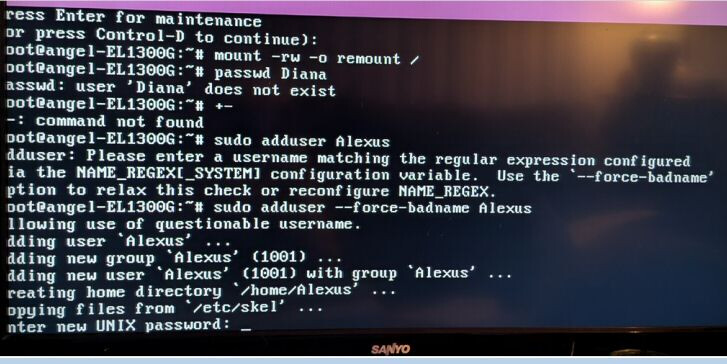
Finally managed to add a new user in the terminal "Alexus"
Now it wants me to add a password.... BUT... every letter or number I try to enter as the first character... it doesn't show it or react to my key entry... is there a hidden password code that I need to go by to create a new password for "Alexus" ????????
Finally got a new user account "Alexus" made in the terminal and now it wants me to put give a password but when I push a key it does not respond to it. What do I need to know about the unix password that it is asking for?
When you arelogged in to root terminal I don't think it shows the characters or asterix characters. Just take it slow and make sure Caps Lock is off and stay clear of the space bar. Write down the password before entering. From memory, I don't think Capital letter for user is allowed apart from name of user, but I think I have said this before and proven wrong.
It did not work.. when I got back to users the account was there but it was disabled.
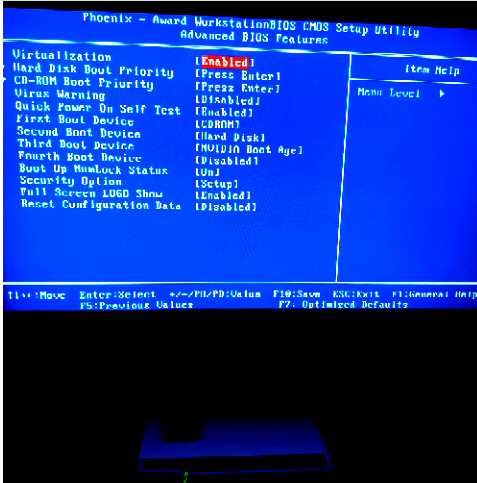
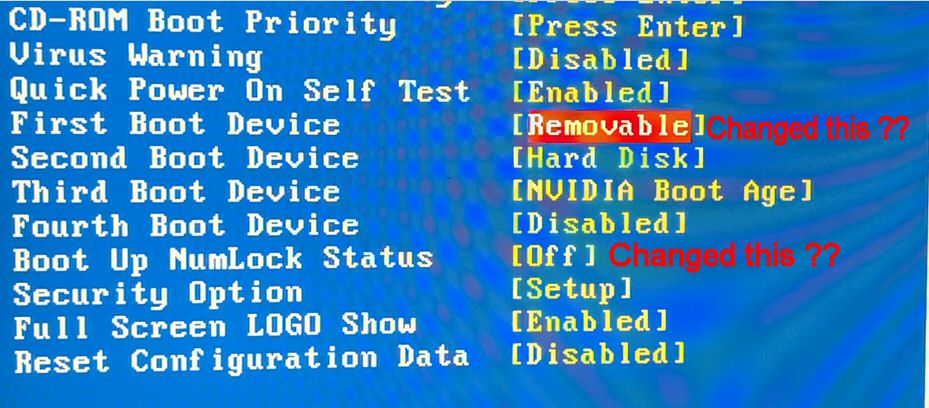
I managed to get into the Phoenix BIOS CMOS Utility pics to follow... I noted the ones I changed.... didn't know if I should change any of the rest or not.
Really thought it was going to install ... wishful thinking again!
Should I change anything else there and try it again???
Regarding the password... Everytime I turned computer on and pushed the F12 key.. it immediately sent me to the enter password page.
At that point, I had no choice but to try again to get the password for Diana... tried and failed until I decided to try and add a new user with admin so that I could get around that "Enter Password Prompt". But my efforts were all useless in the end. I just keep trying everything I can think of to try and accomplish getting the new installed.
Then I decided to return to that Phoenix sign in password page.. which is a different one from the other password page... and I started putting in passwords that I have always used in the past and got lucky with a old password. I now have access to that Phoenix page. Thought I had one the war but I was wrong!
Regarding "NumLock" status... I wasn't sure what it meant but I was afraid it might mean to keep the password lock in place. My password that it accepted was all numbers. For future reference, please tell me what it does mean?
THANK YOU!!!
I am not able to see your screen, but this sounds like a BIOS password.
You then say:
Phoenix Technologies is a manufacturer of motherboard's and supplies EFI BIOS operating systems.
What threw you for a loop was that your BIOS is what is locked.
If it was locked - then USB Boot would also remain disabled until it was unlocked.
This is as true of DVD boot.
But:
Is this password an Administrator password?
If it is NOT Admin Password, you would not be able to, for example, enable or disable Secure Boot - so you can use that to test what account you are logging in on.
If it is Admin password, then ensure the following:
USB Boot > Enabled
External Device Boot > Enabled
Boot from USB Devices > Enabled
Phoenix Technologies considers Zip drives, DVD drives and USB drives that are enumerated to be "removable." Not all USB ports are considered removable. I think it is only if they contain mass storage devices.
Setting that changes Boot Priority - but will not change whether USB Boot is enabled (Permitted).
This is whether the NumLock key is enabled early in the boot process, allowing the NumPad to be used for entering passwords.
Thank You for all your insight and knowledge! Of course, I will try again but I was up all night on computer and watching for snowflakes... 4am this morning... they melted as fast as they touched the ground but it was still snow flakes. Have a good chance of that happening again tonight but I will not be watching for it tonight!
I had heard about that Numbers use in the past but had never experienced it.
The only reference I saw that said security had "setup" in the entry line..
is that for secure boot?
As soon as I start to feel like a human again, I will get back to work with your responses.
Thanks Again and Stay WARM!
Just going back to the terminal screen showing Alexus bad naming. I think this is the convention that the name should all be in lower case. Had you created 'alexus' instead of 'Alexus' then it might have worked.
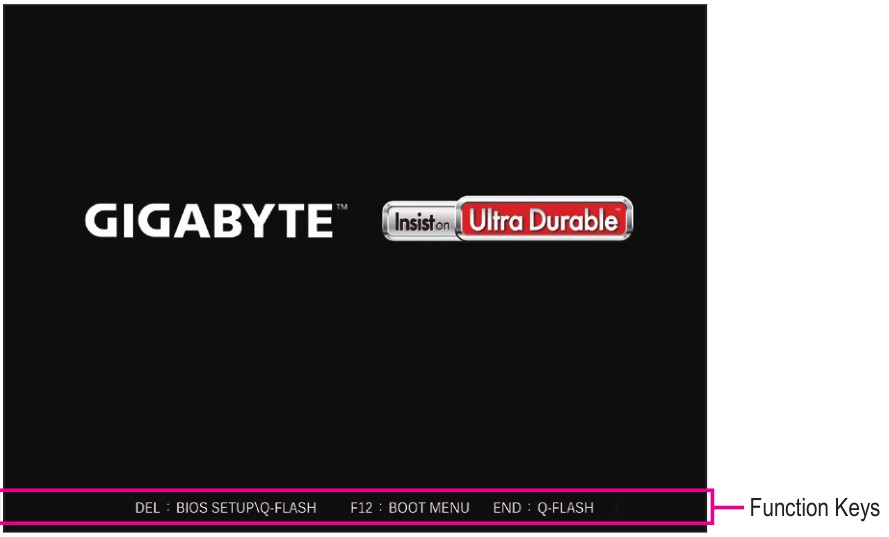
I agree with Aravisian that this sounds like a BIOS password issue. Maybe you shouldn't be pressing F12. Take a picture of where it says to press F12, please, and share it here. The point is to see if there's another key you should be pressing.
I am attaching a picture I fetched from online as an example to better show what I mean. If you are trying to boot from USB, then your startup screen should tell you what key to specifically push to do just that. Hopefully we hear back soon.
Are you referring to mine and my most recent website? I dropped the Serif Web Plus designed website for my host's Sitebuilder which allows me to preview site in Destop, Tablet and mobile mode before publishing. If you are talking about the font, that is all there is available. I refuse to use any social media links as I hold Social Media in very low regard.