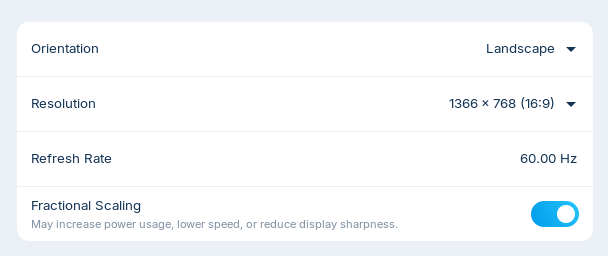
I have not found an answer to this so far. I would like to use fractional scaling to scale everything down, not just the font, below 100%, on an older low resolution laptop.
When Settings > Displays > Fractional scaling is on, it does not bring up any options to choose from.
The laptop has both intel and NVIDIA graphics cards. I tried using the NVIDIA server app to switch to using NVIDIA only (performance mode), instead of on demand, but that did not bring up any options when fractional scaling is on. I also tried uninstalling the NVIDIA driver so it would run on intel only and that also did not bring up any options when fractional scaling is turned on.
I am running Zorin 18.1 Core on a 2015 Acer laptop.
Can you change resolution size at all?
1 Like
You are under Wayland or X11 ? (type in Terminal)
echo "$XDG_SESSION_TYPE"
2 Likes
When You disable it agian, You then have the normal Scaling Options, yes?
I am using x11. Here is what I found when trying to change resolution on the intel card.
Resolution 1386 x 768 (the max) does not have any options when turning scaling on or off.
Resolution 1280 x 720 does not have any options when scaling is off. With scaling on there are options for 100, 125, and 150%.
However, I need it to scale below 100%, maybe 75%.
The NVIDIA driver is currently uninstalled. I'm not sure what to do about that, if I should reinstall and try a different driver or just leave it uninstalled.
You can try it with xrandr.
Enter in terminal
xrandr
to find out the name of your integrated monitor, e.g. eDP-1 (mine was shown in live session as LVDS-1)
Set a scaling factor with
xrandr --output eDP-1 --scale 0.75x0.75
Replace eDP-1 with the name shown in the first terminal output and set a scaling factor you like.
To undo that and make it normal again
xrandr --output eDP-1 --scale 1x1
This isn't a permanent solution at the moment. First, see if it works for you.
I tried to do what you suggested. It zoomed it in to and everything was massive.
I typed in the correct command and it was 0.75x0.75 but I could not scroll to the bottom of the terminal screen. Thankfully I was able to open another terminal tab to enter the undo command, which did not revert it back completely. I used REISUB to restart (since I couldn't access any kind of turn off menu button) and now is back to normal.
I'm sorry that you ran into such difficulties. Good that you were able to fix it. That wasn't a good idea on my part.
Any other ideas I can try so that I can use fractional scaling below 100% for an older, low resolution laptop?
Do you want that everything on the screen is a bit smaller? Then try that command. I made a mistake before. Please adjust the name of the monitor to match the xrandr terminal output.
xrandr --output eDP-1 --scale 1.25x1.25
Using the following:
xrandr --output eDP-1 --scale 1.25x1.25
did make things smaller but the text was grainy. Instead the best solution was to find ways to decrease the font size in Zorin Appearance, decrease zoom in programs like LibreOffice and Brave and decrease the task bar panel thickness to shrink things down to a more normal size.
This is not a perfect solution but is the best so far without distorting things in an unusual way.