I'm a relatively new user to Linux and Zorin OS 18, installed it some 3 months ago and still learning my way around.
This is the Kernel I'm running:
$ uname -a
Linux 360PATH-Z 6.14.0-37-generic #37~24.04.1-Ubuntu SMP PREEMPT_DYNAMIC Thu Nov 20 10:25:38 UTC 2 x86_64 x86_64 x86_64 GNU/Linux
So, I'm having trouble with the search functionality in Zorin OS. Specifically, I can't get Full Text Search (FTS) working in Nautilus/Files 46.4 (anymore) or in the Application Overview (I understand this is called or based on the gnome-shell, correct?).
Full disclosure: Because Tracker was using a lot of CPU while I was working on something, I tried terminating it from the System Monitor, but it kept coming back. So I asked a Linux expert what I could do and he ran these commands:
$ systemctl --user status tracker-miner-fs-3.service
$ systemctl --user stop tracker-miner-fs-3.service
$ systemctl --user status tracker-miner-fs-3.service
$ systemctl --user cat tracker-miner-fs-3.service
After a while (a few days, maybe even weeks, there were a few system restarts in between too), I decided I'd like FTS back, so I restarted the service.
Now, files are being found if I enter (part of) the filename but not if I enter file contents. I did a reset of the tracker index, after adjusting the config so that the Windows Recycle Bin isn't indexed anymore. These are my current settings:
$ gsettings list-recursively  org.freedesktop.Tracker3.Extract
org.freedesktop.Tracker3.Extract max-bytes 1048576
org.freedesktop.Tracker3.Extract text-allowlist ['*.txt', '*.md', '*.mdwn']
org.freedesktop.Tracker3.Extract wait-for-miner-fs false

$ gsettings list-recursively  org.freedesktop.Tracker3.FTS
org.freedesktop.Tracker3.FTS enable-stemmer false
org.freedesktop.Tracker3.FTS enable-unaccent true
org.freedesktop.Tracker3.FTS ignore-numbers true

$ gsettings list-recursively  org.freedesktop.Tracker3.Miner.Files
org.freedesktop.Tracker3.Miner.Files crawling-interval -1
org.freedesktop.Tracker3.Miner.Files enable-monitors true
org.freedesktop.Tracker3.Miner.Files ignored-directories ['po', 'CVS', 'core-dumps', 'lost+found', '$RECYCLE.BIN']
org.freedesktop.Tracker3.Miner.Files ignored-directories-with-content ['.trackerignore', '.git', '.hg', '.nomedia']
org.freedesktop.Tracker3.Miner.Files ignored-files ['*~', '*.o', '*.la', '*.lo', '*.loT', '*.in', '*.m4', '*.rej', '*.gmo', '*.orig', '*.pc', '*.omf', '*.aux', '*.tmp', '*.vmdk', '*.vm*', '*.nvram', '*.part', '*.rcore', '*.lzo', 'autom4te', 'conftest', 'confstat', 'Makefile', 'SCCS', 'ltmain.sh', 'libtool', 'config.status', 'confdefs.h', 'configure', '#*#', '~$*.doc?', '~$*.dot?', '~$*.xls?', '~$*.xlt?', '~$*.xlam', '~$*.ppt?', '~$*.pot?', '~$*.ppam', '~$*.ppsm', '~$*.ppsx', '~$*.vsd?', '~$*.vss?', '~$*.vst?', '*.directory']
org.freedesktop.Tracker3.Miner.Files index-on-battery true
org.freedesktop.Tracker3.Miner.Files index-on-battery-first-time true
org.freedesktop.Tracker3.Miner.Files index-optical-discs false
org.freedesktop.Tracker3.Miner.Files index-recursive-directories ['&DESKTOP', '&DOCUMENTS', '&MUSIC', '&PICTURES', '&VIDEOS']
org.freedesktop.Tracker3.Miner.Files index-removable-devices false
org.freedesktop.Tracker3.Miner.Files index-single-directories ['$HOME', '&DOWNLOAD']
org.freedesktop.Tracker3.Miner.Files initial-sleep 15
org.freedesktop.Tracker3.Miner.Files low-disk-space-limit -1
org.freedesktop.Tracker3.Miner.Files removable-days-threshold 3
org.freedesktop.Tracker3.Miner.Files throttle 0
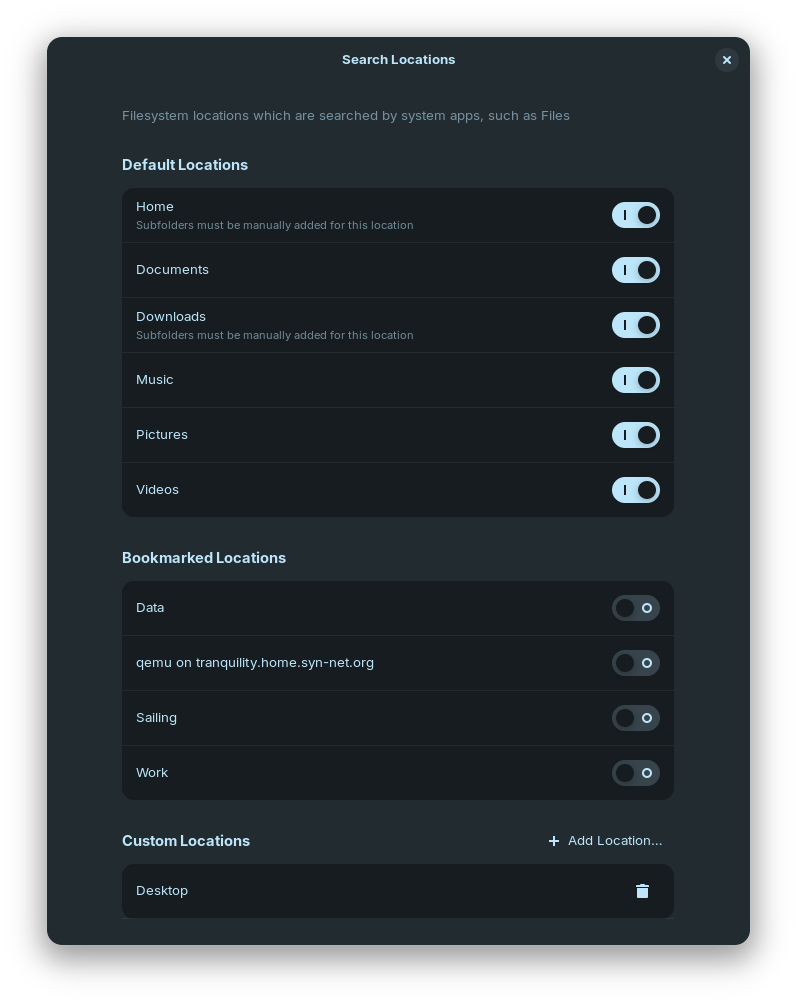
These are the Search Locations in Settings:
New files have been indexed and search through Terminal yields results:
$ tracker3 search <term>
Results:
  file:///<path>/<filename.md>
  <term>
I tried re-installing Nautilus and also tracker:
sudo apt install --reinstall tracker
sudo apt install --reinstall nautilus
I made sure the tracker service is running and I restarted and checked again:
$ systemctl --user status tracker-miner-fs-3.service
● tracker-miner-fs-3.service - Tracker file system data miner
     Loaded: loaded (/usr/lib/systemd/user/tracker-miner-fs-3.service; enabled; preset: enabled)
     Active: active (running) since Sat 2026-01-24 14:10:39 CET; 33min ago
   Main PID: 566309 (tracker-miner-f)
      Tasks: 8 (limit: 13544)
     Memory: 12.0M (peak: 29.2M)
        CPU: 520ms
     CGroup: /user.slice/user-1000.slice/user@1000.service/background.slice/tracker-miner-fs-3.service
             └─566309 /usr/libexec/tracker-miner-fs-3

$ tracker3 status
Currently indexed: 40 files, 17 folders
Remaining space on database partition: 10,9 GB (1,09%)
All data miners are idle, indexing complete
1 recorded failure

Path                                                               Message
…path/Pictures/Screenshots/Screenshot from 2025-12-14 22-59-45.png Could not get any metadata for uri: ...
The situation is more confusing using the Search available in the Application Overview (pressing the Super key and then just typing). Here, I'm getting strange results. It will show results for some files which are definitely not in the Tracker index anymore (but not for all files previously in the index), but no results for new files, neither for filenames nor content.
My questions are:
- What services/processes need to be running in which order (if addidionally to the
tracker-miner-fs-3) so that Nautilus/Files Search will give correct results? - How can I check if Nautilus/Files correctly connects to the required services/processes?
- What services/processes need to be running so that the Application Overview shows the correct/same results as Nautilus/Files and Tracker in the terminal.
- How can I check if the Application Overview correctly connects to the required services/processes?
I hope I have provided enough background information/context. If not, please let me know.
Thanks in advance!