Recently migrated to Zorin OS 17.3, and loving it so far!
However, I'm facing a small issue with G-Sync, and it seems to be not activating for my games on Steam using Proton Experimental. Please find below my PC specs and monitor:
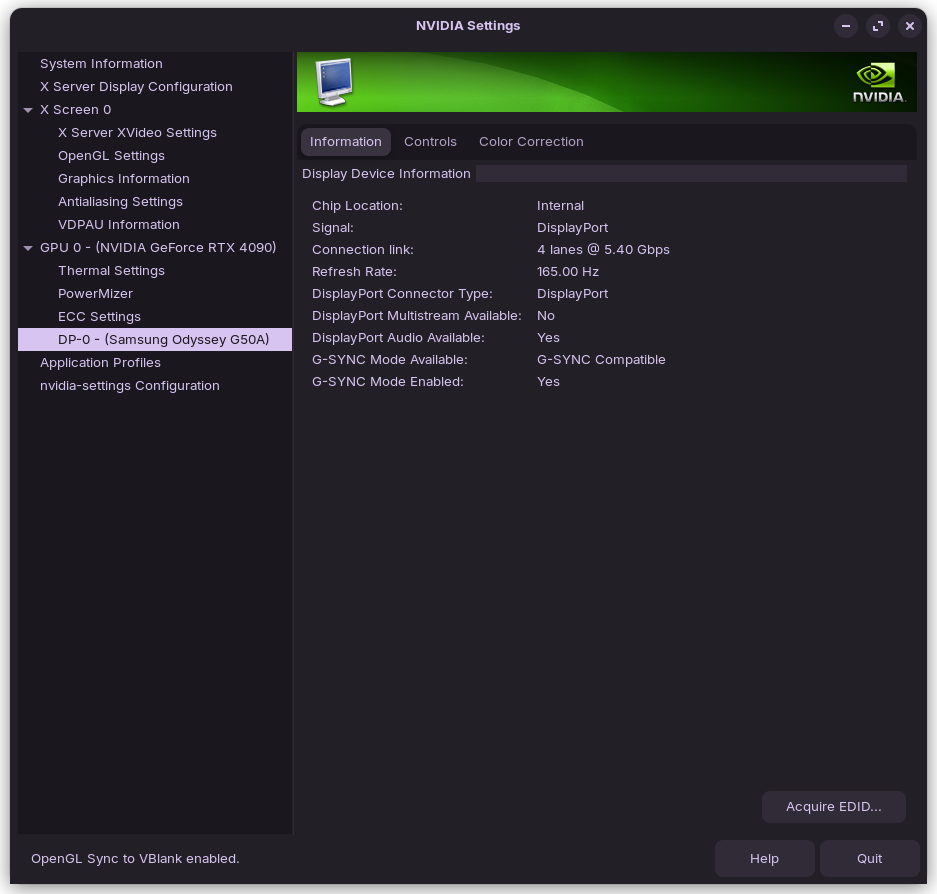
I tried turning on V-Sync, turning off V-Sync, playing in fullscreen, borderless to no avail. It's constantly on "Normal", even with G-Sync support enabled in the Nvidia Settings app.
This isn't necessarily an urgent issue as the games are working as expected, but it would definitely improve the experience.
Having just done a quick search with Brave A.I. search engine, using Ubuntu 22.04 in search criteria as that is what Zorin 17.3 is based on I found this snippet:
"G-Sync Not Working Ubuntu
G-Sync may not activate in Ubuntu 22.04 due to several common configuration issues. First, ensure you are using the proprietary NVIDIA driver and that the necessary options are enabled in nvidia-settings . Navigate to X Server Display Configuration, click Advanced, and enable "Allow G-SYNC on monitor not validated as G-SYNC Compatible". This option is crucial for monitors that are G-Sync Compatible but not officially validated by NVIDIA."
I'm not that well versed in G-Sync, but does it function similarly to how Freesync works in that it needs to be enabled on the monitor side as well as system side? If that's the case, it could be worth looking in the settings of the monitor as well.
In Steam games, using the Visual Indicator, the left-most option is not switching to FLIP, it's staying on BLIT. I tested this with a VRRTest app from Github, and G-Sync was working with it.
Seems to be something from Steam. I'm gonna try re-installing it through the Software app, just in case.
3 hours later, and nothing. I can't seem to figure out how to force the Steam games to use FLIP instead of BLIT. I'm giving up for today, I need some sleep.
Uninstall Steam and reboot. Then install the Steam Package from the Repo with sudo apt install steam and test if it works. Then uninstall it and test the Version what Steam offers here: