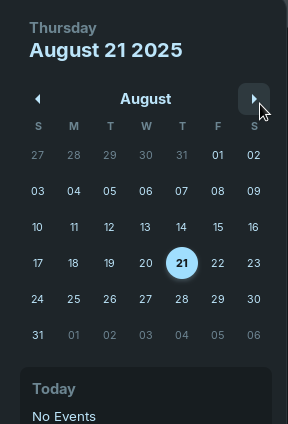
So I have this issue on a few different machines (all Zorin 17.3) where in the taskbar if I use the integrated calendar which I think is just the gnome calendar, it works until I try to change months. If I click the button in the below screenshot to move forward a month, it will rarely work but usually the calendar closes itself and I can't see the next month, but weirdly if I move backwards months, it always fails. I can never look back a month.. The calendar app works if I open it manually, it just fails if I use it in the taskbar. Is this a thing for anyone else?
1 Like
I've tested it and I can switch the Months forth and back. But because I have the Autohide Option active, it only works without a full Screen Window.
And the Calendar in the Quick Settings seems to be independent - or at least can work independent - from the Gnome Calendar App because I don't have Gnome Calendar installed but the Calendar is still there.
2 Likes
Interesting, I tried having no fullscreen windows because I too hide the task bar and yes, it seems to work now. It seems to be something about navigating that calendar and having the taskbar auto hide along with a fullscreen application running in tandem.
1 Like
It remembers me with the Thing, when You have Autohide enabled, Full Screen and You open the Start Menu and make a right-click on a Program and it goes away. It's similar.
So that is why I can't use the right click menu when I right click Zorin menu options! I disabled auto hide to test this out and sure enough, that menu works. I've wondered why that didn't work for me for ages lol
1 Like
I guess that it is some kind of Interference between the Action and the Autohide Mode. We will see how it will react in Zorin 18.
1 Like
This topic was automatically closed 90 days after the last reply. New replies are no longer allowed.