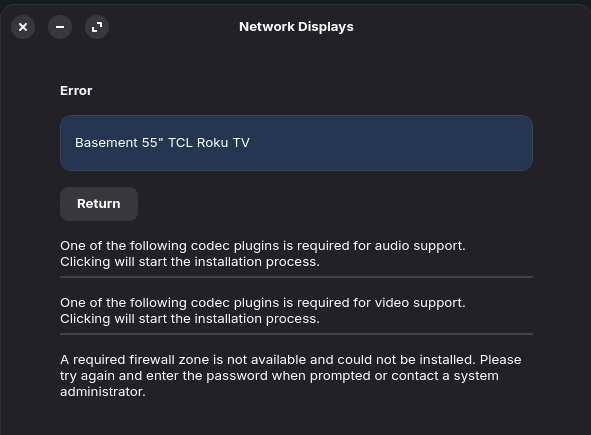
Several months back, I acquired a PC (PowerSpec G434) on which I now have Zorin 17.3, and I acquired a TCL Roku TV (55S451). I enabled "Screen Mirroring" and "Device Connect" on the Roku, installed GNOME Network Displays, which recognizes the Roku as an "Available Video Sink." But when I try to get them to connect, I get the following errors:
It doesn't say specifically which codec plugins are needed, and it doesn't start downloading anything upon clicking. If the firewall zone is referring to UFW, I have that disabled as it caused problems in the past.
(I DO have a MacBook Pro and the Roku IS set up to use Apple AirPlay, but I would prefer to use Zorin with the Roku as I'm slowly phasing out my MacBook and switching over to Zorin.) Is Roku even compatible? (I did a search before posting this and there were two other queries, but they were 2 and 4 years old.) Thanks for your help!
for Codec Support open Gnome Software and scroll down to the End. There is a button called ''Codecs''. Click on it and you get an Overview with Codec Packages. Install them all.
Then open the Terminal for installding additional codec Stuff with:
Note: The first Package is a Bundle with Microsoft Fonts. So, You will get a Licence Agreement Prompt. Navigate with the Tab Key and press Enter on Ok to accept. this is because there are Microfost Fonts.
For the Firwall Things, I would say, You have to add a Rule but when You don't have enable it ...
Thanks for the advice. I installed all of the codecs and reinstalled ubuntu-restricted-extras, but I still receive the same three error messages. I am leaving the UFW turned off as it previously caused a crash (black screen) at bootup and required me to disable it by using the second option from the grub menu and then dropping down into root to disable it, which was a white knuckle experience. Perhaps updating to Zorin 18 Core when it becomes available will resolve the connectivity issue as 18 might include the required codecs? Or perhaps my model of Roku TV just isn't compatible?
On Zorin 18, You have to install the Codecs this Way, too. So, I don#t know if this will make a Difference ...
But You could test it. Download Zorin 18 and put it on a USB Stick, start it and choose ''Try Zorin'' to get in the Live Mode. And in the Live Mode, You could check if it works.