Long story short: Had to enable secure boot for Battlefield 6 in dual boot and it worked fine on Windows.
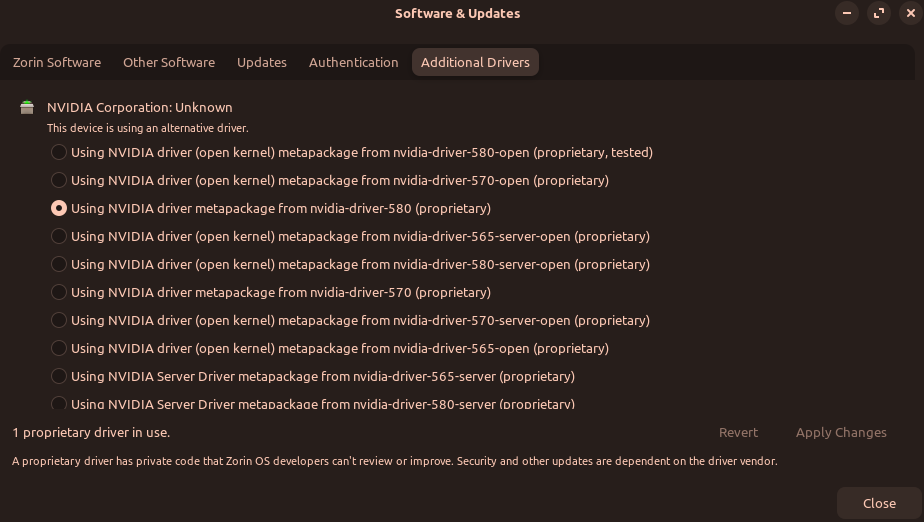
After switching back to the secure boot options i had before, even then it seems that my third party nvidia drivers are not loading back correctly. In Software 580 matepackage is enabled but in settings nothing changes. And when starting a game its obvious somethings wrong.
Definitely, does not look right, I'd swap to 570 driver, restart then do the 580 driver restart and see if NVIDIA shows back up in "About" to see if its probably done it.
Edit: Even after reinstalling nvidia driver via terminal, it does not work. At the end of the installation I get quite the error messages. Maybe it has something to do with that?
W: Possible missing firmware /lib/firmware/amdgpu/ip_discovery.bin for module am
dgpu
W: Possible missing firmware /lib/firmware/amdgpu/vega10_cap.bin for module amdg
pu
W: Possible missing firmware /lib/firmware/amdgpu/sienna_cichlid_cap.bin for mod
ule amdgpu
W: Possible missing firmware /lib/firmware/amdgpu/navi12_cap.bin for module amdg
pu
W: Possible missing firmware /lib/firmware/amdgpu/aldebaran_cap.bin for module a
mdgpu
W: Possible missing firmware /lib/firmware/amdgpu/gc_11_0_0_toc.bin for module a
mdgpu
W: Possible missing firmware /lib/firmware/amdgpu/sienna_cichlid_mes1.bin for mo
dule amdgpu
W: Possible missing firmware /lib/firmware/amdgpu/sienna_cichlid_mes.bin for mod
ule amdgpu
W: Possible missing firmware /lib/firmware/amdgpu/navi10_mes.bin for module amdg
pu
W: Possible missing firmware /lib/firmware/amdgpu/gc_11_0_3_mes.bin for module a
mdgpu
W: Possible missing firmware /lib/firmware/amdgpu/smu_14_0_2.bin for module amdg
pu
W: Possible missing firmware /lib/firmware/amdgpu/dcn_3_5_1_dmcub.bin for module
 amdgpu
this is an issue that happens because you didn't enable secure boot support while installing Zorin OS
There is probably a way to fix this without a reinstall (for example, with sbctl, that i used to set up secure boot on my arch pc), but if you're okay with reinstalling, please try installing by enabling secure boot before inserting the Installation USB, there will be an option to setup secure boot in the Zorin setup.
Yes third party drivers worked perfectly.
I don't know if sbctl is available on Zorin though, i used that for my Arch installation.
I had setup secure boot correctly for Zorin.
Got some problems with my nvidia gpu drivers... Long story stort. I activated secure boot without installing the required software when installing Zorin. Now my nvidia drivers seem to be broken:
So the drivers or the gpu seems to be recognized but when I start Cyperpunk, I get around 8 fps.
I already tried reinstalling everything from the scratch with:
Have you tried using xorg instead of Wayland compositor? Zorin defaults to Wayland at login and it does not play nice with nvidia graphics. At login, choose your username and a cog appears lower right. Click on it and change to 'Zorin on xorg'.
You can disable Secure Boot afterward, if that is an option for you.
If it is not, you can enroll Secure Boot in MOK afterward.
You would need to fully remove, then reinstall the Nvidia driver in order to trigger the signing process
Followed by a reboot - then at the MOK Manager screen, enrolling with a password you create.
However, since you say you did not seem to get the MOK manager screen before... What is your terminal output for:
mokutil --sb-state
If it shows "Enabled", then run
sudo mokutil --reset
Reinstall again:
sudo apt install --reinstall nvidia-driver-580
And watch for the prompt for a Secure Boot password.
I followed your steps and and got the drivers working again - but somehow not fully.
X11 and nvidia drivers showing up as intended but when I start a game e.g. Cyberpunk I now get around 30 fps in areas where I had 80 fps before.
I have no idea if that means some drivers are not loaded or have not been installed correctly...
Maybe my aforementioned error have something to do with that?
W: Possible missing firmware /lib/firmware/amdgpu/ip_discovery.bin for module am
dgpu
W: Possible missing firmware /lib/firmware/amdgpu/vega10_cap.bin for module amdg
pu
W: Possible missing firmware /lib/firmware/amdgpu/sienna_cichlid_cap.bin for mod
ule amdgpu
W: Possible missing firmware /lib/firmware/amdgpu/navi12_cap.bin for module amdg
pu
W: Possible missing firmware /lib/firmware/amdgpu/aldebaran_cap.bin for module a
mdgpu
W: Possible missing firmware /lib/firmware/amdgpu/gc_11_0_0_toc.bin for module a
mdgpu
W: Possible missing firmware /lib/firmware/amdgpu/sienna_cichlid_mes1.bin for mo
dule amdgpu
W: Possible missing firmware /lib/firmware/amdgpu/sienna_cichlid_mes.bin for mod
ule amdgpu
W: Possible missing firmware /lib/firmware/amdgpu/navi10_mes.bin for module amdg
pu
W: Possible missing firmware /lib/firmware/amdgpu/gc_11_0_3_mes.bin for module a
mdgpu
W: Possible missing firmware /lib/firmware/amdgpu/smu_14_0_2.bin for module amdg
pu
W: Possible missing firmware /lib/firmware/amdgpu/dcn_3_5_1_dmcub.bin for module
 amdgpu
No, these relate to missing expected AMD software that is not yet included in the kernel. They note anticipated release, not an actual missing file and are harmless.
Can you launch cyber punk and while it is fully running, alt+tab and open a terminal and run
nvidia-smi
And relay the terminal output here? (What I am looking for here is if PRIME Select is routing the rendering through the Nvidia GPU or if your system is Hybrid,w here Nvidia does rendering but Intel GPU does the display scan out).
I made this script a while ago back on Mint, but it should work for any Debian-based distro. Signs all kernel drivers (including the NVIDIA ones), allowing you to boot in to Linux with secure boot enabled. No toggling needed. However, I'd more-so recommend backing up your files and reinstalling Zorin with secure boot enabled so it can do it properly. I haven't used this script in a long time, and I never used it on Zorin, but it should work.
Yes, this looks like Nvidia is performing the rendering, with iGPU doing the Scan out.
Using Prime Select, can you test if you switch to Nvidia Only and see if FPS improves?