Graphical corruption after suspend (not just screen off) – artifacts and blurry small fonts

Hi everyone,

I’m experiencing a graphical issue on Zorin OS when the system goes into suspend due to inactivity (not when the monitor simply turns off).

To clarify the difference:

When the monitor turns off only, everything works normally when I wake it up.

When the entire system suspends automatically after inactivity, the problem appears after resuming.

After waking the computer from suspend, the screen shows noticeable graphical artifacts — like scattered black/gray blocks or “stains” across the display. In addition, small fonts look distorted or pixelated, as if the rendering is broken. The issue affects the whole desktop environment, not just a specific application.

The problem does not happen after a normal reboot. It only appears after the system resumes from suspend.

What I’ve observed:

Happens only after automatic suspend due to inactivity

Does not happen if only the screen turns off

Reboot fixes it temporarily

Small text looks especially bad

The artifacts are visible across the entire screen

Has anyone experienced something similar?


Does this happen when You set it manually in suspend? Does Your System run in Wayland or X11? You can check that with the Terminal Command echo $XDG_SESSION_TYPE

It says X11

If you have an old computer, you can keep using X11, but if you have a newer computer, it'll work much better with Wayland.

Thanks for the suggestion.

My system specifications are:

CPU: AMD Ryzen 5 3600

GPU: NVIDIA RTX 4060

RAM: 16 GB

1 Like

Thanks for the specification! That's actually very new and not old at all! :grinning_face_with_smiling_eyes:

Have you tried switching to Wayland in the login screen? If not, you can try switching to Wayland over there (by clicking on the gear/settings icon in the bottom-right). In case its not visible, i'll attach the commands for the same.

Also, NVIDIA graphics cards have always had issues with linux in general, but a ton of fixes have been done after Wayland arrived, so I hope this works for you

I switched to Wayland as suggested.

The situation has improved compared to X11 — I no longer get the large black/gray squares all over the screen after resume.

However, there are still graphical glitches present. As shown in the attached screenshot:

There are small visual artifacts near UI elements (for example near the “Z” icon in the taskbar).

Some fonts look slightly corrupted or improperly rendered.

The issue is subtle compared to before, but definitely still present after resuming from suspend.

So while Wayland reduces the severity of the problem, it does not completely fix it.

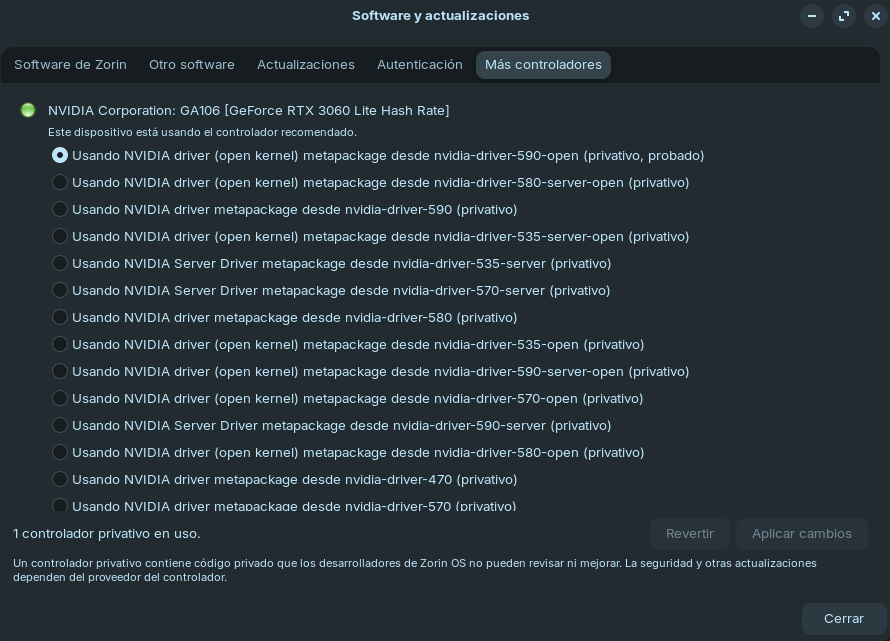
I am using the proprietary NVIDIA drivers selected through the “Software & Updates” application. Specifically, the one listed as: “NVIDIA driver (open kernel) metapackage from nvidia-driver-590-open (proprietary, tested).”

Could this be caused by the NVIDIA driver?


Good to see some improvement! There's two things I noticed, first is that in terms of the font, the 'r' alphabet has an issue being rendered, and for the Zorin icon issue, it's definitely an issue with the GPU (mostly the NVIDIA drivers).

I'd suggest you two steps that you can do one at a time, and you can report your experience here after the first step and then based on what has improved/not improved, I can suggest the second step or rather another solution altogether.

The first step for you is to switch to the older versions of the NVIDIA drivers (because it's always the graphics card causing the graphical issues). You can switch to the older ones and reboot after each version downgrade and test each version after suspend.

If none of those work, you can let us know and we'll see if the second step should be taken or not :+1:t2:

Maybe try the non-open Driver Version.

I’m not sure how it got fixed.

After switching to Wayland (which I have kept enabled), the issue was still present, although not as severe as before.

I then tried changing the NVIDIA driver. The latest one available was 590, but I installed 580 instead. I did not notice any difference, so I decided to try the open-source driver (the non-NVIDIA one). However, after doing that, automatic suspend due to inactivity stopped working, even though the option was enabled.

This morning, I switched back to the NVIDIA 590 driver (the one I originally had installed), and now everything works correctly. The system suspends automatically due to inactivity, and when I resume, the display looks normal with no graphical issues.

Thanks everyone for the advice.

1 Like

It seems that what happened yesterday was just an exception.

Today the graphical issues have returned, affecting the entire screen again after resuming from suspend.

I will try changing the NVIDIA driver once more to see if that makes any difference.

I was genuinely thinking of replying that such a fix seemed temporary, cuz i know the nature of Linux haha :sweat_smile: (and it came true :smiling_face_with_tear:)

Yes, you can try other drivers again and check. We'll wait :+1:t2:

In case if it still doesn't work, I'd suggest downgrading the kernel to 6.14, cuz people with 6.17 kernel seem to be facing higher more and more issues. I will explain the process in that case.

I tried the driver version 570 (the maximum available right now is 590) and it seemed like everything was working fine. The system has suspended 3 times today. The first 2 times there were no graphical issues.

The third time it also seemed like there were no graphical issues, until I opened the file explorer and in the left column I found the glitches.

Now I don’t know if this issue, which seems much less serious and doesn’t affect as much (for now), happens randomly or depends on the driver.

I was also able to check that the Files application (Nautilus) was open when the system suspended. After resuming, with the graphical glitch present, I closed that window and opened it again and it was fixed. But I imagine the normal behavior of the system should be to keep everything correct as it was when it suspended.

Great to see more improvements! I think this has something to do with some graphical rendering information corruption of the apps/UI elements that were stored on the GPU memory before the suspend session. In case these glitches are currently happening only to apps that weren't closed and not at all to the rest of the UI after suspend sessions, then I can suggest you two options:

  1. Remain with the Driver Version 570 (Open/Server, whichever you found success on), and make sure to either close all apps before suspending or after suspend, restart all apps (my suggestion) that were left open before the system entered the suspend session.

  2. Another solution I once saw while questioning this issue on Claude AI was to refresh the GPU state after the suspend session, which might be helpful. Here's the output+commands I've asked Claude Haiku 4.5 AI to generate:


(Output Starts)
Wayland changes things significantly here, and it's good that your friend found it more stable than X11.

Wayland-Specific Considerations

On Wayland with Nvidia, the GPU state handling is different because the compositor (like Gnome Shell) manages the display differently. The good news is that Wayland is generally more resilient to GPU state issues, but suspend/resume can still cause problems.

Here's a Wayland-optimized version of the script (to create a new script file):

sudo nano /etc/systemd/system-sleep/nvidia-wayland-reset.sh

Add this content (from #!/bin/bash to esac):

#!/bin/bash
case $1 in
    post)
        # Wayland-specific GPU reset after resume
        echo "Resetting Nvidia GPU for Wayland..."
        
        # Reset GPU state without reloading modules (safer on Wayland)
        nvidia-smi -pm 1 > /dev/null 2>&1
        
        # Give Wayland compositor time to reinitialize
        sleep 2
        
        echo "Wayland GPU reset complete"
        ;;
esac

(press Ctrl+O followed by the Enter key to save/write the file and Ctrl+X to exit back to the terminal)

Make it executable:

sudo chmod +x /etc/systemd/system-sleep/nvidia-wayland-reset.sh

Why This Approach Works Better on Wayland

  • Avoids full module reloads that can conflict with Wayland's GPU management
  • Lets the Wayland compositor handle reinitalization rather than forcing it
  • Works even after a restart (Yea i specifically asked if it did and it does cuz systemd executes it everytime after a suspend session)

One More Thing to Check

Since they're seeing remnants only when apps were open during suspend, they might also benefit from checking if there's a Wayland-specific Nvidia setting in their display settings or Gnome tweaks. Sometimes enabling "Nvidia PRIME" or checking GPU sync settings helps (This seems to be generic AI suggestions that might not even exist. If it does, let us know)

Has your friend noticed if the remnants appear in specific apps, or is it random? That might tell us if it's an app-level GPU cache issue versus a system-level one.

(Output Finished)


Disclaimer: As i mentioned before, the second solution is AI generated and hence it might contain mistakes. However, I went over the command lines and it looks good as per my knowledge. I've written my help tips in the output within round brackets () for better clarity.

Thanks, that could indeed be the reason, that it’s not restoring the state properly.

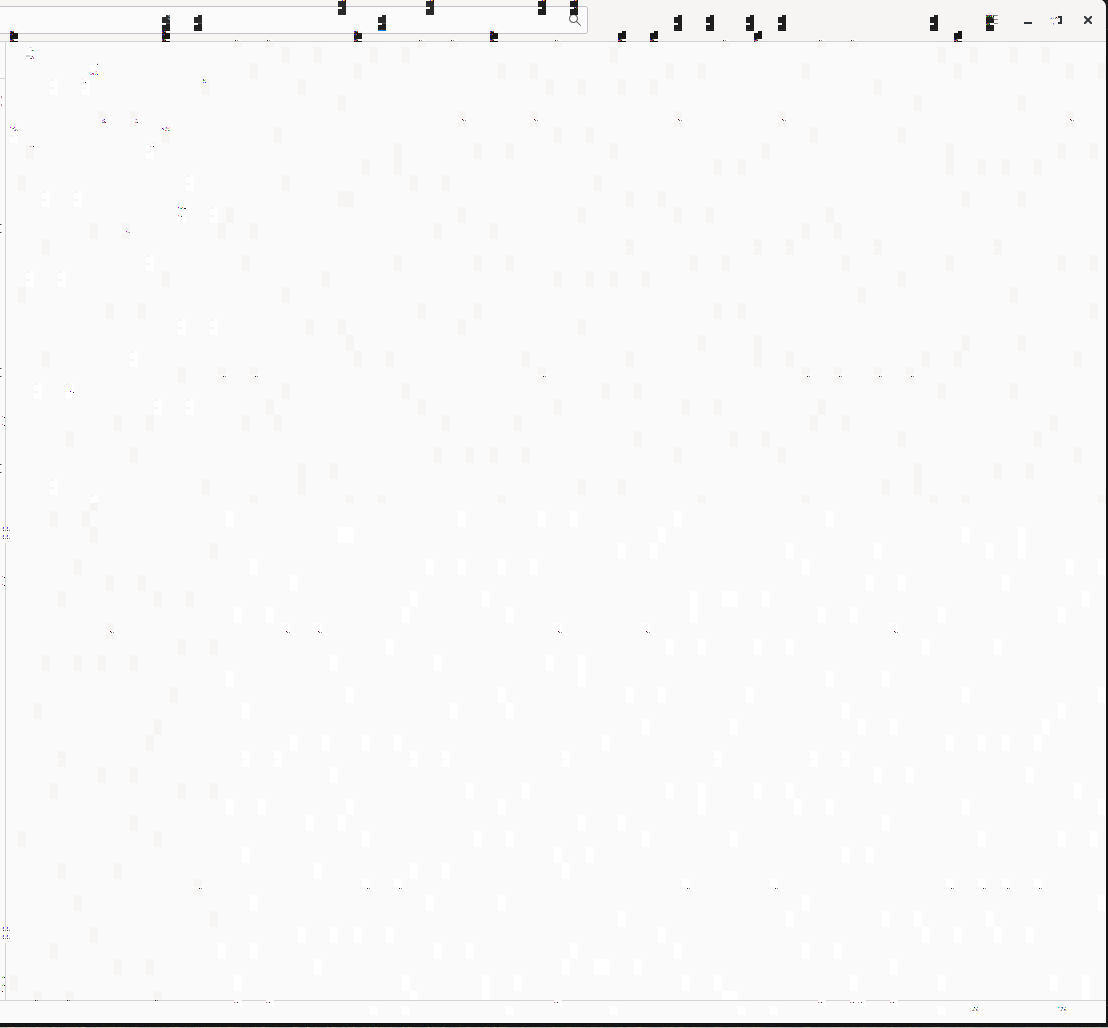
After writing my previous message I looked more closely, and it’s not just that some elements are not displayed correctly. The icons that appear normal are actually being replaced by others.

Since this is a minor issue and it can be fixed simply by closing the window and opening it again, I’ll keep using this driver. I also haven’t noticed any difference in games. I’ll continue testing to see if these are the only glitches and if the more serious issue from the beginning doesn’t return.

As for the script, as you mentioned it was generated by AI, and since this is my main system I’d rather not test it in case it breaks something. If this were a test machine or a secondary system I would probably try it.

Thanks for the effort and the suggestions.

If things continue like they are now, I’ll leave the topic here. If the large squares across the screen return like at the beginning (or something similar), I’ll let you know so we can continue testing other options.

1 Like

Good call @Belko2.
I agree that the issue at the current stage is very minimal compared to what it was in the beginning and hence it'd be better if we don't bother the system anymore with extra commands :+1:t2:

I hope everything goes well for you, but in case of any display freezes or any glitches that might make your UI unusable, you can try the following key combinations (this worked for me in GNOME 49):

  1. Ctrl+Alt+F1 will lead you to the login screen, where you can login back to your account and check if the issue is resolved or not. If not, you can use the below commands.

  2. Ctrl+Alt+F3 will lead you to a command line interface (CLI), where you can login using your username (the one written before your OS version in the terminal, like john in john@zorin), along with your current password.
    If you see the light green command prompt (your_username@zorin:~$), you can now run any commands like sudo reboot for restarting or sudo poweroff for shutting down.

  3. Ctrl+Alt+F2 will lead you back to the graphical user interface (GUI) that you were on before (in case you weren't able to login in the CLI)

I've tried these combinations, and you can try too, so that you can be familiar with these commands. If anyone else found success with my commands at post number 14, please let us know here!

Once again, I'm glad I could help, and thank you too for the detailed replies! :raising_hands:t2:

1 Like

Most users have an Integrated GPU (Intel) as well as having a Dedicated GPU (Nvidia, AMD).

It is important to remember that by default, you will be using the integrated Intel GPU until the load turns the dedicated GPU on by demand - so if the Integrated Intel driver is the flaw; it won't show up if the Dedicated GPU is running - this can make the graphics problem seem intermittent.

In my case I don’t have an integrated GPU.

My system has a Ryzen 5 3600 and an NVIDIA RTX 3060, and the Ryzen 3600 does not include integrated graphics, so the system is always using the dedicated NVIDIA GPU.

Because of that, there isn’t an Intel iGPU that the system could switch to, so everything is running on the NVIDIA card all the time.

2 Likes