I've been running Windows10 and Zorin17 on two separate drives. The multi-boot menu was built when I installed Zorin on a second drive. The menu showed Zorin and Windows 10. Everything was working.
Now, I installed Windows11 on a 3rd drive. After that, I ran update-grub from Zorin terminal. Its messages showed that it detected Windows10 and Windows Recovery(which wasn't on the menu before I installed Win11).
The menu now lists Zorin, Windows 10, Windows Recovery.
Except for Zorin, none of the Windows selections are working, Windows11 is not even on the menu.
When I boot using a boot order menu (F12 on Dell), each OS boots fine.
This is an old PC with Legacy BIOS.
The disks are shwing as:
Windows10 - sda
Windows11 - sdb
Zorin - sdc
Hoping to get this resolved with the help on this forum.
Thanks
Create a Bootstick with Zorin, then start it and choose ''try Zorin'' to run in Live Mode. In Live Mode look for ''Boot Repair'' and let it run.
Boot Repair hung in the middle, completely froze my pc. I powered it off, repeated, got to the same hung state.
Now, when I try to start Zorin, it takes me to GRUB command line and that's it. When I enter exit at grub prompt is shows:
No boot device available
Strike F1 key to reboot, F2 to run the setup
UPDATE:
I restarted Zorin from the install usb and went to the /boot/grub/grub.cfg on the hard drive with Zorin. The file was empty. I restored it from a backup of this file which I saved just in case. This put me back to where I was. At least I can boot Zorin and Windows separately without using grub menu.
So boot repair destroyed the grub.cfg file and hung.
Any idea what I do next?
Windows 10, 11 and Zorin OS are all installed?
Are they all installed as EFI? Legacy (MBR)? Both?
If all EFI - what is the size of your EFI partition?
Hmm ... the Thing is: You have installed Windows after Zorin (even when there was a Windows installed before). Normally, we would recommend to install Windows first and then Zorin to avoid Issues.
Another Point could be that Your BIOS runs in Legacy Mode. Now would be the Question if Windows 11 was installed fitting to that with an MBR Sheme. When You are in zorin install GParted with sudo apt install gparted
When installed, open it and make Screenshots from the Drives and their Partitions and post it here. So, we can get an Overview how the Partitions are set up.
I fixed it by manually correcting grub.cfg.
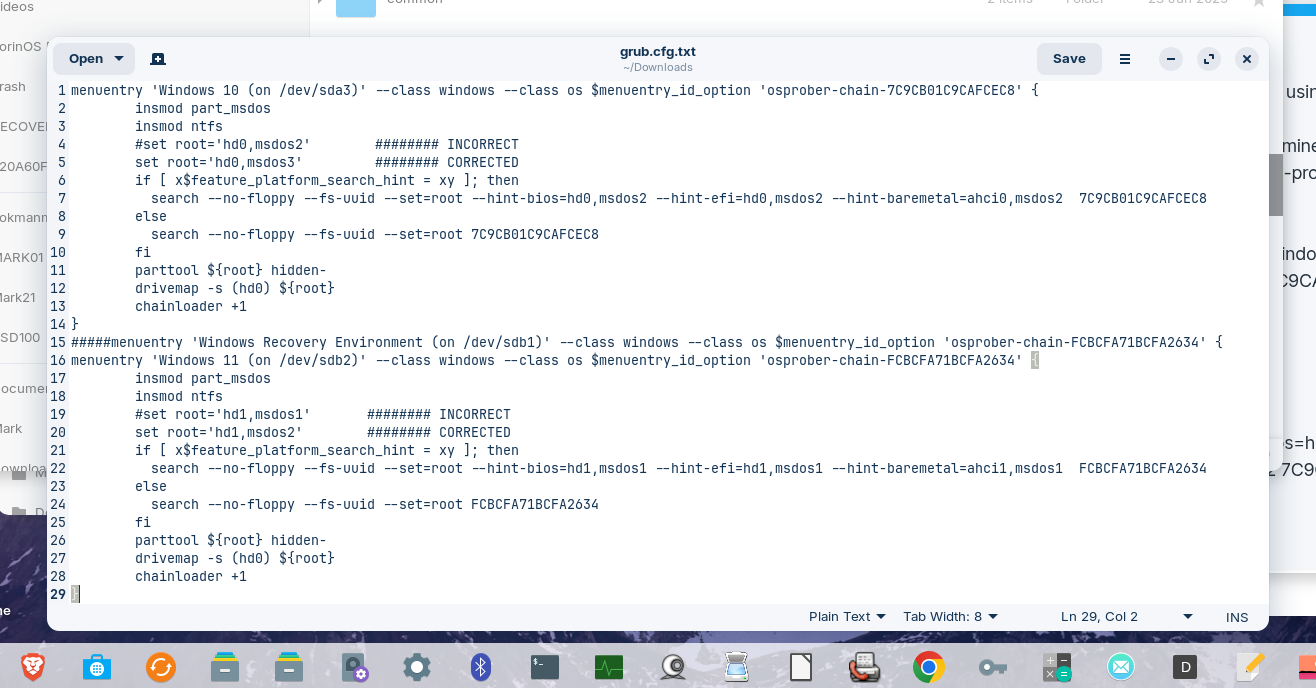
menuentry entries for windows10 and 11 had incorrect set root which pointed to wrong partitions.
| #set root='hd0,msdos2' ### INCORRECT | |
|---|---|
| set root='hd0,msdos3' ### CORRECTED |
| #set root='hd1,msdos1' ######## INCORRECT | |
|---|---|
| set root='hd1,msdos2' ######## CORRECTED |
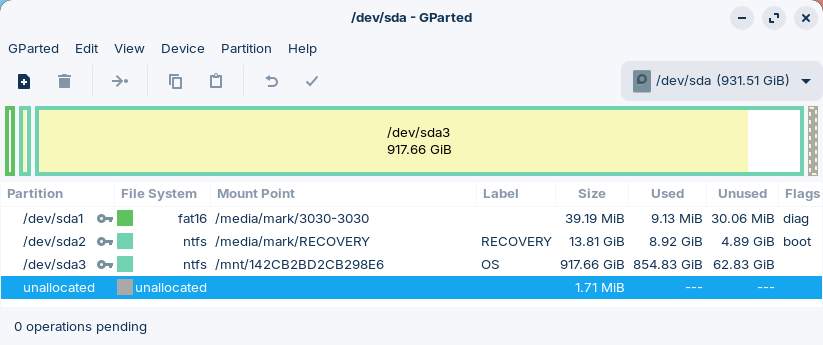
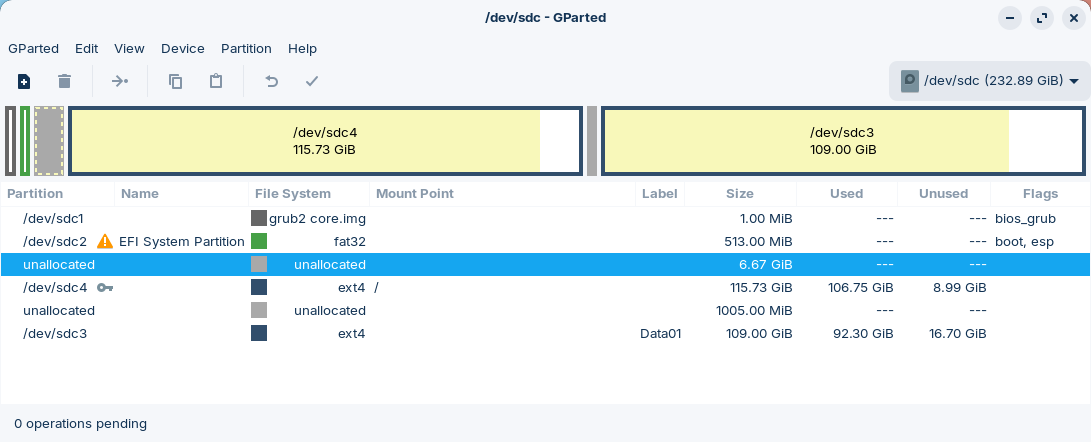
I uploaded screenshots of gparted for the 3 devices and the entire fragment of menuentry from grub.cfg.
/dev/sda - windows10
/dev/sdb - windows11
/dev/sdc - Zorin
Windows11 was installed from an ISO usb created using rufus with parameters for legacy BIOS and MBR.
So far, I haven't found a clear info on how to determine the cause of incorrectly generated grub.cfg. I understand it is based on os-prober, but why, still trying to find a cause and how to eliminate it.

This topic was automatically closed 90 days after the last reply. New replies are no longer allowed.