GTK-NoCSD for GTK3/4/LibAdwaita/LibHandy

Today, I tried creating a .deb package for GTK-NoCSD in a Zorin 18.1 Lite live session because I had read that you can create .deb packages with checkinstall.

After several attempts (I had to constantly create new directories manually because in terminal were shown errors that the directory didn’t exist, and I also had to use a number instead of the automatically generated description for the version after I set GTK-NoCSD as name), the installation finally succeeded.
With double-clicking on the .deb file I was able to install or uninstall the package.

I’m not sure if I should have made any entries when I was asked for the values, or if what I did was safe.

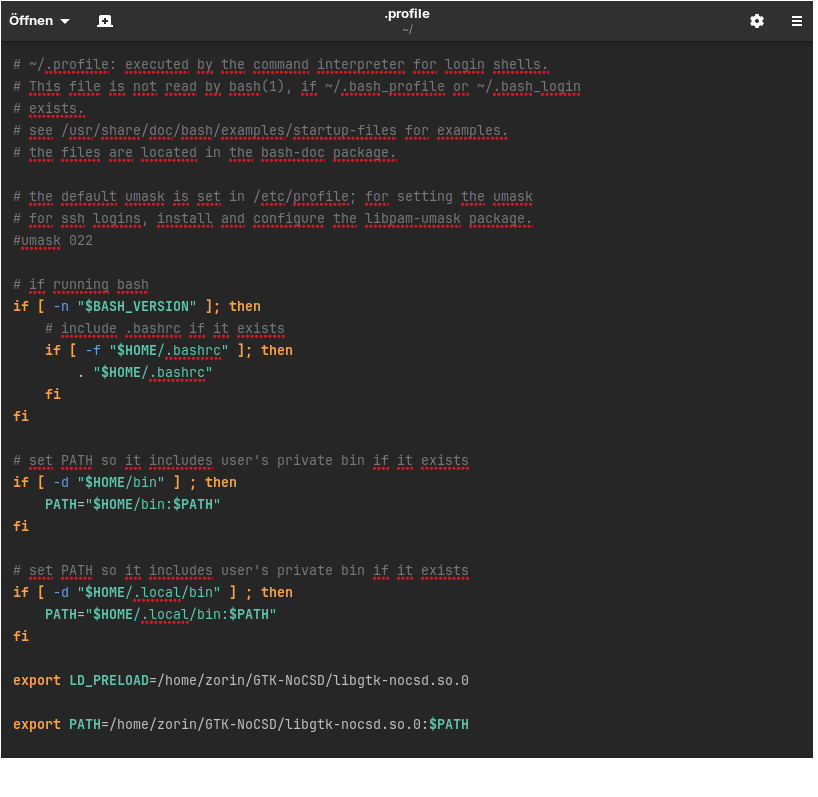
Unfortunately, it didn’t work automatically like gtk3-nocsd, and I had to add the line export LD_PRELOAD=/usr/local/lib64/libgtk-nocsd.so.0 to ~/.profile.
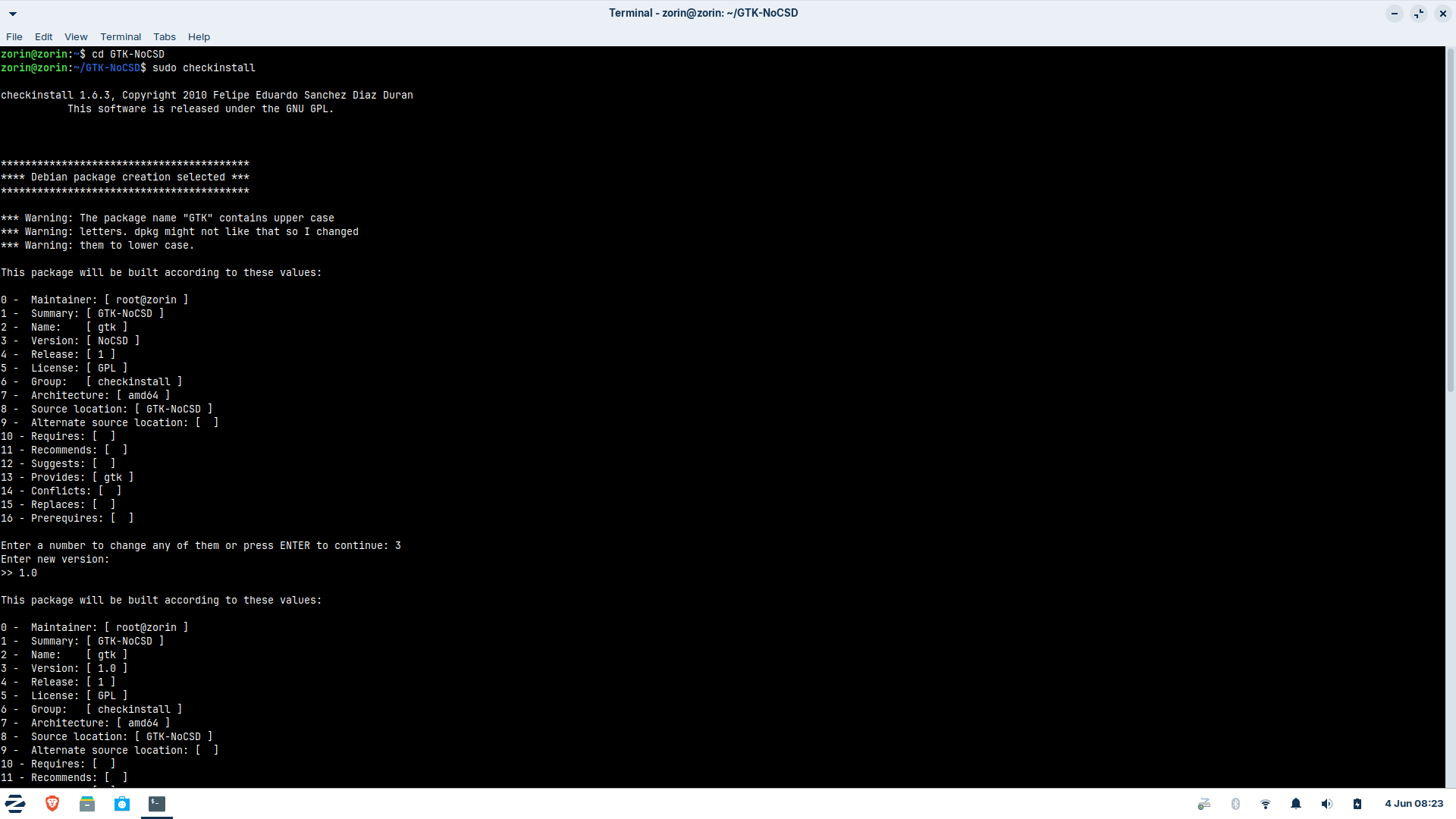
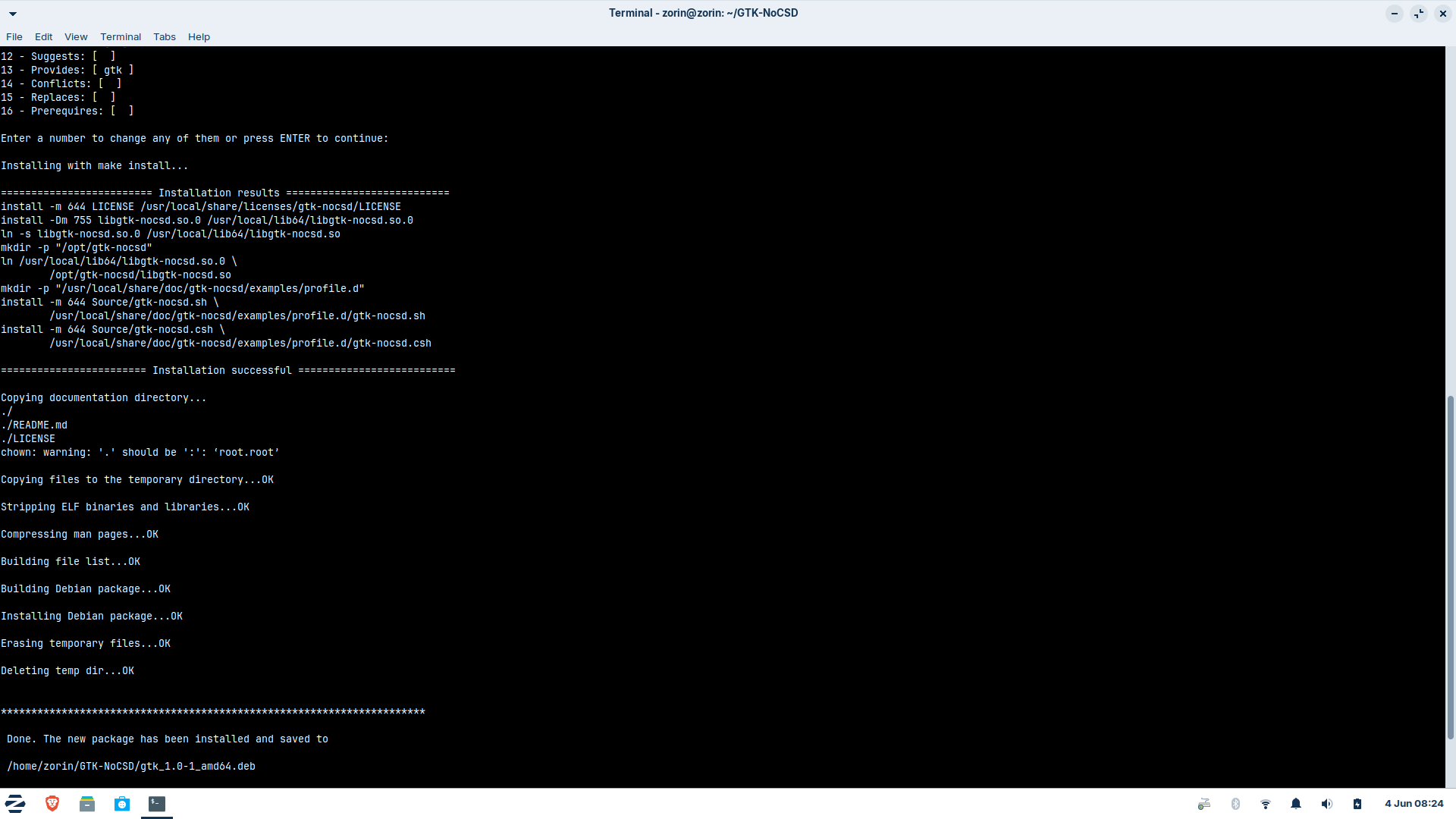
That is the .deb file: gtk_1.0-1.amd64.deb

Are there any advantages or disadvantages to installing it this way? It doesn't appear neither in Gnome Software Center nor the Start menu, probably because it's just a library and not a standalone program.

I'm confused because the instructions of the developer don't use make install at all - they use gcc instead - so I'm not sure if installing to the /usr directory is even recommended.

Edit:
I've since read that checkinstall is outdated, no longer maintained and can cause serious problems in the libraries, especially when run as root. That doesn't sound very trustworthy, but checkinstall is a package in the ubuntu noble repository.

In one post was mentioned that it would be better to run

checkinstall --install=no --fstrans=yes make install

I did that, and this time I also ran “make” beforehand, but I couldn’t tell any difference in the result. The library was also installed in /usr/local, but this time the .deb file didn’t display a lock icon (last time root was the owner). The directories had to be created manually again.
I use debcreate, not checkinstall.

Using gcc means to call on the GNU Compiler Collection to compile software - which may not be necessary of installation is merely placing libraries on the system.

Exactly.
Using the make command is probably the best way. This is not GUI software you deploy and use; it is a set of additional libraries - so it will not appear as a package in Gnome Software, nor as a launchable application.
The only advantage in creating a debian package is if you want to maintain and deploy it for public use. This allows you the ability to patch and submit updates to users.

1 Like

Maybe change the Number 0 - Maintainer because there stands ''root@zorin'' to Your User Name or a Placeholder.

1 Like

Yeah, that confused me too. It was because of the live session where the username is Zorin. When I make this on my real system then probably my username is set there.

I thought it might be easier that way if you ever want to uninstall the package. But with the make install command for the installation, the uninstallation would also work.
On the other hand, installing it with gcc in the home directory was very straightforward, and you can probably uninstall the program by simply deleting the GTK-NoCSD folder. Since it doesn’t work at all without the environment variable in ~/.profile, installing it shouldn’t (hopefully) cause any permanent damage. But I’m still a bit hesitant because of the Thunar issue, and I don’t currently have Zorin 18 Lite or anything similar installed anywhere. I was just curious about how to create a .deb package.

This is a useful curiosity and I often use it on my own, creating local packages for ease.
I needed to learn how in order to deploy public packages, but once I did, I found that secondary advantage that you mention, now.
Again, I recommend using debcreate and not checkinstall. Checkinstall is not bad. Just a bit too simple and slim to handle current packaging very well. No longer maintained means it is not updated to do so.

I need to catch up in this lengthy thread... So, I am not sure on this issue.
Until I get caught up - I will offer a guess.
Thunar is GTK3, so the library for gtk-nocsd cannot break it.
However, environmental variables can interrupt Thunar loading, especially if preload is involved combined with XDG loading in Thunar.

Setting PreLoad globally can definitely do this - heh... I have done similar myself...
So most likely, avoiding a Global Setting of Preload is your best bet (for now).
Submitting this as a bug report to MorsMortium for a global fix is the next step.

To set a wrapper for Thunar, all you need is a file containing:

#!/bin/bash
LD_PRELOAD=/usr/local/lib64/libgtk-nocsd.so.0 thunar "$@"

(Double check the variables in that - I have not installed MorsMortiums new gtk-nocsd since I have eliminated CSD's in a different way on my system)
Place that file in /bin and name it whatever you want... "thunarnocsd" or something.
Give it executable permissions and use that to launch Thunar.
OR...
You can append the thunar.desktop file exec line as:
Exec=env LD_PRELOAD=/usr/local/lib64/libgtk-nocsd.so.0 thunar %F

Either way, this isolates Thunar and launches it with nocsd, but avoids PreLoad Environmental Variable hiccups.

You had already advised me to create a wrapper, but I couldn't get it to work. I had tried so many things, also changing the exec line of the .desktop file.
Even when the environment variable wasn't set globally, I couldn't get Thunar to start with the preload, for example, via the terminal. Thunar was always empty, with no folders.
I tried running Thunar individually with the preload via the terminal. It never displayed any folders.
I'm not sure if I have tested the wrapper and changed .desktop file with the program installed with make install at /usr/local or just with the program installed via gcc in home directory.
At some point, I stopped because I couldn't find a solution and the speed of loading apps, e.g. Gnome Software, was worse than without the program.
Today I just used Nemo instead of Thunar.

Then a bug report is definitely the next step. Sounds like a gtk-hook failure.

Looking at MorsMortium github:

This looks good on Gnome and makes these applications alike, but looks off everywhere else and can potentially break window managers and remove window manager provided functionality.

This is noteworthy:

Bear in mind the segment after, where .desktop files get their DBusActivatable=true part removed, which fixes them not picking up the library.
There is also a manual guide: SingleAppUsage.md

It appears that the developer is aware of certain issues already...

Perhaps my path is not set correctly. I don't know how to do that. Creating a file ~/.bash_profile and adding the PRELOAD line there or to bashrc file has never worked, only when the line was added to ~/.profile.
But I don't know what that line must be for the path a) when GTK-NoCSD is installed in ~ b) when it is installed in /usr/local/lib64
and where I shall put that line for the path.

Quote of morsmortium:
"PATH needs to be set up correctly, for example my ~/.bash_profile has this line:

export PATH=/home/morsmortium/.local/bin:$PATH

"

This is a use case thing - I can see easily how this one is weird.
Your User Profile takes priority - and that includes your ~.profile.
The ~/.bash_profile will also get priority, after ~.profile and only for sessions logged in bash shell.

A user, maybe MorsMortium being such, that is used to running in a bash login shell might forget and assume that everyone else does too.
A bit like an Arch Linux user advising you to pacman install and you read it and know to translate that to your distro and type apt install.

So to break this down the tree to the basic file - /etc/environment
Setting something there sets a Global Environment setting.

If you set:
export PATH=/home/morsmortium/.local/bin:$PATH
That is a User Environment setting. However... This does not necessarily avoid the Global Setting problem I mentioned above. It is still being broadly applied to all apps and all windows in your User Environment - in that regard, it is User Global, rather than System Global. For this reason, I suggested specifying per app.
At least because of Thunar. I think it is the only one balking.

Breaking down that command:

$PATH

This is the path that would be used by the system if you set no setting. If launching the app means it would look in PATH /usr/local/bin, the above command instructs to redirect to /home/$USER/.local/bininstead (I am assuming this is where the install places the local file of gtknocsd. I have not tried out this build so that is a guess based on the reason for that command.)

export

This exports that environment setting.

PATH=

This specifies the replacing path to be used.

1 Like

Do I have to set that export PATH line somewhere? Unfortunately, I still don't understand whether I need to make any adjustments or not.
Or is that line only for launching single apps and not for the global user environment setting which I want to use?

Sorry - no. I was not very clear.
That is the User Environment command for your profile and it is:
export PATH=/home/$USER/.local/bin:$PATH

The $PATH is a dynamic variable - so you leave that as it is. Setting it to one defined path would hardcode it to only work for apps that use that path, not all of them.
$USER can be changed to Your User name, as the folder appears in root, /home/...

Thank you very much for your help. I’m going to try installing it again during a live session and see if the program can be found at the specified path. This is all very complicated for me, and perhaps the program isn’t quite ready yet and is still in development.

The path ~/.local/bin doesn't exist after the installation with gcc.There is nothing. The program is at ~/GTK-NoCSD/libgtk-nocsd.so.0

I do feel it is quite new and it needs a lot of fleshing out.
It is a Great Start. I am not nay-saying this, at all.
But anything new needs time.

So... LibAdwaita and GTK4 both work differently from GTK3. It is harder to achieve what gtk3-nocsd did.
Reading MorsMortium's page, he is quite upfront that all development and testing occurred in a limited environment.

User feedback and bug reports are the very thing that can narrow down the areas that need work to flesh it out.

You tend to dive into the unfamilar and start learning and each time - the unfamiliar is unfamiliar - Until it no longer is.

My example of an Arch user saying pacman and your familiarity not even really noticing it, just adjusting that with a tiny mental note of "She means APT"... is kind of spot on.
To a New User from Windows OS, that would seem so complicated. "But... but how do you know that Pacman is the Arch version of apt? What... but what if they say yum?" After a very short time, they are saying. "Different package managers on those distros, same principle. Easy. Got it."

For some apps gtk3-nocsd is better, for others that one.

I understand what you mean. A year ago, much more things were totally new to me, and now I get used to and know a bit more about terminal commands or where apps save their files.

1 Like

MosMortium may have moved the shared object file (.so) to ~/.local/bin.
I do have a /.local/bin directory but... I mean... I do a bunch of other development stuff... I really cannot remember off hand if Zorin OS defaults to that being unpopulated - the /bin folder only created at need...

But you can create it. OR, direct to your ~/GTK-NoCSD/libgtk-nocsd.so.0 if you want to. It just needs a valid path that reaches the .so file.
Doing that way is less organized, less neat... but for testing purposes, not harmful.

Okay, I'll try with the path where the program is. I feel like the instructions are very confusing because they don't always use the same installation method. Everything should be tailored to a compilation with gcc or to an installation using the package from the distribution or the make file, or at the very least, there should be separate instructions for each.

Like... 90% of GnuLinux is unfamiliar and complicated to me.
I look at it and it has fangs and claws and I realize it is too much, I am in over my head.
Then I punch myself in the face ten times while holding a very angry lobster, take a breath and dive in until the fangs recede and the claws retract and I am strutting around like a know-it-all rooster.
Who is, inexplicably, holding a very angry lobster under one wing.

My .profile file looks wrong because there is above something with a path at if ...fi.

It didn´t help with Thunar.