I think its been about 2 1/2 years since I installed Zorin 17 (And I was late to the game as I waited for the Upgrade option to upgrade directly from 16 to 17).
I've been watching to see any mention of the next version but haven't seen a mention of it. I'm going to wait for the upgrade option (hopefully) like I did last time so I know that will mean an even longer wait but just wondering if there's been any mention of the next version (officially)?
Welcome back David. Word? No. Guesses, plenty lol. I hope for late Sept. but only if it's ready.
There is a whole thread here somewhere I think.
1 Like
You can subscribe to the newsletter then you'll be informed.
Thought I might have missed something. I do check in almost everyday for any news. Thanks.
1 Like
Because we are now in the 2nd Half of 2025, it shouldn't take too long until the next Release. But at the End: It is ready when it is ready. So, we can only wait.
1 Like
I thought I should mention, for you as well as anyone else reading this, that the most common source of errors during the upgrade was due to third party repositories added into the system.
Some installers add their own repositories automatically, and you may not be aware of such modifications, so it's a good idea to check before running the upgrade avoid issues like this as much as possible.
To check for third repositories run the following command in a terminal window:
find /etc/apt/sources.list.d -type f -not -name zorin*
This should produce an output like in the screenshot below, showing all the repositories that I have installed which are not specific to Zorin OS. Keep in mind that, depending on when you installed Zorin OS, some of these may have been installed for you already, like Brave or Mozilla.
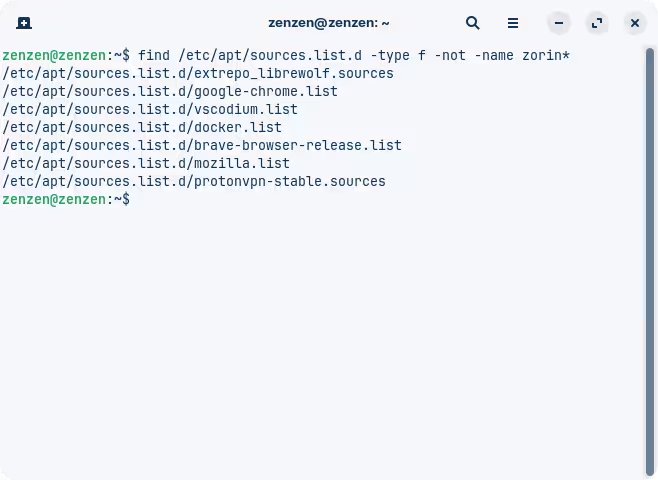
The most troublesome repositories are those that are hard coded to work for a particular version of Ubuntu. Since these are third party repositories it's not always possible to upgrade them automatically, which is why they are left untouched, eventually thus causing an error during the upgrade.
We can also check for that, extending the previous command a bit:
find /etc/apt/sources.list.d -type f -not -name zorin* -exec grep -li jammy {} +
If there's no output after running this command, you're all set. Otherwise, you'll have to remove or disable the repositories. In my case that would be the one from Docker:
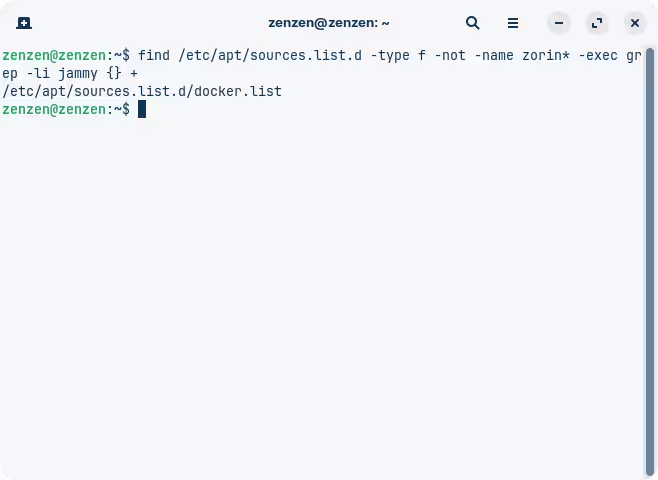
We'll run another command to do just that. I prefer renaming the files in case something goes wrong later on. Once the upgrade is successful, these repositories will need to be replaced with their updated versions.
find /etc/apt/sources.list.d -type f -not -name "zorin*" -exec grep -li jammy {} + | sudo xargs -I "{}" mv {} {}.bak
This one is a little longer but all it does is finds the potentially problematic repository files, as before, and renames them by appending a ".bak" extension to them. This is safer than deleting or modifying any files, and the system will ignore these files entirely during the upgrade (it should, anyway).
Running the previous command shows that the Docker repository has been renamed successfully:

9 Likes
It also means I am likely going to be busy on the next Unofficial Manual! 
2 Likes
zenzen...That was excellent info...Looks like I'm good. I do remember on the upgrade from 16 to 17 I had to do a bunch of tidying up especially for Pulse Audio in the menu. That was easily dealt with using Alacarte (Which I needed to reinstall) and then removed extraneous menu items (There were a bunch). Still the total upgrade took me like 1.5 hours including correcting things (Samba, menu, etc.). Compared to a reinstall which took me like more than 8 hours with all customizations, etc. in Zorin 16. I'll only do a reinstall if absolute necessary as some things like my Capture Card with OBS can be tricky to get working correct again.
1 Like
I've since switched to Fendora 42. Unfortunately, I can't use my new hardware under Zorin 17.3. It's running the old kernel 6.8. I also haven't had a chance to update it to 6.14, like with Linux Mint. I've waited a long time to buy new hardware. That seems to be it for the lovely Zorin. I've been using it since Zorin 15 Pro.
Linux Mint uses Ubuntu 24 as Base. And that got a new Kernel because of a new Point Release. But You can install on Zorin a newer Kernel, too:
2 Likes
True, but you should know by now, your manuals are quite useful, especially to newbies brand new to Linux, and or, Zorin OS.

1 Like
thank you, it's really clear 
1 Like
This topic was automatically closed 90 days after the last reply. New replies are no longer allowed.