Ibus is already integrated with Gnome you don't need any special commands. You can look at the table below:
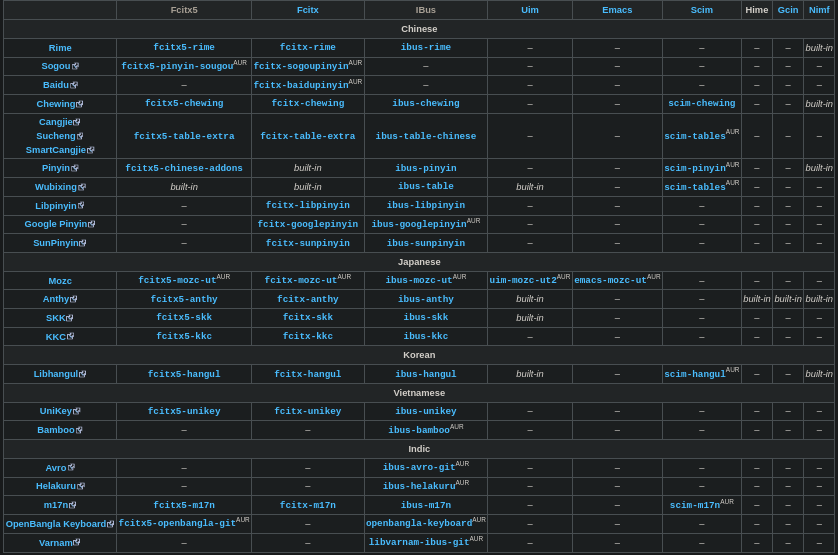
this will show you what you need. I use Fcitx5 on KDE and IBUS on Gnome(i use them to type Chinese), There is more info on Input method - ArchWiki and IBus - ArchWiki.
Steps to get it working:
-
We need Input method for this example I will go with
Ibus-mozc:
To installIbus-mozcwe need to entersudo apt install ibus-mozc. -
Now we don't need out terminal anymore.
-
Go to Settings
Region & Language->Manage Installed Languages->Install/Remove Languages->Japenese->Apply -
Reboot
-
Settings->Region & Language->+Japenese->Japenese (Mozc)->Add -
I never used Japanese and I also don't know how so if anything doesn't work I'm not gonna be helpful. You can ask me if you want to set up Chinese tho.
Tip: You can press Super + Spacebar to switch between languages.
Sorry but I don't even know Japenese at all so I don't know what is Japanese Kana Keyboard. I have poo poo brain. I hope this at least help 75% if not I failed my mission. 