My Zorin OS 18.1 has started with the home folder showing on the desktop each time. I can not think of anything that I did to set it up this way . And more importantly I can't find a way to stop it.
Any ideas would be appreciated.
My Zorin OS 18.1 has started with the home folder showing on the desktop each time. I can not think of anything that I did to set it up this way . And more importantly I can't find a way to stop it.
Any ideas would be appreciated.
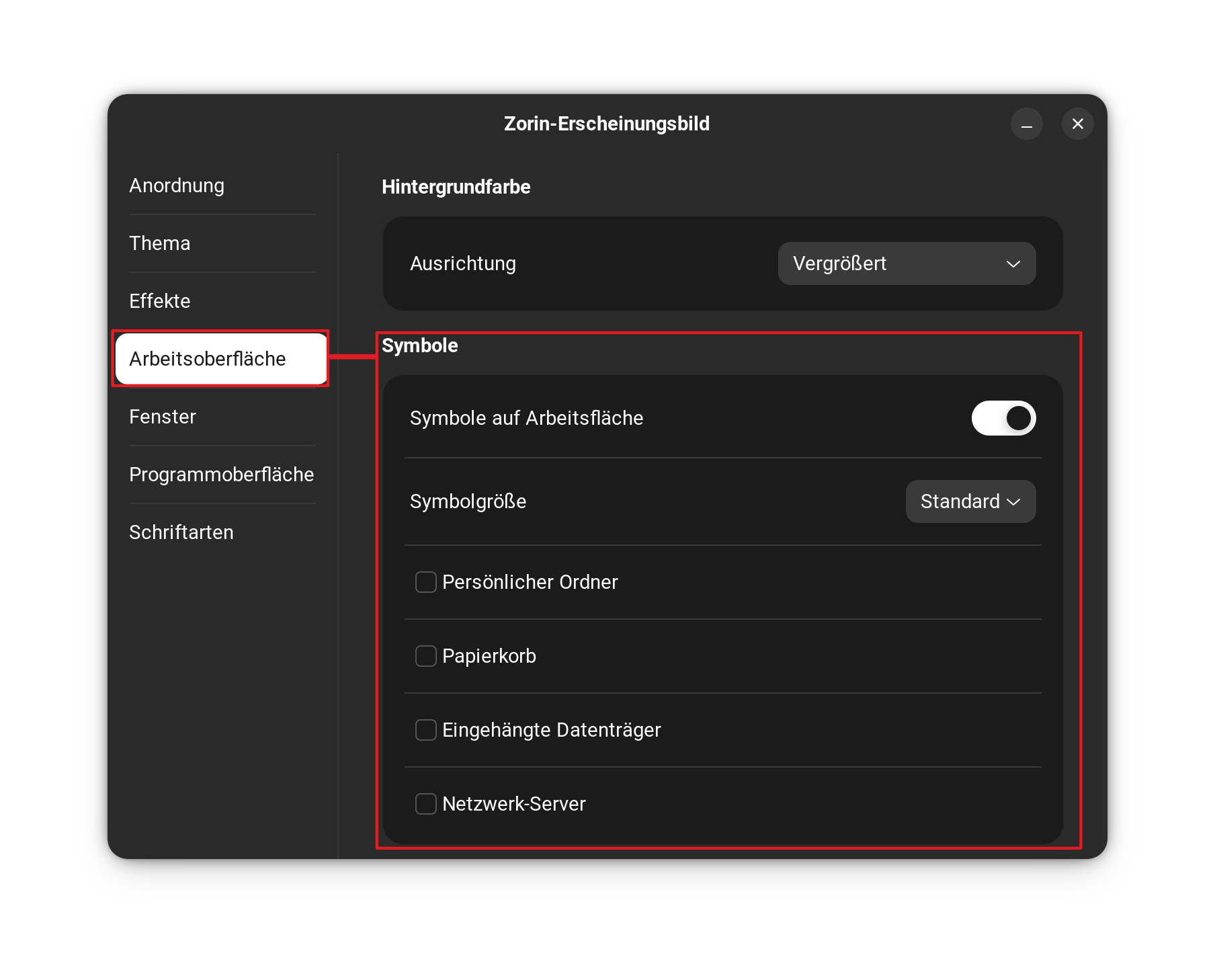
Go in Zorin appearance and disable it in desktop tab
Is in Zorin Appearance app at tab desktop your home folder enabled? Then disable it.
Okay... I'm too late... By the time I looked it up, wrote it down, and translated it, Nourpon had already beaten me to it.
That would do it but it would also close all icons on the desk top. And the File/home is opening not in an icon but in an a full window and that is what I would like to stop.
Give us a screenshot when it happen to understand
and go in terminal and give me the output of
ls -la /home/tof/.config/autostart
Don't disable show desktop icons, only uncheck the box for the home folder.
That sounds as if Nautilus (the file manager) is added to autostart as Nourpon wrote.
No, when You unmark it like You see on my Picture only the Folder disappears - not Desktop Icons in common.
So, it opens in the File Manager after Start Up?
Yes, Every time the computer starts in the morning the file/home is opening in a full windows not an icon. And going into Appearance and disable the tab causes the loss of the 3 program icons i want on the desktop.
Please make a screenshot of the content of ~/.config/autostart (press ctrl+h to show the hidden files in your filemanager; ~ is a shortcut for your home folder) or show the terminal output of
ls ~/.config/autostart
What do you mean with
When you disable "show desktop icons", then the window with your home folder doesn't appear?
Can you perhaps also take a screenshot of your desktop after login that shows the unwanted window?
That is a good Idea.
I don't know why I stopped here but I did. In any event, I went from a USB install to a duel boot and of course lost a lot of ground. But I also change from Nautilis file manager to Nemo. It is more like the Windows Explorer I'm Used to. When I had the program on the USB I could run a windows app called freecell HD while in Zorin. I have not been able to get back to it. I was thinking it was through windows some how. I do remember that I had to set up a program to get there and the only thing I can remember about it was the screen was a blue color and there were about 5 or 6 things it checked to be sure were installed before it could run. Darned if I know the name but would sure like it somebody could identify it.
If your question is about the Freecell issue, please start a new thread for it.
And it would be helpful if you could contribute by answering the questions that have been posted. It's not much fun when we try to help someone and spending time and then get no response at all.
So, is Your Issue here now fine/disappeared/solved/doesn't matter anymore or not?