Does anypony know how to change the Start Menu Icon like in Linux mint? Linux mint has it but not Zorin OS?!? I've tried doing that and found location inside of "zorin-menu@zorinos.com" but it seems like the "zorin-icon-symbolic.sv" .svg file is locked, so you can't remove nor change anything about it 
Unfortunately, I do not know the exact answer to your question. Much of the Zorin menu is locked and you can't configure it
If it is only due to the file permissions, you could try it with root permissions.
Enter
sudo -i
in the terminal, and then the name of your file manager. If you are using the default file manager, it is nautilus in Zorin core
nautilus
or thunar in Zorin lite.
Then the filemanager will open with root permissions and you will have access to all files.
Another possibility would be to install the Arc menu (it is a gnome extension) instead of the Zorin menu in Zorin core (or the xfce4-whiskermenu-plugin in Zorin lite). This will give you a much more flexible start menu where you can define the icon yourself.
Would you please add your Zorin version in your forum's profile?
Using ArcMenu like @Forpli already linked would be the easier Solution. There You can set up an Icon for the Startmenu Button.
But when You want keep the Zorin Startmenu, You can change it there, too. But You have to do it manually. Here:
You are already on the right Track. That is to change. But You need sudo Rights. Here a little Guide:
Open the Location /usr/share/gnome-shell/extensions/zorin-menu@zorinos.com in the File Manager. Then look in the Pathbar and click on the 3 Dots and choose the Option ''Open in Terminal'':
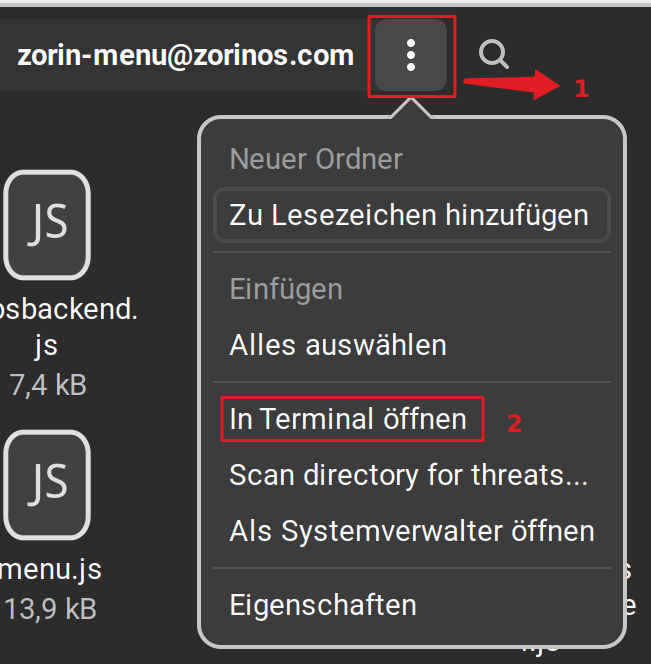
In the Terminal first type sudo cp zorin-icon-symbolic.svg zorin-icon-symbolic-svg.bak to make a BackUp of the File to safe it if You want it back. Then type sudo rm zorin-icon-symbolic.svg to delete the Icon. Then close the Terminal.
Then take the Icon/Picture that You want use as Startmenu Button and put it on the Desktop. Then rename it to zorin-icon-symbolic.svg and then copy it to the Directory. For this open the Terminal again and type first cd Desktop to be in the Desktop Directory. Then type sudo cp zorin-icon-symbolic.svg /usr/share/gnome-shell/extensions/zorin-menu@zorinos.com to copy it. Look in the Path if the File is really there and then reboot.
2 Likes
This topic was automatically closed 90 days after the last reply. New replies are no longer allowed.