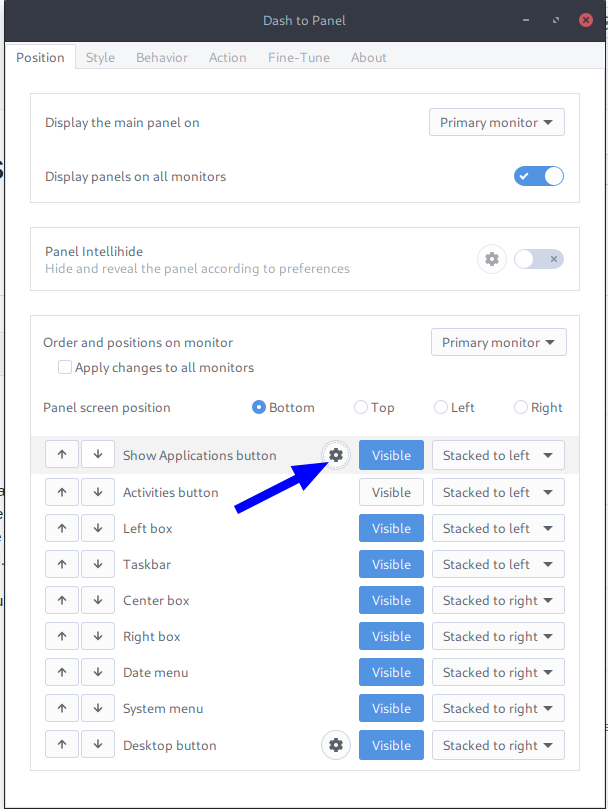
You can set it so that the taskbar is shown on all monitors (At taskbar settings set >display panels on all monitors).
When you use zorin-taskbar or the gnome extension dash to panel you set it so that the taskbar is shown on all monitors and then hide taskbar on the monitors you don't want (I hope this works, it is not a current version).
Celebrated a bit too soon. I think because my main display is an ultrawide, the move panel extension doesn't work - It resizes the bar to 2560 and then leaves it on the uw.
I hope the Zorin devs consider adding this functionality in future updates. Part of the reason i want it on another monitor is that my uw is an oled, so i dont want a permanent bar on there. However my main reason is for games: Those need to open on the primary monitor, but the taskbar needs to remain visible on a secondary monitor.
Right now i've set it to display on all monitors, then set panel opacity to 0%. It kinda works but is obviously not ideal. The left box is also not shown on secondary monitors despite being set to visible, making the start menu show up in the upper left corner for some reason.
Simply being able to drag the taskbar to the desired position would be a perfect update.
You could try it with "Dash to dock" or
Zorin dock extension and make the setting there that it is displayed on the second monitor (and then you could disable Zorin panel extension in the extension manager to show the panel not on your primary monitor). Unfortunately, I can't test it because I only have laptops and no monitors.