How do you find information in your files? Alternatives to fulltext search and plowing through archives

How do you find information in your files?

Use case:

  • finding commands in cheatsheets
  • finding URLs to handbooks / manuals
  • useful tutorial etc.

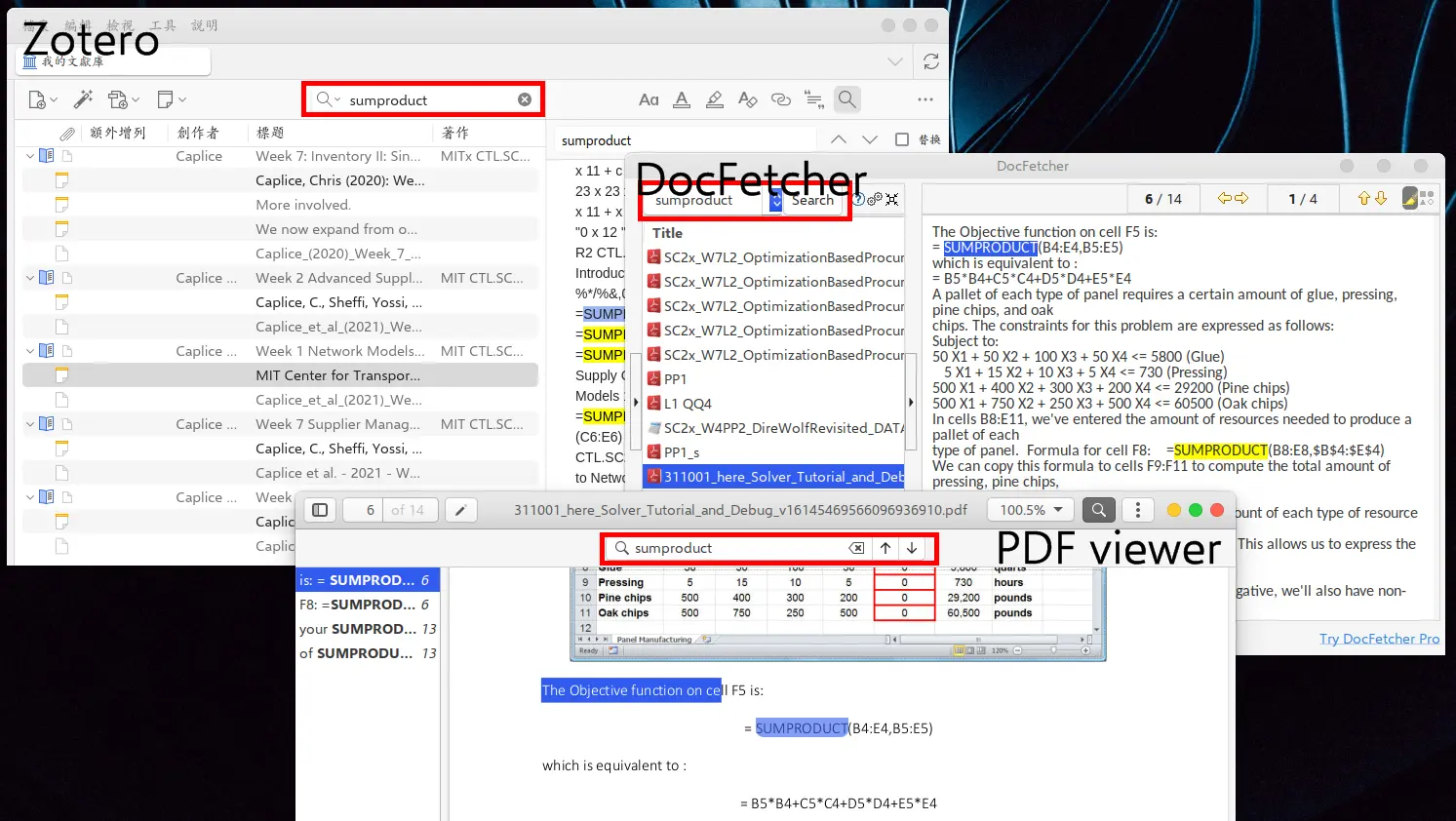
The example screenshot shows results for the Excel command =sumproduct() . It works, but it’s not pretty.

Any suggestion and idea would help.

I use Nemo File Manager, which includes catfish File Search for File name or for Content within a file.

2 Likes

You could also use mate-search-tool.

sudo apt update
sudo apt install mate-utils
mate-search-tool

To create an icon entry (because by default when I tried on my Zorin 18 install it didn't show up):

sed '/^OnlyShowIn/s/^/#/' /usr/share/applications/mate-search-tool.desktop \
> "$HOME"/.local/share/applications/mate-search-tool.desktop

You could also set up the tool to open up on a keyboard combo, so that you always have it available easily. Not the nicest solution, but I do find that in the past it has worked for me fairly well.

2 Likes

I've known about Zotero for a while now, but have never used it. I was under the impression that it was quite good, is it not? Have you tried Zim? That's another one that I'd like to look into at some point.

Apparently catfish can be installed as a standalone application. I should give that a try.

1 Like

Very good, if you're a habitual reader and Sherlock Holmes type of personality.

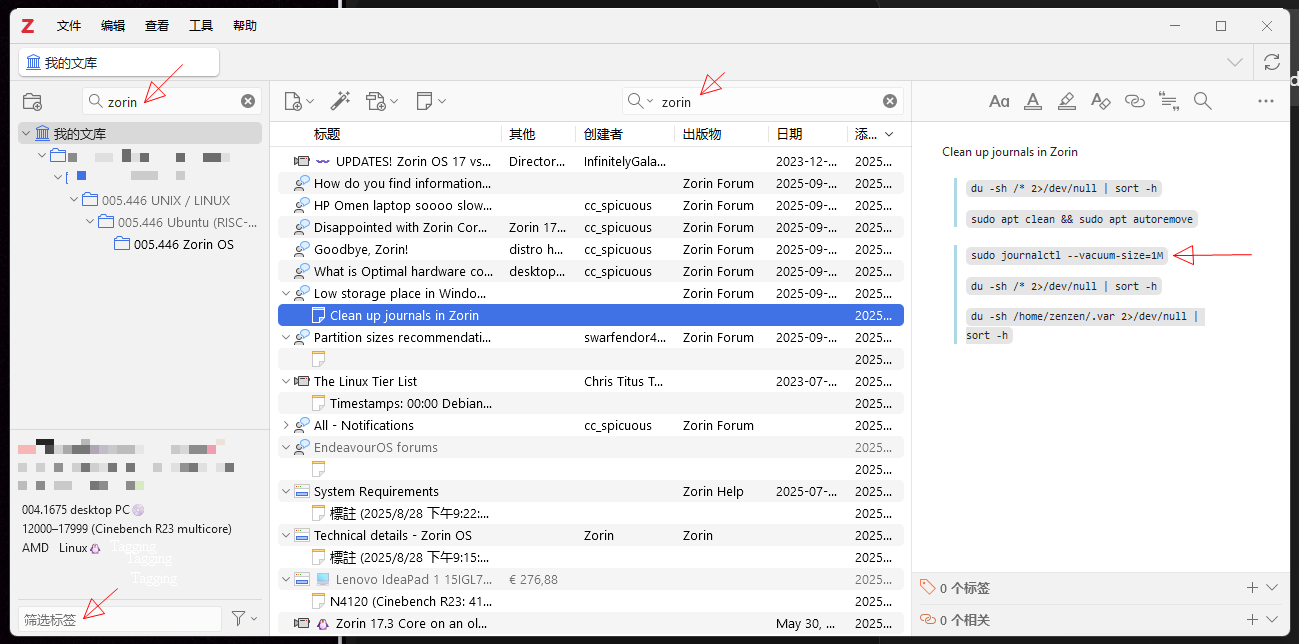
Above an example of finding the terminal command for keeping log file sizes in check, they can grow to some 5GB sometimes, I found that command on this Zorin forum, only kept the command rather than the whole thread.

I browse the web and then habitually keep a record or copy of what I read, it's just one click on the toolbar, for coming back or re-reading etc., what people do with smartphone photos for remembering stuff.

Here an example of searching for faster laptops and their prices, part of the record is when, where, by whom.

Drawbacks:

Doesn't do well XBOX/Nintendo/Steam/Netflix browsing for films or music, doesn't have a gallery for photos. You can do catalogues for the same, but you won't have much fun in browsing. It's not "in your face" type, more like Excel line by line. On the other, if doomscrolling is a problem for you, this solves the problem, there is no doom scrolling.

Fulltext search

Zotero can have an index of the PDF content and then you can search for exactly that, too. However, I found on older hardware, that index needs to be loaded into RAM and if you don't have too much, but a big library, it's quite slow. I've turned to keeping a copy of keywords and the table-of-content (TOC), rather than the fulltext in Zotero. For fulltext, I'm currently with DocFetcher, it can do complex searches, too, like "Paris London"~5 find the pair of Paris and London with maximum of five words between them.

Complex entries

For entries with complex project files, like a programming course with data files, slides, video/audio, quizzes, use the technique from file sharing by zipping/rar directories and folders, rather than keeping the files loose.

That, of course, prevents simple video browsing à la Netflix, again.
That is very good to know, thank you!

I should give it try anyway but over the years I've tried a number of programs to keep my files organized, and I always seem to come back to using nested folders arranged hierarchically.

Most of my files are plain text anyway, which work really well with standard utilities like grep. For PDF files, I run pdftotext first, which works pretty well. For binary files like word or images I just dive right in, the old fashion way.

For storing websites locally, I recommend a browser extension called SingleFile. It downloads the contents into a single HTML that you can read later at anytime. Since HTML is nothing but text, it's easy to search. This probably won't work as well for websites such as this forum, that show content interactively through JavaScript.


That name rings a bell :face_with_hand_over_mouth:

1 Like

Me, too, but inside.

Instead of bookmarks in browsers

In response to @Cars10 and @Forpli about bookmarks in Which browser do you use every day? - #100 by Forpli :

It's advisable, to "save to Zotero without a snapshot", because webpages nowadays come with a lot of bloat, gigantic 15MB images and 800KB javascript. To keep the snapshot momentarily, what I do, is to make a snapshot including all bloat, skim the text, copy and keep the relevant parts in a Zotero note, then delete the webpage snapshot (files), only retaining the entry and note. This saves quite a bit of megabytes. At other times, I apply 7z or rar to compress files, or convert media files to files with better compression rates. Many PDF files come with indeces (Stichwortverzeichnis) at the end, table of content (Inhaltsangaben) in the beginning, I copy that into a Zotero note, too. Both ways ensures that a Zotero search finds text that are otherwise contained within the source. (I don't use the Zotero fulltext index, because the database gets bloated very quickly and slows Zotero down.)

2 Likes