I've tried arch, fedora and the audio works well with the weirdtreething github support. But it seems that those instructions does not work on zorin. Now it kept showing dummy output and the system cannot detect the sound card.
It sounds as that doesn't work on distributions like Zorin that are based on LTS distributions.
1 Like
Welcome to the Forum!
Do You use built-in Speakers or external? If external: wired or wireless? Did You tried it with Pulse Audio Volume Control? It is a Tool for set up Audio Output and Input. You can install it with sudo apt install pavucontrol
When installed, take a Look at the Configuration and Output Tab for checking what Audio Options and Profiles are available and test them.
i use built-in speakers and the command "aplay -l" returns no soundcard detected
- Are Secure Boot and Fast Boot in BIOS disabled?
- If Windows is still installed: Is Fast Start-Up in Windows disabled?
- Could You connect an external Speaker to check if it runs (wired and wireless)
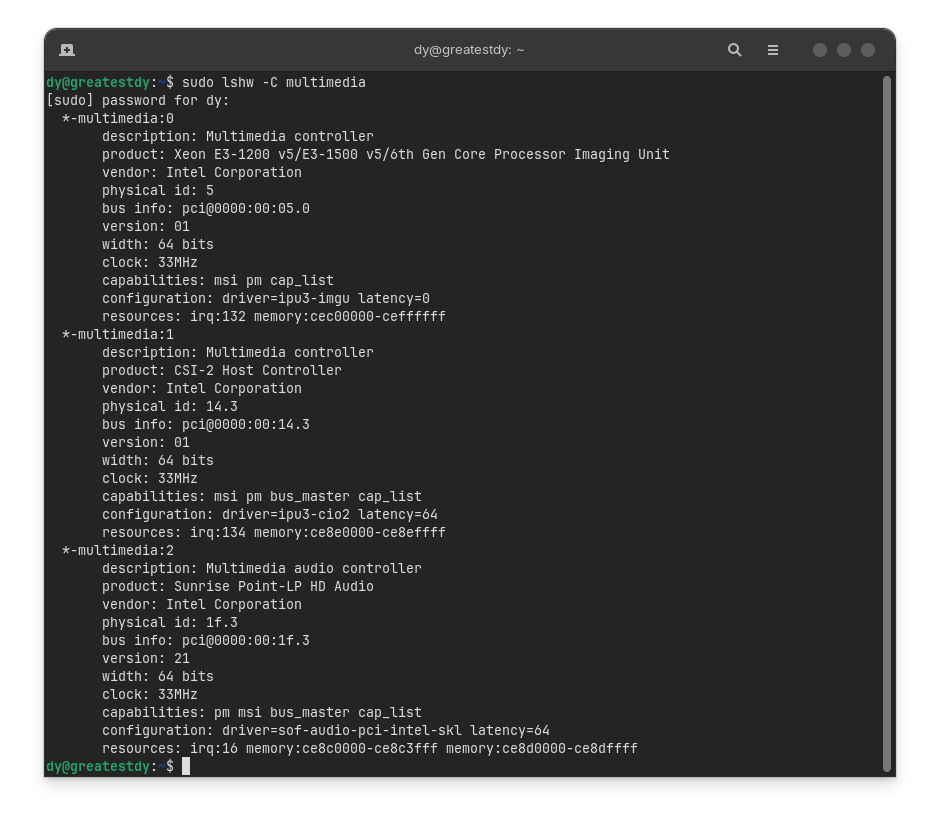
- Please post the Output or the Terminal Command
sudo lshw -C multimedia
- I haven't checked yet
- I did not install Windows on pixelbook
- External speakers are working, both wired and wireless, but the wireless sometimes broke (airpods pro)
This topic was automatically closed 90 days after the last reply. New replies are no longer allowed.