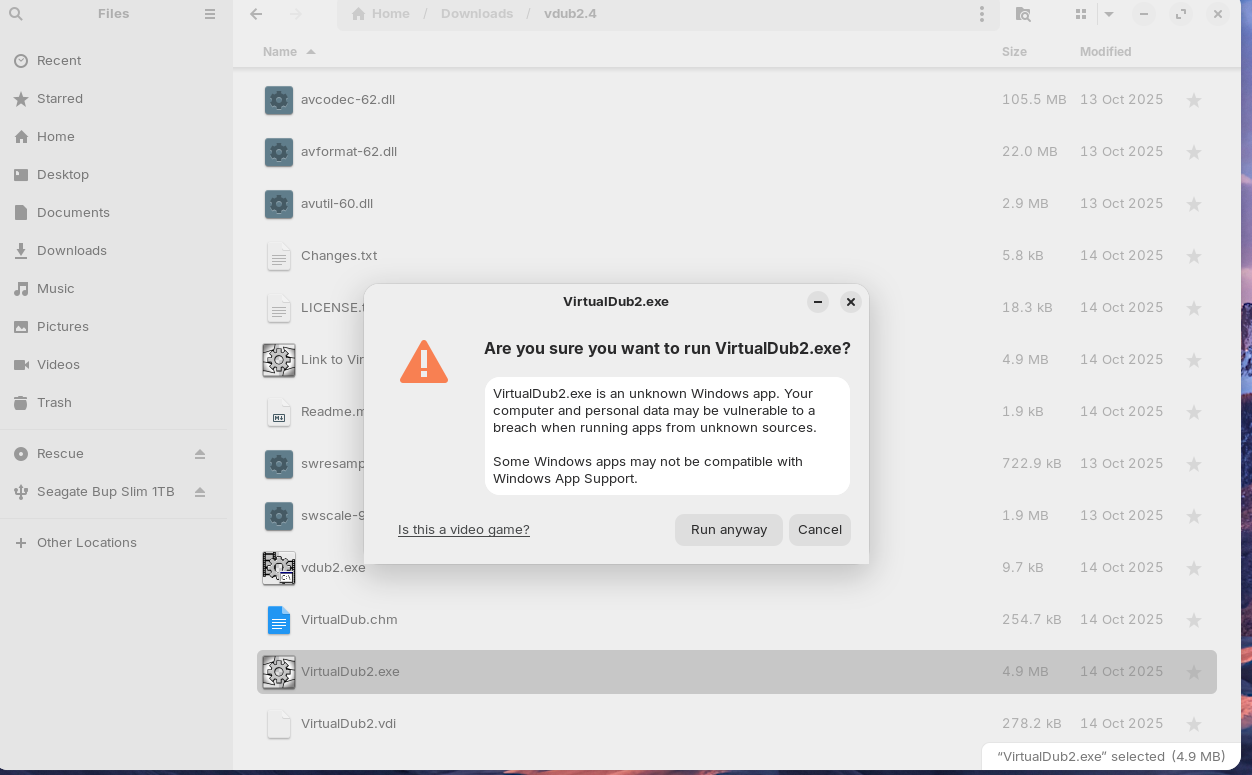
Hello - I'm trying to have it so that Windows .exe files are opened by default
(double click) and just start up.
Double clicking the files does nothing. If I right click and select "open with"
the only thing that looks remotely what I want
is "install windows application"
but even that's not correct because this Windows app runs right out of its
.exe file, no install necessary
Selecting that option gives me this warning, then after selecting "run anyway"
the program starts.
How can I set things so that these .exe files open with a double click and
banish that warning forever?
Thanks
That diolog warning is there to check you, incase you are about to make a mistake. Its common knowledge that virus's come from EXE files. Its just a slight annoyance to new users. If you trust the exe, you can run it anyways.
Thanks but these are trusted files/floders, the exact same locations I run in
Windows 10 (same PC, dual boot).
I just want a way so that Zorin no longer bothers me with that message
Open a EXE and it should say install Windows Application Support software or something like that then install that and it should install wine and bottles!
Even if the name says "install" it doesn't install anything it just runs the EXE, its just how Wine is named on the "Open with" menu.
Its called like that probably because a lot of people would run something like a Windows app installer with Wine to install an app instead of a portable EXE.
Unless I am missing something, I do not see in this post the answer to fix one of the issue described by the OP, which I am experiencing too and it is extremely frustrating.
On my laptop running latest Zorin OS, when I doubleclick on a exe, it launch it with Wine.
But on my desktop, running the same version, there's obviously something wrong as doubleclick does nothing, Right click - run, does nothing either.
To start the exe, I have to right click - select "open with" and then select the top one "install windows application".
And the "Always use for this file" option is activated.
So why on my laptop doubleclick an exe works, and on my desktop with exactly the same zorin os / wine version, it doesnt ?
Stil nothing and I am on this for uncountable hours....
On a side note :
Answers like this just adds to my actual frustration.
If your grandpa might come to download a virus, its ok for the sake of him to let that stupid warning.
But it is not OK to force people that know what they are doing to see that message constantly. I have a Linux computer and I want to customize it the way I like just like it has always been. You are adding obfuscation layers that prevent us to do so.
There should be a way to disable this.
There should be a way to trust specific exe. Add an option for trusting, compute their hash, store it, compare on doubleclick and execute it right away when user exec them if the hash is the same.
And if you dont want to do that, just let user disable this warning once for all and for all exe.
Because not everyone is an IT idiot like you seem to imply.
And I will add this :
Your CONSTANT prompt warning is in the actual state, the real idiocy. Because by prompting ALL THE TIME, on all KNOWN and user-trusted exe, you make the user to not even pay attention to that warning anymore. And the result is that even if an exe was never executed previously, and is a virus, the user will blindly click OK, because it has become a habit, because you force us to click OK on that warning 287 times per day.
And all this is complete NON-SENSE and a source of frustration, and finally turn it into the security issue that this warning was supposed to mitigate.
Im a mod, not the developer, and I did not code the software to annoy you. Kindly reflect your feedback to @AZorin who is one of the developers. Maybe he can better assist you with your specific issue.
PS: I dont assume everyone is in IT. Infact, I know most people are not in IT, and that most Windows users have never even installed and OS before. I, did not do this, I did not cause your frustration. I....Tried to help. My post, was 25 days ago. Linux can be frustrating at times, but I....Did not cause this!
This is a valid question that perhaps the ZorinGroup can address.
I do not know why you are experiencing this stark difference, either.
I speculated above about a possible mimetype query not completing properly.
Both of these are valid. Blindness by Boy Who cried Wolf is a real problem.
And configuration for user workflow is supposed to be the core of GnuLinux.
A core that is being phased out, in favor of Developer Control.
Features being quietly removed.
ZorinGroup are the Zorin OS developers, not the Gnome Developers. And their choices can reflect in user experiences, even if they are not in direct control over Gnome choices.
Now, we have covered the good and the bad, let's look at the ugly:
Age stereotype that does not match evidence. Let's just not act this way here.
The poster reminded you of a security feature.
This implication was not made, though claiming it was or was not becomes nebulous.
The wise move is to not assume the other persons intentions.
These are important because you have shifted from posting your frustration and needs for your workflow into abuses outside of the boundaries of the Forum Posting Guidelines.
Please remember we are not belittling your experience, nor your frustration. Do not belittle others based on age, experience or attempts at clarifying how the desktop works.