First off to do this correctly a few things need to be in place in case something goes way wrong
#1 goto software store and download an app called TimeShift this is important as it will help restore you back to where you were in the event something goes wrong
#2 you will need to be able to see the zorin boot menu if by chance a kernel panic happens.. to do this in the terminal type
sudo nano /etc/default/grub.....
you may to install nano with sudo apt install nano
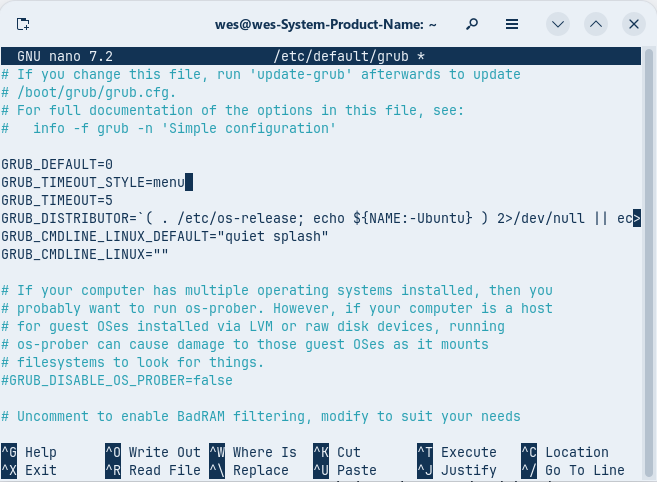
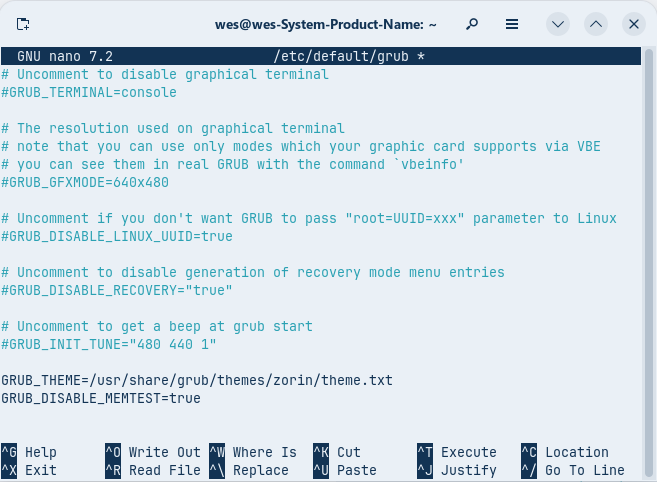
once in the grub area change it to look like this
use the arrow keys to get down to line you want to change move past the word then backspace it out when done i move all the way to bottom using the down arrow till it stops should look like this
then hit control+o then enter then control+ x
then in terminal sudo update-grub
make sure to do this or it will not change it in the grub
Now all this so far is how i did this on my system to get to this point without to many problems. now for the final step, first let make sure we are upto date with
sudo apt update && sudo apt upgrade
now we need to install another repo in order to get the Liquorix kernel in terminal type
sudo add-apt-repository ppa:damentz/liquorix ........then after
sudo apt install linux-image-liquorix-amd64
at this step it may take some time as it will need to download the headers and the image for the linus kernel...as with all the above steps make sure it has no errors when it finishes. this may be awhile as it installs alot of goodies for the Pcie 4.0 and Pcie 5.0 motherboards and the more modern hardware 2021 to 2025 once it finishes it should restart if it starts without a panic welcome to liquorix run the uname -r to make sure it installed the see if system is stable running serveral apps and maybe some games to see if all is working.. now open software updater let it finish and click settings then open the other software tab and remove the Cappelikan repo from there as it is no longer needed if you wish to stay at the current kernel lvl you are at in liquorix then also remove the damentz repo as well and it wont update any farther.. hopefully all went well and hope this was helpfull in geting the liquorix kernel installed....enjoy