I have been trying to locate how to install the YouTube TV app on my zorin . I couldn't find a good answer. I did install Microsoft Edge browser. From there I opened up YouTube TV and signed in and it asked me if I wanted to install the app. I did. it works fine. I was unable to do this through Chrome.
Is chrome installed as .deb package? If not you could try this package. First remove your installed chrome app if it was flatpak or snap.
Not sure how I installed Chrome but I am happy that I was able to get the YoutubeTV App on my desktop through Edge. Also, I have installed This Forum app through Edge and searched the Software and couldn't find it available. Yes, I am a newbie at this Linux stuff! Thanks for the help though!
Its ok, we all learn by doing, and there is no better teacher, then making ones own mistakes, and learning from them. We also learn from other's, so its good to ask questions. With that said......
FYI, you are asking for help with a YouTube TV app, not OS Customization, so I moved your post to the "General Help" category, so it will receive more help responses.

It should be offered automatically up at the address bar when you visit the website that you can to install:

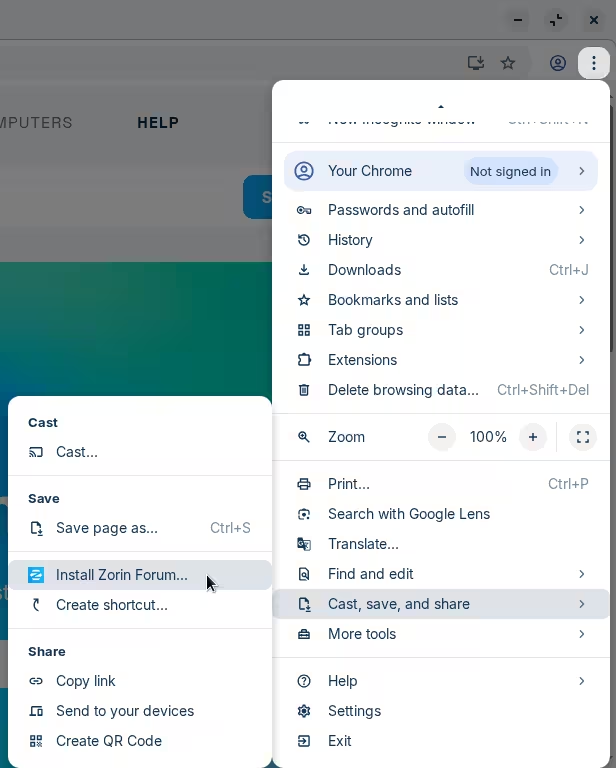
Or, alternatively, you can find that option under the options button → Cast, save and share → Install Zorin Forum
In GNOME Software there are VacuumTube and YouTube TV Client, aren't they what you'd like?
2 Likes
Based on how the question is phrased I would assume OP means "installing" in the context of a web application — also known as a Progressive Web Application, or PWA.
Standalone applications are different in that they are their own program which may behave differently, depending on how they're made. For example, FreeTube, which is a privacy-respecting frontend for YouTube.
1 Like
The YTTV "app" is just a web page without the normal controls at the top. It's dumb.
This topic was automatically closed 90 days after the last reply. New replies are no longer allowed.