In Windows or Ubuntu I have the option to use only the external monitor, very useful if the laptop is docked an the lid closed.
On my Windows laptop it's even automatic, i.e. when I close the lid, the internal display is automatically disabled.
There is no such option in Zorin 18 and I can't find anything on the web.
This question also comes up when people are using Ubuntu (base of ZorinOS) as a server.
If you have done websearches, you have probably found how to keep the laptop running (not suspend) when lid is closed, but laptop screen stays on.
I have done websearches using searchterm: "use external display only when lid closed Ubuntu 24.04"
(Note. You can always substitute Ubuntu 24.04 for ZorinOS 18 in searches, to increase the scope of your search.)
From what I have read so far is that there is no simple way to have external monitor only with laptop screen off with lid closed.
But have a look here, in case you missed this one: https://unix.stackexchange.com/questions/248033/configure-linux-laptop-to-switch-off-screen-but-otherwise-remain-running-when-li
I have already configured it to not sleep/hibernate/power off when I close the lid.
What I want is to have only the external monitor active when I work at home. Closing the lid won't turn the internal display off, but that's a minor inconvenience (mostly it reduces the lifetime of the display), it's more the fact that with the internal display active it often happens that I move the mouse accidentally to the internal display and then have to blindly guide it back.
And there is the danger of any windows opening on the internal display where I don't see them and then think something isn't working (I have the external display set as the main display),
Searching for a script solution to switch monitor configurations, I first found "gnome-monitor-config" but that is deprecated and replaced by "gdctl", but that isn't installed and I don't know how to get it.
"sudo apt install gdctl" doesn't find it.
Maybe this guide can help you:
Unfortunately not.
I now found out that I can actually de-activate the internal display, but not here (where I'd expect that setting)
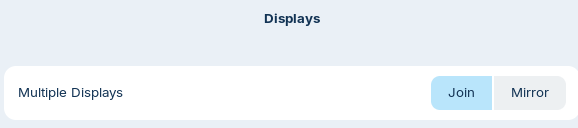
but in the settings of the internal display:
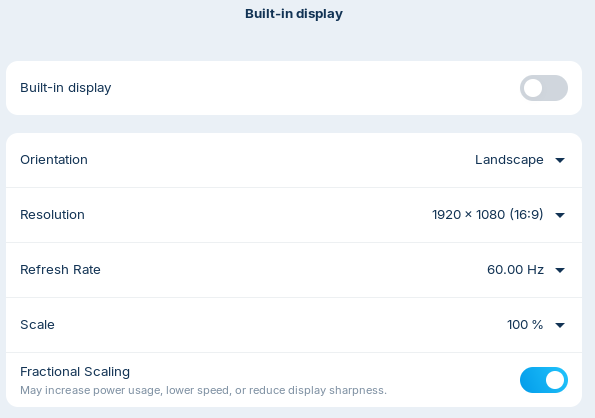
But it's still only respected when I'm logged in.
After a restart, I still have to open the lid to see the login prompt and only after logging in, it switches the internal display off again.
It does automatically switch to the internal display when I disconnect the external monitor, and back to the external one again when I plug it back, so that part works as expected.
So it does here, but did it de-activate the internal display?
That is only for Gnome 48 upwards.
I have no idea which GNOME version Zorin 18 uses 
And I shouldn't need to know that as a simple user, right?
So back to that "gnome-monitor-config" which I have to compile myself?
I'm not sure if that would work:
When you are on Xorg you could use this command to turn the internal display off and add it to startup applications.
xrandr --output eDP-1 --off
Create a launcher with this command, you can name it as you want
(check the name of the internal monitor first by entering xrandr in terminal and look if it is eDP-1)
Maybe you need to set it up before so that the login screen is displayed on the external monitor
no but the lid is closed so kind of
Well, I think it is never bad to know what Desktop Version You use. Zorin uses Gnome 46.
I don't know that. Do You can show a Link?
1 Like
8 posts were split to a new topic: Easy of use tangent debate
Thank you!
May I suggest Perplexity.ai?
Basiclally like Chat-GPT, but better because it has been designed around providing reference sources for every answer it provides. As a high contextual LLM, you can talk to it as if it was intelligent (though it is not, and if you have doubts about the answers, query it, even argue with it).
This is how I was able to gain answers to just about any and every question I asked in regards to the specifics of my successful changover from 40 years in Windows to Linux. II verified them of course...by asking more questions. This has become an EXTREMELY valuable tool (and I am not one in favor how AI is being rushed and forced on us in general).
My point: use this for your rough-cut work in information gathering and informing yourself on the nature of things. Then, when you've come to the end of some process via the AI, go to the boards for help. Doing your homework this way is so incredibly easy, and having done your homework will be valuable on this forum.
2 Likes
Good that it works for you. I'm still way too suspicious of anything AI. If studies reveal that >40% of all AI generated answers on the internet are either wrong or incomplete or biased and mostly unverifyable, that doesn't really make me trust them.
And if I have to check the sources it gives anyway, I can just as well find those sources directly through a normal web search.