Hello, New to Zorin 17.3. Just installed today in dual boot mode with Win 10. Wi-Fi works perfectly in Windows but cannot get it out of Airplane mode with Zorin. I've tried other fixes from the forum but nothing works. The connect mode is pressing F12 on my laptop. Pressing it doesn't change color from orange to blue. During install, it asked if I wanted to connect via Wi-Fi which it recognized and I selected this option but it didn't work. I've installed all available updates but again, no luck so far.
I would appreciate any help anyone can give. Thank you...
HP-ENVY-17-Notebook-PC:~$ rfkill list
0: phy0: Wireless LAN
Soft blocked: no
Hard blocked: yes
Some notebook computers have a physical button on the case of the computer or on the keyboard that toggles Airplane mode. Have you checked if you have one?
Can you tether your phone as HotSpot to your computer temporarily using a USB cable?
Once connected, open terminal and run
sudo apt update && sudo apt upgrade
sudo service fwupd start
sudo fwupdmgr refresh
sudo fwupdmgr update
If that does not work, we may need to install a driver manually.
Thanks for the reply Aravisian. I tried all and nothing worked. I did try plugging in a Tp-link wireless adapter into a USB port and it turned off Airplane mode as soon as I plugged it in but still no WI-Fi connection.
Can you tell me where to find and how to install a driver if needed?
Oh, the laptop is an HP Envy 17 circa 2015. It came with Win 8.1 but I upgraded to Win 10 when it became available. I upgraded to a SSD a few years ago.
Tried both and neither worked. If you need any data from the terminal or an image of what I'm seeing, please advise and I'll attach to my next response.
I installed Ventoy on a USB drive and used it to try various versions of Linux and had the same Wi-Fi experience with all versions. They were running from the flash drive except for the first version I tried which was Ubuntu. I downloaded it on the notebook and setup in dual boot mode as I've done with Zorin.
Aravisian, many thanks for your help. I haven't gone through the steps yet but have one question. In step 5 it mentions "Replace YOUR_WIFI_INTERFACE below with the name of your wifi interface (e.g. wlan0)." In my case is this "Wireless LAN" or logical name wlo1?
This is what happened after entering data in step 2.
aviator@aviator-HP-ENVY-17-Notebook-PC:~$ mv ./Mediatek-Ralink-RT3290-Updated-Driver /usr/src/rt3290sta-2.6.0.0
mv: cannot stat './Mediatek-Ralink-RT3290-Updated-Driver': No such file or directory
aviator@aviator-HP-ENVY-17-Notebook-PC:~$
How do I proceed now?
You need to extract the file if it is compressed - and move the terminal into that folder so it can see the file.
Moving the Terminal into the directory:
You can do this by the Change Directory command cd right there in the terminal. If you launch terminal, you are in your user Home directory by default.
From there, you can cd into the directory you just downloaded/extracted
cd ~/Mediatek-Ralink-RT3290-Updated-Driver
Then it should see the command.
Alternatively... if you have the addon for the Nautilus file manager to have Right click "Open in terminal" or Nemo File Manager for the same, you can just do that (I consider that right click menu option essential as I do not always want to enter a long path into the command line just to navigate).
@swarfendor437 's suggestion is also worth trying to see if the newest Zorin OS works with that card out of the box.
I installed version 17.3 the morning that version 18 changed from Beta to Release that afternoon. From what I've read, it is recommended to wait for 18 to show up as a software update if running 17.3 rather than doing a full install at this time. This is what I thought was the best thing to do.
I tried Zorin 18 Beta in trial mode and would not come out of Airplane mode, only ethernet.
I don't see where the driver downloaded. Here is the terminal display from steps 1 and 2.
aviator@aviator-HP-ENVY-17-Notebook-PC:~$ git clone GitHub - robertbindar/Mediatek-Ralink-RT3290-Updated-Driver
Command 'git' not found, but can be installed with:
sudo apt install git
aviator@aviator-HP-ENVY-17-Notebook-PC:~$ sudo apt install git
[sudo] password for aviator:
Reading package lists... Done
Building dependency tree... Done
Reading state information... Done
The following additional packages will be installed:
git-man liberror-perl
Suggested packages:
git-daemon-run | git-daemon-sysvinit git-doc git-email git-gui gitk gitweb
git-cvs git-mediawiki git-svn
The following NEW packages will be installed:
git git-man liberror-perl
0 upgraded, 3 newly installed, 0 to remove and 0 not upgraded.
Need to get 4,147 kB of archives.
After this operation, 21.0 MB of additional disk space will be used.
Do you want to continue? [Y/n] y
Get:1 Index of /ubuntu jammy/main amd64 liberror-perl all 0.17029-1 [26.5 kB]
Get:2 Index of /ubuntu jammy-updates/main amd64 git-man all 1:2.34.1-1ubuntu1.15 [955 kB]
Get:3 Index of /ubuntu jammy-updates/main amd64 git amd64 1:2.34.1-1ubuntu1.15 [3,166 kB]
Fetched 4,147 kB in 6s (705 kB/s)
Selecting previously unselected package liberror-perl.
(Reading database ... 265835 files and directories currently installed.)
Preparing to unpack .../liberror-perl_0.17029-1_all.deb ...
Unpacking liberror-perl (0.17029-1) ...
Selecting previously unselected package git-man.
Preparing to unpack .../git-man_1%3a2.34.1-1ubuntu1.15_all.deb ...
Unpacking git-man (1:2.34.1-1ubuntu1.15) ...
Selecting previously unselected package git.
Preparing to unpack .../git_1%3a2.34.1-1ubuntu1.15_amd64.deb ...
Unpacking git (1:2.34.1-1ubuntu1.15) ...
Setting up liberror-perl (0.17029-1) ...
Setting up git-man (1:2.34.1-1ubuntu1.15) ...
Setting up git (1:2.34.1-1ubuntu1.15) ...
Processing triggers for man-db (2.10.2-1) ...
aviator@aviator-HP-ENVY-17-Notebook-PC:~$ mv ./Mediatek-Ralink-RT3290-Updated-Driver /usr/src/rt3290sta-2.6.0.0
mv: cannot stat './Mediatek-Ralink-RT3290-Updated-Driver': No such file or directory
aviator@aviator-HP-ENVY-17-Notebook-PC:~$
aviator@aviator-HP-ENVY-17-Notebook-PC:~$ cd ~/Mediatek-Ralink-RT3290-Updated-Driver
bash: cd: /home/aviator/Mediatek-Ralink-RT3290-Updated-Driver: No such file or directory
aviator@aviator-HP-ENVY-17-Notebook-PC:~$
Looks like you needed to install git - which you did.
After that, you needed to repeat the previous command that failed due to git not being installed at that time: git clone https://github.com/robertbindar/Mediatek-Ralink-RT3290-Updated-Driver.git
Problem at step 2 again. I now see the Mediatek folder now in Home directory. Can I cut and paste it into the usr/src folder in the Computer directory? It doesn't appear to be zipped, or do I open the terminal and cd to Computer directory then usr/src and and try to run run step 2 again?
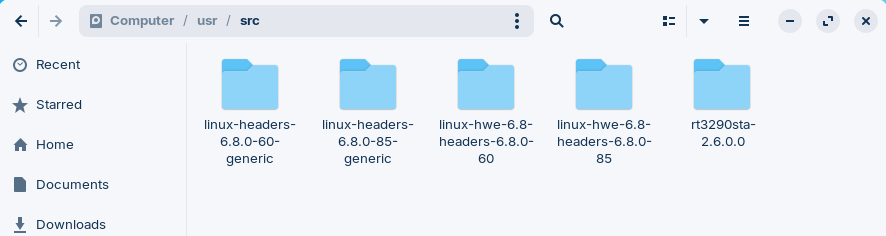
I see it in the Computer/usr/src folder. Do I have to change something to get this terminal command to see it?
aviator@aviator-HP-ENVY-17-Notebook-PC:~$ sudo mv ./Mediatek-Ralink-RT3290-Updated-Driver /usr/src/rt3290sta-2.6.0.0
[sudo] password for aviator:
aviator@aviator-HP-ENVY-17-Notebook-PC:~$ sudo mv ./Mediatek-Ralink-RT3290-Updated-Driver /usr/src/rt3290sta-2.6.0.0
mv: cannot stat './Mediatek-Ralink-RT3290-Updated-Driver': No such file or directory
Has it already been moved?
If you can provide screenshots, it would help.
Does /usr/src contain rt3290sta-2.6.0.0? If it does, the mv command moved it, so it is no longer at the original directory.
If it is not there...
That means the command is being run from the wrong directory.
This is where screenshots can help - we cannot see your computer - if you show your Home directory with that folder and file and we see it is present, or can see the contents of /usr/src...