Only way i can have sound is when i connect my monitor and sound comes from my monitor.
Up till yesterday i could swith to my laptop speakers.
Laptop speakers nolonger work , HP Elitebook 830 G7 Notebook PC

Which kernel are you currently using?
uname -r
Hearing sound through the monitor suggests that it is being piped through your GPU.
6.17.0-40-generic
Op boot i pressed esc key then selected to do a test and selected board test , received no errors on sound
The reason I asked was because of this statement:
To me, this suggests something caused a change like a system update. Had you run any updates?
When was the last time you Rebooted the machine?
it updates every day.
i only noticed it few hours after updates , didn't reboot after updates.
Only rebooted after i noticed sound was gone from the laptop speakers.
From terminal, what output do you get for:
lspci -nnk | grep -A3 -i audio
and
aplay -l
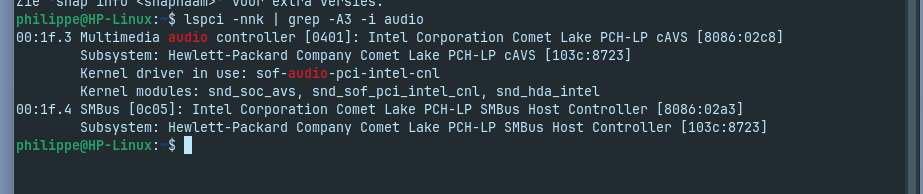
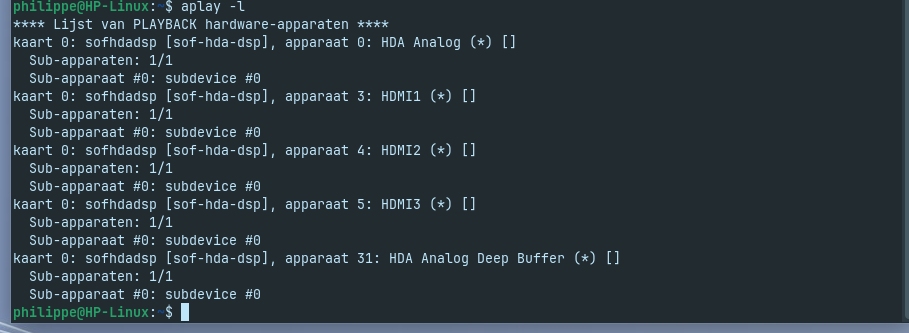
So, the kernel is detecting the hardware properly.
What about
systemctl --user status pipewire

journalctl -b | grep -Ei 'sof|snd|hda|audio'
Any logged errors? What we have so far is; the kernel can see it. And Pipewire is loaded.
You might also install pavucontrol if it is not already installed.
sudo apt install pavucontrol
Launch it
pavucontrol
On Output Tab, check if your speakers are listed.
Check Configuration Tab, see if the speakers have a profile.
Thank you
After installing and launch pavucontrol , i was able to set the output .
1 Like
It is a handy tool to have. 
So, it looks like something was not broken - probably just was reset to a safe default and needed to be set back to your speakers.
either way i'm happy i got my sound back on my laptop 
1 Like