I am still surprised at the amount of terminal input required

There is no TL;DR. I gots words.

I would like to focus on this. And as a statistic of one, I hope others will chime in.
If I google search a variety of Windows OS problems, I often reach an answer that requires opening a cmd prompt.
I experienced this as a lay user, early in my life.
I experienced it as an advanced user.
And as a professional.

I could, easily, demonstrate this now. However, I think it would be less biased and more informative if curious readers of this thread, try it out for themselves.
That can allows broad range of searches, (perhaps I was unaware early on I was delving into technicalities, though I doubt it.)

This is a Strong Point.
I often hear claims, that directly clash with over twenty years of observation.
Because in working with it, with people trying to solve it, they said the same.

Your assumption was likely on point, but errant only in that it also assumed that nano is required.
Filepaths are foundational to scripting, Powershell and your professional experience as stated.
Based on your experience, you can utilize that to rely on what you already know about Operating Systems.
In a hurry, I often give a CLI response, using Nano.
When I have time, I often give both options, the GUI method first for comfort, the CLI option for those open to learning power and efficiency.
I wish I had the kind of time to allow always giving such full replies. But I don't.
And after many years helping people on Zorin OS forum, The Vast Majority do not balk at the terminal.
Those that do are rare.
Of those who do, many roll up their sleeves, and are delighted when the succeed.
Some, are hesitant or resistant... But after experiencing a bit, they let go of fear and embrace what it offers.

So, I encourage people to not assume that people are inept, and terrified. Many are cautious but with a small amount of learning, and a bit of actually being allowed to believe in themselves in a way Microsoft frowns on - they are happy to enjoy that success, be a bit bold.
It is that same feeling video games capitalize on with achievements.
So we have established precedent that this is how people are.

I have been helping people transition for years and no - the vast majority do not fly at the first sign of trouble. Or the second.
Or even the third.
They are determined. They are ready and most importantly, eager, to believe in themselves and take back control.
Even if it takes some work.
Often, they are annoyed. Frustrated. Even, angry.
But ready to quit?
Not even.

And a few, do fly. That is why I say, they did not really want to.
Because they are the few, that were not really feeling it.

I know...
That GnuLinux has a reputation from days gone by of elitism.
And assuming new Linux users are brainless.

That is not how we do it, here.

A person may be unfamiliar. They may be so rattled and confused, they misspeak or call something the wrong thing. Or make a rather unfortunate guess.
And not often, but sometimes, someone joins that really can only be described as "clueless."
It can be frustrating.

But here is where things get interesting and defy our assumptions.

Being clueless does not mean incapable. In Our Society and especially with computers, we are inundated with the message that we are powerless and must give up control to others.
Tool sales, automotive or home repair, have been steadily declining for years. It's not just computers.

When you remind a person, that seems clueless at the outset, to believe in their own brain, they do.
They want to.
Deep down, they are tired of being told that they can't do it.

We tell them they can and - Next thing you know, they are doing it.
The bike is staying upright and they are pedaling, a grin splitting their face, wind in their hair.

The terminal Brings Joy.

Yeah, it might look scary. I do not know every command. Neither does Linus Torvalds. He carries a cheat sheet and so do I.
When the user, told for years they can't and have begun to believe it arrive here...
And we say "You can."
They do.
They start out, a bit hesitant. Maybe even stubborn... and then transition to, "I can." It takes years for oppressive elements to convince them they cannot.
And minutes to show them they can.

This is the moment that defines a new GnuLinux Users experience.
Not when they first had a problem.
But when they first overcame it - and are ready to tackle more.

2 Likes

Coming from the S.u.S.E. world, I was also surprised by the level of command line usage.
So, in my opinion, this must come from the Debian world’s customs and traditions.

Well said, Aravision. I like the analogy with the bike :grin: ... reminds me of myself a long time ago ...
But be aware that the people that come to these forums and get help and are happy after do not represent a statistically unbiased sample of users.

Many who run into problems (be it in Windows or Linux or MacOS) and don't quickly find a simple solution by searching the web will either just give up and live with it or go ask "someone who can help" (way too often I've been that guy who's being asked ...). Those seldom show up in forums to ask questions there and get the guidance they need.

1 Like

This is true. Statistically, we do not have solid numbers.

This is why I posted what I did above; we see consistent growth among no-tech people in GnuLinux.
From this, we can safely infer that many people are finding answers. Whether from joining a forum or from reading without joining.
If a person joins this forum, for example and we walk through some steps and reach a solution; a lot of people can quietly follow those steps and reach that same solution, without registering and commenting. There are many, as well as other resources like Reddit and StackExchange.

This, as much, shows the problems in GnuLinux as much as it does the successes.
Yet, the consistent and steady growth of GnuLinux adoption tells us that people are resilient and resourceful.

In my experiences (especially over the last decade or so), the requirement of the terminal have become less and less. I do believe, however, that long-term linux users (myself included) often get stuck with just providing a terminal command just because A) we know it but more importantly B) it's usually WAY faster and less frustrating.

Take something as simple as marking a file as executable. By default, probably most would say you could simply type in something like

chmod +x filename

and that would do it. This could lead someone to believe that the terminal is required for something like this... when it's not. It's also achievable by simply

Right click the file -> Properties -> Mark checkbox to make the file executable -> Apply

Is either approach wrong? No. Matter of fact, I alternate between the two. Just because sometimes one might be easier for me, or the other. But in this, doing something as simple as this, can also show people that the terminal is NOT scary. You just did something to the system, through the scary black box, and it's working just like you want it.

I like believing that possibly providing simple terminal prompts such as this, would allow people to become accustomed to using the terminal, and slowly over time think of other ways they could use it to make their life a little easier.

And yeah, that's going to lead to possibly a lot of users just straight up giving up. But we have to bear in mind, a LOT of users of computers nowadays don't even know where their downloads are, or what a file directory even is. Linux isn't the answer for everyone, but it's the answer for a lot more people each and every day. The line keeps going up on users, and will continue to most likely trend upward:
Linux Market Share Remains Above 3% for 3 Months in a Row [January 2026 Report]
It's not fast growth, but it's slow and steady.

And if I'm honest with you, even though computers are more prevalent than ever in our world, computer literacy seems to be going down. So trying to teach people how to do stuff on a computer is better than being told by some large corporation that their way is best. This is how we've gotten to this point (and why even normal people are starting to get ticked off at microsoft).

A bit of a rambly post, I'm sorry for that, but I do genuinely think if people can't handle having to type something into a box, then they need more help than we (or maybe anyone) can give.

3 Likes

Ok first I must thank @Raj20 for starting what turned into a very interesting topic. Everyone had great points and it was very enjoyable to read.

Also it was very nice to meet @CDR0224, and I understand completely where they are coming from when they say

because I know people like that in real life.

I think a lot of it has to do with how Windows the OS in general and the people who write instructions on how to do tasks in Windows- perhaps unwittingly, I make no assumptions - train the average user that they are stupid, but that's ok - because Windows makes it easy for stupid people to use computers too.

I never actually noticed this the whole decades of my life I used Windows (and Mac, I used both but primarily Windows). I always just believed: 'Well I'm pretty stupid with computers. It's a good thing these smart people write guides showing me what buttons to push to get the job done!'

It's only after noticing subtle differences when seeking help, as a user of GNU/Linux systems, that I realized that atmosphere of 'help' in Windows was actually grooming me to become a 'helpless' computer user that relied on a team of highly trained professionals to design and develop an app that would run simple terminal commands for me when I clicked the appropriate pictures. Because I am possibly too stupid to do something like CTRL ALT T texttopdf /path/old.pdf /path/new.txt , and instead must browse my machine for the application, click the application, wait for the application to load, click the button I want on the application, type the input the application requires, click the button to submit, etc etc. Like a caveman, grunting and pointing at the correct series of images to complete the task, instead of simply typing a one line command like a civilized being.

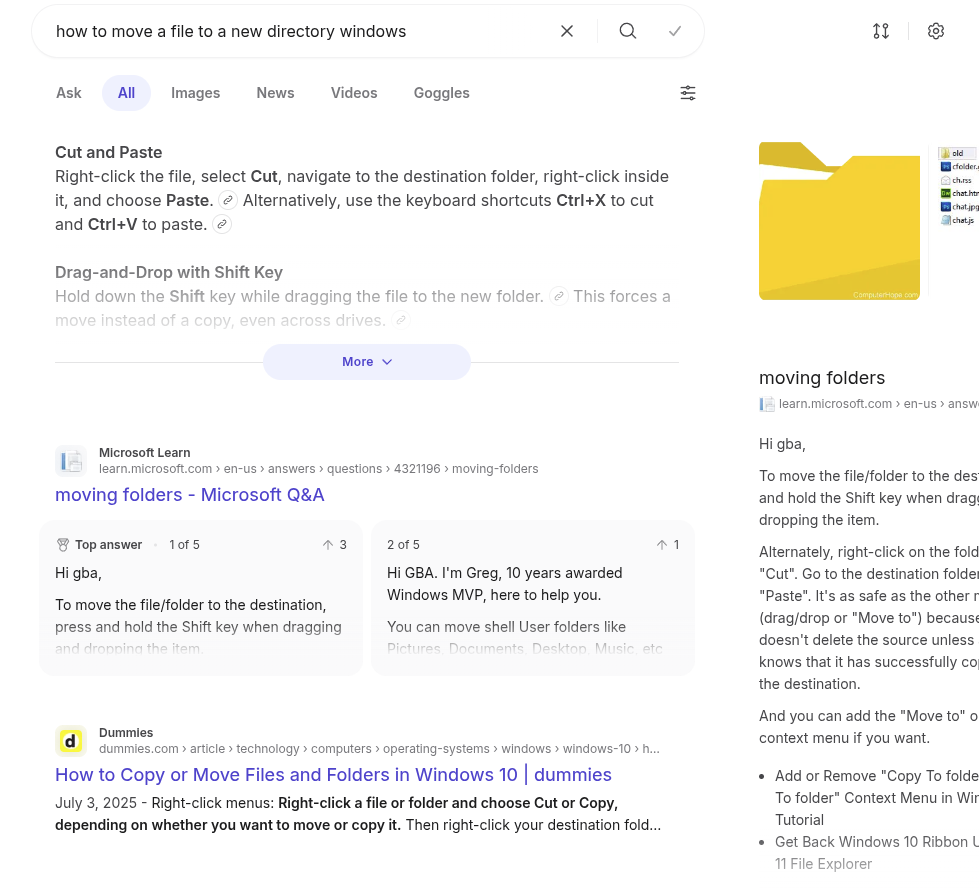
So typically when I needed to learn how to do something on Windows, I would search the internet. I would go to a link, follow the guide, full of pictures, on the various Icons to click and etc. Rarely, but sometimes, at the verrrry bottom of the guide, would be a way to complete this task via the Command Prompt. But, tucked away like that - if mentioned at all, it really seemed like that must be a Less Ideal way of doing things. Complicated. Hard. Suitable only for Exceptional Circumstances by people who Knew What They Were doing. Not something 'people like me' needed to know. Here is an example of this phenomenon that I simply searched right now:

Ok. Seemed perfectly normal to me a year and a half ago when I barely had even heard of Linux, let alone GNU/Linux, and certainly never thought I would one day be using it.

Let's compare the search results of the same question, different OS:

So I noticed a weird pattern after I started using Zorin. Searching the internet for help with computer things on a Linux system, you are most likely to find the complete opposite of the Windows results. The terminal commands are more likely to be shown first, and the GUI way of doing things, if mentioned at all, will be at the verrrry bottom.

Why am I using the example of 'how to move a file'? Because for years, file system tasks in Windows were something I hated (but wasn't really conscious of how annoying they were). I had to jump through so many hoops just to complete a simple task! I had to click the menu, click the file manager, click the destination file to Open in New Window so I didn't accidentally drop the files I was trying to move into another folder, select the source files, carefully lassoing them and attempt the initial drag over to the destination window and praying that they moved, not copy, and that I didn't let go and have them splatter all over the desktop or something.

I had no idea how cumbersome that all was.

I had not been using Zorin long at all before I discovered I HAD DONE IT ALL FOR NOTHING! Literally years of my computer use life flashed before my eyes. You mean I could just mv, cp, mkdir -p, and a myriad other previously long drawn out and annoying tasks, with a simple command? I mean, once they're how I want them, I can open the GUI and click on folder icons all day long if I want to, but for actually administering maintenance I will never again be like a dancing monkey trained to click click click drag little pictures around.

But of course you can do all that in Windows too. But you won't. You will do it the Windows way. Because that is the way that is endorsed and illustrated in documentation/guides and repeated from one user to the next. And sadly yes I agree, that is what Windows users come to expect.

But I kind of disagree that Zorin makes you need to use the terminal. I use Zorin and antiX pretty much interchangeably, and Q4OS now and again. Those are the only 3 Linux I've used so far, I like them all and I can't think any one of them makes you use the terminal.

But I do agree when you search for help, people that use Linux are most likely to give you the quickest and most efficient way of solving your problem and a lot of times that's going to involve opening the terminal. So that might turn Windows users off.

But I hope they don't stop giving those solutions. It has been very beneficial in my case.

6 Likes

Having moved to Linux Mint then Peppermint then Pop and now Zorin + Budgie.

I have only used the terminal for:

Neofetch (saw it online thought it was cool)

Editing a mount point because it was not automounting for my second drive. And the built in tools did not fix it.

Installing Budgie DE (pure wanted to do it)

I do believe installing programs, configuring appearance, power settings and core elements are done via GUI Tools now.

I think the Community should absolutely raise things like the mounting drives, docking settings etc.

If it has to go through terminal for a true or false, or drop down their should be a button.

Linux Mints System Information tool and System Administration tools are good examples of this working.

So is Zorins Software Updater and Additional driver function

I've stated elsewhere of my Windows 10 drive dying. What shocked me was the WD 1 Tb HDD was dated 2021. Not bad for HDD. The new one? Dated 2019 and bought from WD directly (none of the online computer hardware resellers seem to have them to hand, asking for you to 'pre-order').

So, getting to the interesting bit. To save faffing about as my external backup drives are pretty full I thought I would clone the old to the new using Rescuezilla (DVD of 2.51). I start the process and no matter what I do, I can't unmount /dev/sdb3 which holds C:\

Then I remembered about changing the hidden settings for the Power Button options in Windows. So I prevent the HDD going into sleep mode, and for good measure I open CMD as administrator and enter:

powercfg /h off

Boot up with Rescuezilla and still a no go.

I then look at creating an image on an external drive that has a bit of space on it. I can see reference to the Windows 7 image I created of the same drive, hoping to delete it, no joy.

Go back to the cloning option and from the instructions I had gleaned from perplexity A.I. search engine suggested creating a 'mkwin ...' on the tmp/dev/sdb3 partition.

To cut a long story short, I gave up on Rescuezilla, booted up my Ventoy stick with Hiren's Boot CD (which uses a PE of a cut-down Win 11) and from the HD Tools, choose the free cloning software from Lazesoft. Job done.

Returning to the command line. Historical experience.

  1. As a self-employed IT Contractor I had to copy directory structure on a client's NT4 desktop using only the DOS prompt to the new drive. However, they were getting so frustrated at the time it was taking they stopped me midway and decided on a fresh install request.

  2. An engineer who was employed by the company I was contracted to work for had visited a client's NT4 machine that needed 'rebuilding', the client being part of a purchasing section was reliant on a particular piece of software. When the engineer returned to base in the build area, he received a phone call from the user saying they could not find the icon on the desktop for rhe purchasing app. Whilst he had his 3310 Nokia wedged between his chin and shoulder he remotely restored the missing icon via command line and told the user to look to the bottom right of the screen. The user then apologised as they thought they had missed spotting it! :rofl:

  3. The same engineer challenged me to see if I could change my password before he could use my credentials. He was in a building bay 2 stations away from me and I could not defeat his DOS skills. :angry:

I remember him telling me that DOS had over 1,000 commands that are not widely known, more than ever was normally put out there in guides such as "DOS for Dummies!" (I think I've still got a copy somewhere).

I was annoyed at missing a Linux Magazine special with pull-out Linux commands ready reference.

Lastly we need to remember that in the days of the Terminal, green characters on a black screen, there were few if any viruses. They became prevalent with the introduction of the GUI (Graphical User Interface), or in Amiga speak, W.I.M.P. (Windows, Icon, Menu, Pointer).

Let's not forget even in Windows to find ip address would often require the use of ipconfig /all and other useful related commands such as ipconfig /release, ipconfig /renew, ipconfig /flushdns.

In the Terminal in Linux we have ifconfig -a, but this is no longer readily available, requiring the installation of 'net-tools'.

Hehe, that's a Windows command and only influences whether Windows will hibernate or not. Nothing to do with the disks themselves and completely irrelevant if you boot another system on that machine.

I don't know Rescuezilla, but I have used Clonezilla successfully a number of times on various computers from friends. A bit obscure and complicated, but once you know how to do it, it works fine, even imaging a disk to a file on a network share (and restoring it!).
For my own computers, I use Macrium Reflect, for system backups/restores. The bootable USB-Stick runs a small Linux, but with a GUI. Much easier to use. Downside for me is not that Macrium is an application that is closed and has to be paid, but the fact that now they also went to a subscription model, so I'll have to choose something else in the future (another opportunity to get away from anything US made, but that's another topic).

1 Like

Rescuezilla replaced redobackup which only worked for mbr based GNU/Linux and was abandoned by the developer after the final iteration of 1.4. Rescuezilla supports both mbr and EFI GNU/Linux installs. It also uses Clonezilla as part of it's core. The free Macrium Reflect that comes on Hiren's Boot CD only appears to be capable of backup and restore, not Clone. Lazesoft took care of the cloning without a hitch. Itcs nice now to barely hear the armatures moving on the new HDD.

Surprised you settle for armature equipment. :upside_down_face:

I did buy a Crucial M.2 SATA for a gifted Dell Latitude E5500. Zorin 17 Education kept crashing and freezing on it so it ended up with MX-Linux on it (this was after I upgraded it from 2 Gb RAM to a max of 8 Gb, replaced the CMOS battery and replaced the CD-RW for a DVD-RW and a correct power supply; the gifted notebook had come from work where previous users had got power packs mixed up who worked off site. Then eldest's drive was failing with Windows 11 on it so it got used for that.

I am happy to use HDD. I don't need instant access. Good things come to those that wait.