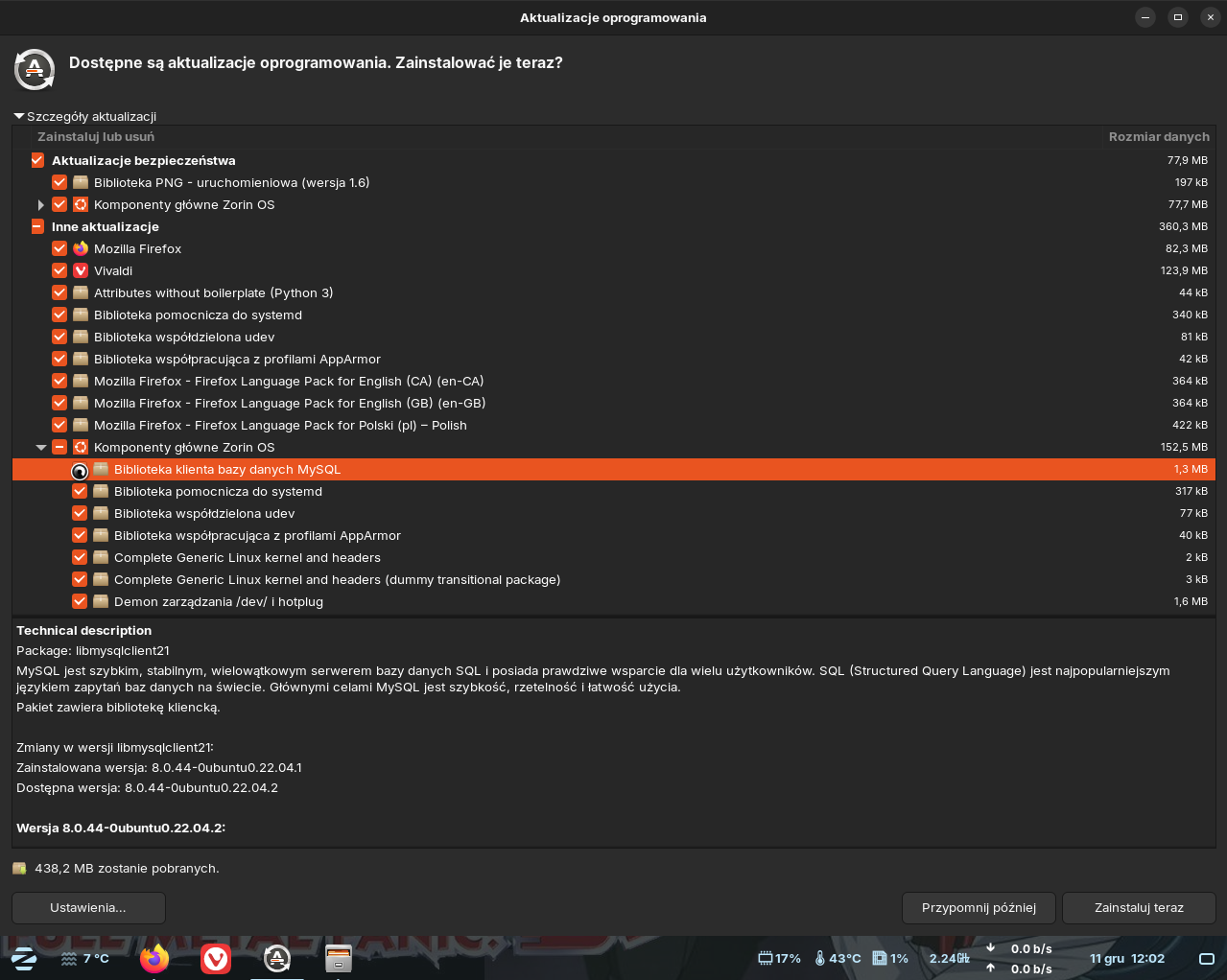
When Software Updater proposes me some updates,, I can not delete "thick" near any of them. For example I want to install updates excluding Firefox, and I can not exclude it. When I try, the program shows animation "waiting" (rotating animation near cursor) and nothing happens... I can only use option Exclude All or Include All...
My Zorin was upgraded from 16.3 to 17.3 (not fresh installation).
Very rare I can exclude some updates, but not all. Usually I can exclude nothing. Software Updater freezes or crashes? I have no idea. System seems to work OK in spite of it was upgraded, not fresh installed...
I can use option Exclude or Include All, but it is not a solution...
I think I know what you mean. I've seen this behavior a while ago, but it was with some other package. Unfortunately, I can't explain why this happens or how to even troubleshoot it... Maybe we should move this one up Feedback or you could write a report here:
As a workaround, you can run the update command manually in a terminal window, where you can specify which packages to update. How you would this this:
Run the update command to refresh the repository lists a.k.a: check for updates.
sudo apt update && apt list -u
The apt update command should report how many packages are available for upgrade. To see the list of which ones, you can then run the apt list -u.
Install the packages that you want to upgrade with:
sudo apt install --only-upgrade <package_name>
For example: sudo apt install --only-upgrade vivaldi-stable.
This approach is unfortunately inclusive, meaning that you have to specify the packages that you do want to upgrade, instead of excluding the ones that you don't want.
$ sudo apt update && sudo apt upgrade
[sudo] hasło użytkownika tytus:
Stary:1 http://archive.ubuntu.com/ubuntu jammy InRelease
Stary:2 http://archive.canonical.com/ubuntu jammy InRelease
Stary:3 https://dl.winehq.org/wine-builds/ubuntu noble InRelease
Stary:4 http://pl.archive.ubuntu.com/ubuntu jammy-updates InRelease
Stary:5 http://ppa.launchpad.net/zorinos/apps/ubuntu jammy InRelease
Stary:6 https://dl.google.com/linux/chrome/deb stable InRelease
Stary:7 http://ppa.launchpad.net/zorinos/drivers/ubuntu jammy InRelease
Stary:8 http://ppa.launchpad.net/zorinos/patches/ubuntu jammy InRelease
Stary:9 http://ppa.launchpad.net/zorinos/stable/ubuntu jammy InRelease
Stary:10 https://linux.teamviewer.com/deb stable InRelease
Stary:11 http://security.ubuntu.com/ubuntu jammy-security InRelease
Stary:12 https://packages.mozilla.org/apt mozilla InRelease
Pobieranie:13 https://zotero.retorque.re/file/apt-package-archive ./ InRelease [2 153 B]
Stary:14 https://packages.zorinos.com/stable jammy InRelease
Stary:15 https://packages.zorinos.com/patches jammy InRelease
Stary:16 https://packages.zorinos.com/apps jammy InRelease
Stary:17 https://packages.zorinos.com/drivers jammy InRelease
Zign:18 https://repo.vivaldi.com/stable/deb stable InRelease
Stary:19 https://repo.vivaldi.com/stable/deb stable Release
Pobrano 2 153 B w 6s (389 B/s)
Czytanie list pakietów... Gotowe
Budowanie drzewa zależności... Gotowe
Odczyt informacji o stanie... Gotowe
46 pakietów może być zaktualizowanych. Można je zobaczyć wykonując 'apt list --upgradable'.
Czytanie list pakietów... Gotowe
Budowanie drzewa zależności... Gotowe
Odczyt informacji o stanie... Gotowe
Obliczanie aktualizacji... Gotowe
Zostaną zainstalowane następujące NOWE pakiety:
  linux-headers-6.8.0-88-generic linux-hwe-6.8-headers-6.8.0-88
  linux-hwe-6.8-tools-6.8.0-88 linux-image-6.8.0-88-generic
  linux-modules-6.8.0-88-generic linux-modules-extra-6.8.0-88-generic
  linux-tools-6.8.0-88-generic
Następujące pakiety zostaną zaktualizowane:
  apparmor binutils binutils-common binutils-x86-64-linux-gnu firefox
  firefox-l10n-en-ca firefox-l10n-en-gb firefox-l10n-pl
  gir1.2-javascriptcoregtk-4.0 gir1.2-javascriptcoregtk-4.1 gir1.2-webkit2-4.0
  gir1.2-webkit2-4.1 libapparmor1 libapparmor1:i386 libbinutils libctf-nobfd0
  libctf0 libjavascriptcoregtk-4.0-18 libjavascriptcoregtk-4.1-0
  libmysqlclient21 libnss-systemd libpam-systemd libpng-dev libpng-tools
  libpng16-16 libpng16-16:i386 libsystemd0 libsystemd0:i386 libudev1
  libudev1:i386 libwebkit2gtk-4.0-37 libwebkit2gtk-4.1-0
  linux-generic-hwe-20.04 linux-generic-hwe-22.04
  linux-headers-generic-hwe-22.04 linux-image-generic-hwe-22.04 linux-libc-dev
  linux-tools-common python3-attr systemd systemd-oomd systemd-sysv
  systemd-timesyncd ubuntu-drivers-common udev vivaldi-stable
46 aktualizowanych, 7 nowo instalowanych, 0 usuwanych i 0 nieaktualizowanych.
Konieczne pobranie 438 MB archiwów.
Po tej operacji zostanie dodatkowo użyte 769 MB miejsca na dysku.
Kontynuować? [T/n] t
I launched upgrade using APT and I'll try to reinstall update-manager. I'm afraid the best solution will be fresh reinstall of Zorin, but I can not do this for few months yet. That's why I ask you for help.
Here is a little Mistake. This is the WINE Repo for Noble, not for Jammy. You use Zorin 17 which has Ubuntu 22 LTS (Jammy) as Base. Noble is Ubuntu 24 LTS and would be for Zorin 18.
I'm not sure if it does. But when the Reinstall command didn't work, it would for me a Point to check if it affects that.
Open Software & Updates and go there to the ''Other Software'' Tab and look if the WINE Repo is listed. If yes, unmark it and try it again. If it shouldn't be listed, You would have to go to /etc/apt/ and there You have to take a look in the sources.list File if the WINE Repo is there written and comment it out with a # at the Beginning of the Line.
If it shouldn't be in the sources. list File, go to /etc/apt/sources.list.d/ and look there for a WINE-related File, open it in Terminal and use sudo nano File-Name to work on the File and comment it out with a # and then press ctrl+o to save, Enter to confirm and ctrl+x to exit. Then make a sudo apt update to make it affect.
I have experienced the same issue as well. The updater doesn't respond when manually unchecking packages to exclude from upgrade. To narrow it down I think it has something to do with the specific package and it's related packages. Until you uncheck all the related packages along with the one you are trying to exclude, the updater doesn't respond properly and have to force quit.
In my case I was trying to exclude Libreoffice from the upgrade, after unchecking it, the updater became unresponsive and cursor kept spinning and I had to kill it from the task manager. On the next try I took a look on all the available packages that are to be upgrade and from their description I noticed how some other packages related to Libreoffice are also available for upgrade. So I tried to unselect those as well. At first I could not able to proceed because the updater kept getting unresponsive when I tried to uncheck the packages. But after a few tries, one time I finally managed to uncheck all the packages related to Libreoffice. And then the updater became responsive once again and the spinning cursor came back to normal and I could proceed with the upgrade afterwards. After that whenever I tried to do so the updater always went unresponsive.
As the workaround I used the following command to mark hold the Libreoffice and it's related packages so that I don't have to go through the same headache again and again:
There's no WINE Repo in "Other Software" and no in /etc/apt/sources.list
I found a file winehq-noble.source in /etc/apt/sources.list.d but I completely uninstalled WineHQ when my installation of MS Office failed (checked in Synaptic and I have no packets WineHQ for Ubuntu Noble installed) I'll try to disable this repo following your instructions and I will be watching if it will help.
I usually excluded some updates only temporarly, for example when I was affraid new version of CUPS or LibreOffice affect my printers or my documents I processed at that time (once, an upgrade of Firefox deleted all my opened bookmarks... It was a nightmare...). In ZORIN 16.3 I had no problems with manage updates. After upgrade to 17.3 problems occured...