My zorim finishes them normally the system installation, and it is apparently saved on the computer. But when he asks to restart the system and remove the flash drive, it doesn't boot at all even with the system there. What do I do? I'm going crazy
Are you dual booting with Windows OS?
Have you yet run Grub Repair?
Can you give your system specs, to see if there is some hardware incompatibility (For example, Nvidia Card)?
the computer no longer has windows, I'm not sure if I've used this command, but I've used so many. Do you think I should try this again or do something else?
In your BIOS Settings:
Is Secure Boot enabled? It should be disabled.
Is Fast boot enabled? Disable that.
Are you set to AHCI or RAID? It should be AHCI.
I do not know if again, since I do not know if you have attempted Grub Repair. But I recommend it as the first thing to try.
ok, I will try to use this command, if it doesn't work I will check the bios settings. About secure boot I know it is disabled, but I don't know about fast boot. by the way, after running the command, what should I do? restart the computer or something else?
The page I linked to has a series of commands, which prompt you along the way to let you know the next step.
It also logs all actions, so you can relay that log here if Boot Repair fails.
ok thanks. i will try to run the commands and come back with updates after doing so.
I went to the website and ran the commands shown there, but it showed me this that I will attach in my message. Is this normal or should I go to the computer bios?
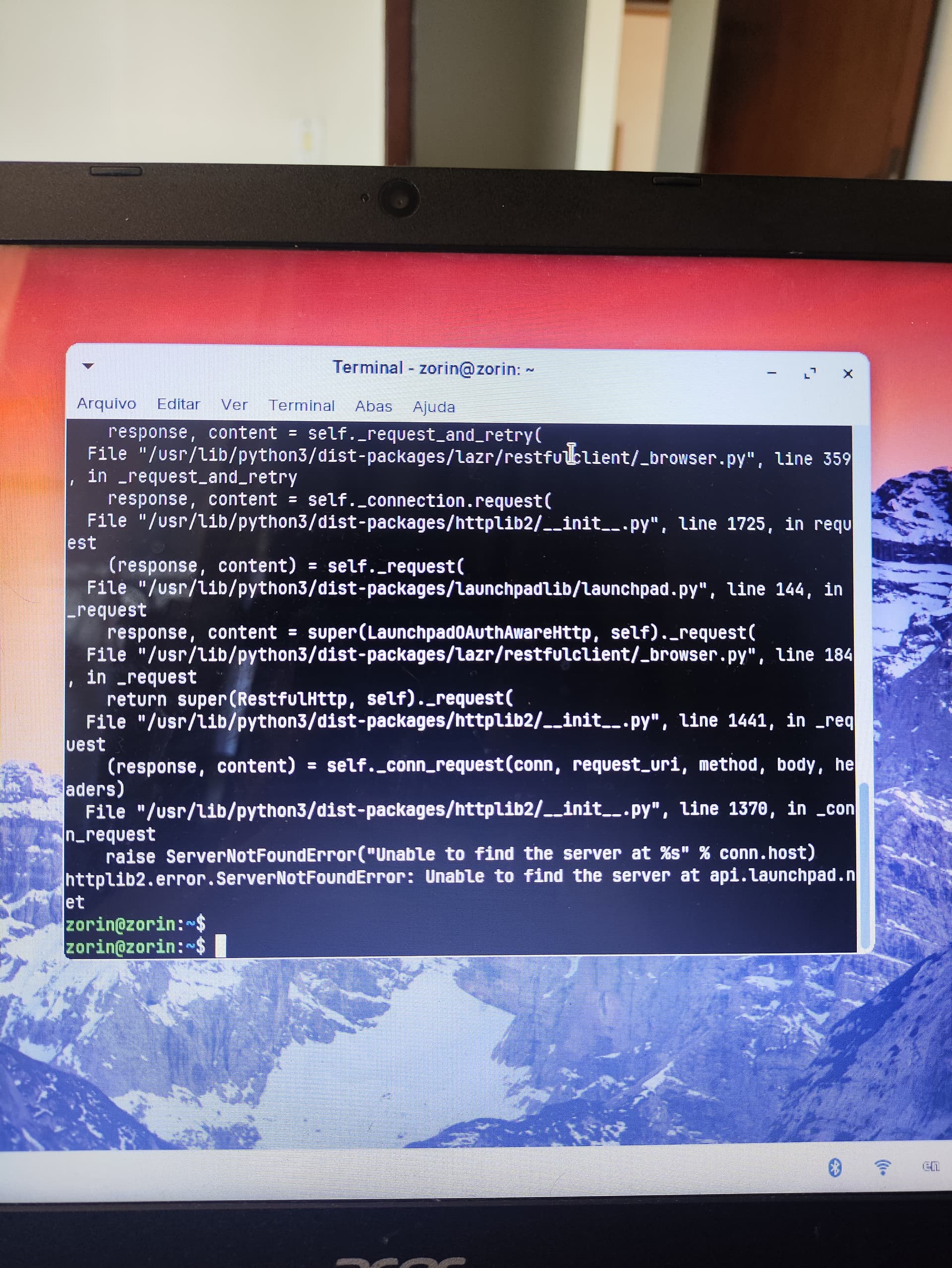
I uploaded the image but I don't know if it was sent, I hope so.
I went to the website and ran the commands shown there, but it showed me this that I will attach in my message. Is this normal or should I go to the computer bios?
Is networking enabled?
The terminal is relaying that it cannot contact the server to get boot repair.
was, but I'll try again
Boot Repair is already available in the Zorin Live Mode.
- Are Secure Boot and Fast Boot in BIOS disabled?
- Does Your BIOS run in UEFI Mode or Legacy?
- What Tool did You use to create the Bootstick?
- When You look in Your BIOS for something like Boot Order, do You see there an ''ubuntu'' Entry? If yes, set it to the first Position.
Yes, Secure Boot is turned off, but the Fast Boot option doesn't appear in my BIOS. My BIOS works in UEFI mode, I used the Rufos tool to create the USB stick. When I view the BIOS, I don't see an option like "Ubuntu", with the USB stick, Linux appears in the first option, but it still doesn't turn on.
In Rufus, You have the Option ''Partition Sheme'' where You can choose between GPT for UEFI BIOS and MBR for Legacy. Did You took GPT?