Nope it's still the same. I'll revert to 580.
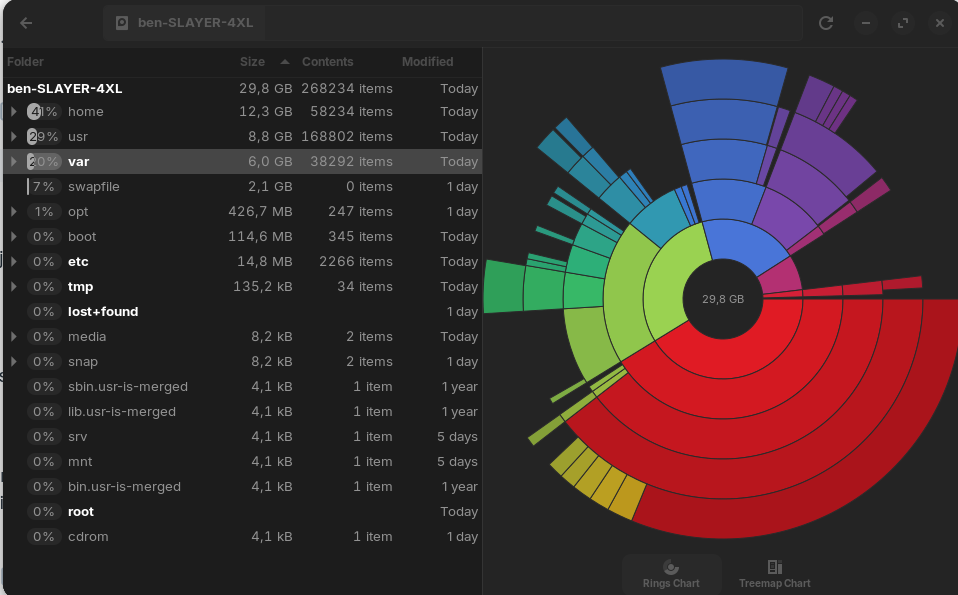
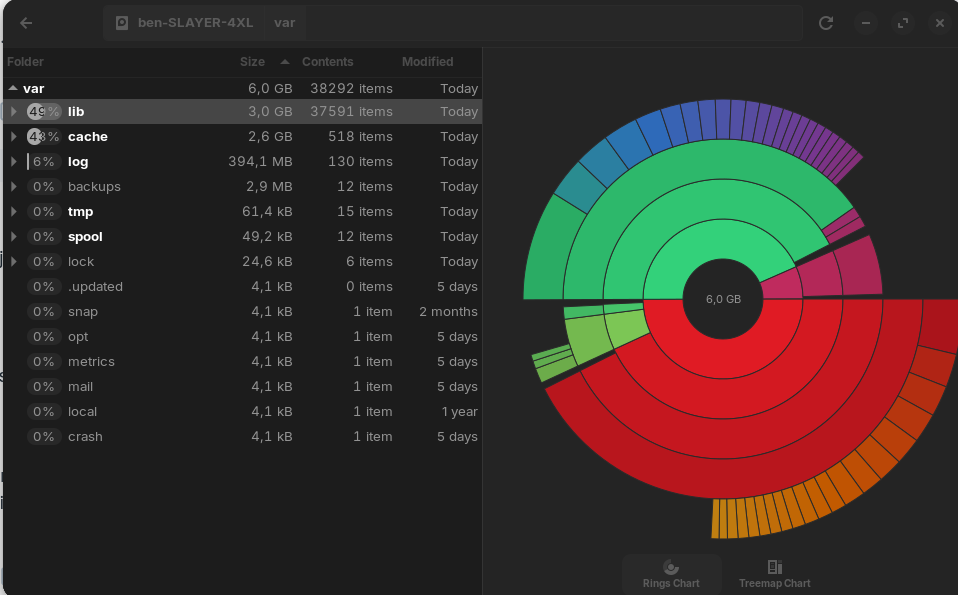
Can you open Disk Usage Analyzer and just take a peak at how full /var is getting?
The more this thread goes on:
- Any graphics driver - same result
- Multiple but specific applications showing delays, even if low level on the graphics stack
- Slow boot
tells me that there is some critical system issue, not the graphics.
The Nvidia drivers are working, and I think not the cause of the symptoms.
I originally attributed the issue to the nvidia drivers because it was working fine on xorg nouveau. And they went away when i changed the driver to xorg nouveau. The issue is again also even worse with 535. The freezes are permanent there, needing a restart.
I wouldn't say specific. Since i installed Zorin only about 2 days ago there aren't many apps installed. I think it's safe to say that the problems are systemwide. On pretty much any app etc.
As far as apps go there are currently only Librewolf, Steam and GPU screen recorder other than the stock apps.
If slow boot means apps opening up slowly then yes. I assume that is not about the pc booting up.
I did mean PC Booting up. If you disagree - I am misremembering what was said in this thread.
I go through many threads on the forum and can mix things up sometimes.
Your /var folder looks great. It's tiny. That is not the problem.
I have used a 4070 without any troubles - though currently am on a 3070 with no troubles. I have used all the Nvidia drivers over time and only a couple gave me issues.
You will hate me but... How do you feel about a fresh install of Zorin OS?
Something... is clearly wrong.
PC bootup is clean no problem on that.
You will hate me but...
Not at all, the install is fresh as it can get already. I'll reinstall it and report back tomorrow.
1 Like
Alright after reinstalling Zorin twice apparently steam was causing all the freezing.
I noticed it before the first reinstall. The os worked perfectly fine before i opened steam. Which i generally do first so i hadn't noticed that.
I used the ZorinOS install of steam (Apparently i had done the same with the .deb package without noticing.) again and the problem is definitely steam. Or at least NVIDIA drivers and steam, that combination seems to be the culprit. Whenever i open it, random freezes start. I kill all steam related processes from the system monitor. The issue goes away.
Should i try using the flatpak version? I read that flatpak steam might cause some problems.
If it helps to resolve your issue; yes. I have no idea why the .deb package would cause grief but...
You may need to install Flatseal in order to manage flatpak permissions and file/storage access.
Well that fixed it. Weird but yeah apparently Zorin OS steam packages create some kind of conflict with NVIDIA drivers. At least on my hardware.
Thanks for helping. I am finally free.
Instead of the APT Package from Zorin, You could try the Package from Steam directly:
In my first reinstall i tried that. I used the .deb package. But you get a popup when you double click the .deb and apparently i had clicked the button that downloads it through Zorin's packages first time installing steam. This time i just went with the .deb's own installation but that was somehow even more borked. Steam wouldn't open up in a single click i would have to click like 10 times. At it also took a weirdly long time for the login screen to pop up. So i did another clean Zorin install because i didn't know how to remove the installed .deb package.
I don't really know what the underlying problem with both the .deb installation and the packages in Zorin's repo are, maybe i just installed them wrong, but for now flatpak seems to be working.
I did some more testing.
- Flatpak steam install shows the game in the same window as itself (Not a huge problem)
- When running a game the same freezing bug happens when opening the files app etc. There are also some in-game freezes.
- Whenever i alt-tab the game stops responding. Whenever i click wait i get a black screen than get the same prompt.
Considering that it was working just fine with apt installation i don't really know what the real problem is at this point. I think i should just stick to the windows dualboot for gaming.
I'll try the installing the .deb again. How do i uninstall the steam's .deb after i installed it? I don't want to do another entire reinstall.
Also i'm just now trying to install the apt again and steam prompted me with this:

How do i install the nvidia-driver-libs:i386?
I recommend using gdebi to manage your .deb packages.
The default in Zorin OS is to install .debs using the Software Store. But this can create confusion, as you encountered.
Gedbi's dependency list is long. But it is actually quite small.
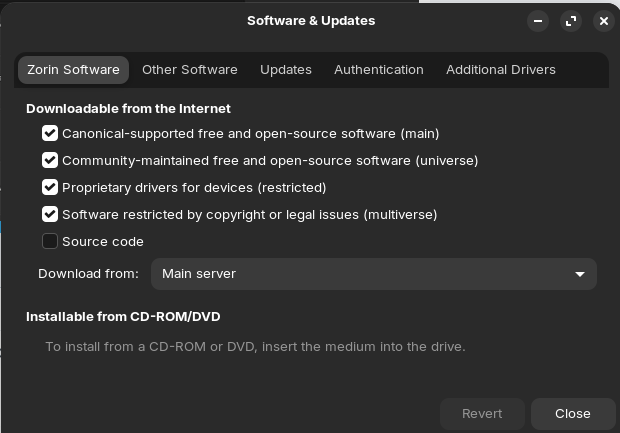
Can you launch Software & Updates and ensure you are set in Download from to "Main Server"?
This happens to me on 580 too, not the prompt, just a black screen.
I need to stay on the 550 drivers because of that issue, but the Ubuntu Nvidia repo is transitioning away from 550 and redirecting to 580 when you try to apt install version 550.
You could try the older version of the 550 drivers, which are still available through apt, and see how they work for you.
Summary
$ sudo dpkg --add-architecture i386
$ sudo apt update
$ sudo apt install steam-installer (from default repo - not sure in your case !)
https://linuxconfig.org/fix-steam-unsatisfied-dependencies-error-missing-i386-architecture
That might be a bit confusing, I understand. When You download a .deb File and You Double-Click it, gnome Software open's because this is the Interface to install the .deb Package - that doesn't mean that You install the Package from the Zorin Repo.
Like @Aravisian already wrote, You could avid this Irritation by using a tool called Gdebi. It is a little graphical Tool to install .deb Files. And it shows You what Dependencies might be needed, which is really practical.
You can use the Command sudo apt purge steam or You use the downloaded .deb File and Gdebi to uninstall it.
So i right clicked steam.deb and selected "Software Install" to open with. It installed the gnome software app came up and after opening steam on the software app everything seemed to work fine. But steam does not show up in the Zorin menu, does not show up in the settings>apps, and does not show up in the software store. The only steam that shows up is not installed. The app is installed but i have no way of reaching it. How can i remove it or start it up?
These are such odd experiences.
If needed, you can tap ctl+h to show the hidden system files in home directory.
These are the folders and files with a (.) in front of the name. The Tilde represents the Home directory path.
Open ~/.local/share/applications
Create with right click a new Document.
Name it steam.desktop
Paste into it:
#!/usr/bin/env xdg-open
[Desktop Entry]
Name=Steam
Comment=Application for managing and playing games on Steam
Comment[pt_BR]=Aplicativo para jogar e gerenciar jogos no Steam
Comment[bg]=Приложение за ръководене и пускане на игри в Steam
Comment[cs]=Aplikace pro spravování a hraní her ve službě Steam
Comment[da]=Applikation til at håndtere og spille spil på Steam
Comment[nl]=Applicatie voor het beheer en het spelen van games op Steam
Comment[fi]=Steamin pelien hallintaan ja pelaamiseen tarkoitettu sovellus
Comment[fr]=Application de gestion et d'utilisation des jeux sur Steam
Comment[de]=Anwendung zum Verwalten und Spielen von Spielen auf Steam
Comment[el]=Εφαρμογή διαχείρισης παιχνιδιών στο Steam
Comment[hu]=Alkalmazás a Steames játékok futtatásához és kezeléséhez
Comment[it]=Applicazione per la gestione e l'esecuzione di giochi su Steam
Comment[ja]=Steam 上でゲームを管理&プレイするためのアプリケーション
Comment[ko]=Steam에 있는 게임을 관리하고 플레이할 수 있는 응용 프로그램
Comment[no]=Program for å administrere og spille spill på Steam
Comment[pt_PT]=Aplicação para organizar e executar jogos no Steam
Comment[pl]=Aplikacja do zarządzania i uruchamiania gier na platformie Steam
Comment[ro]=Aplicație pentru administrarea și jucatul jocurilor pe Steam
Comment[ru]=Приложение для игр и управления играми в Steam
Comment[es]=Aplicación para administrar y ejecutar juegos en Steam
Comment[sv]=Ett program för att hantera samt spela spel på Steam
Comment[zh_CN]=管理和进行 Steam 游戏的应用程序
Comment[zh_TW]=管理並執行 Steam 遊戲的應用程式
Comment[th]=โปรแกรมสำหรับจัดการและเล่นเกมบน Steam
Comment[tr]=Steam üzerinden oyun oynama ve düzenleme uygulaması
Comment[uk]=Програма для керування іграми та запуску ігор у Steam
Comment[vi]=Ứng dụng để quản lý và chơi trò chơi trên Steam
Exec=/usr/games/steam %U
Icon=steam
Terminal=false
Type=Application
Categories=Network;FileTransfer;Game;
MimeType=x-scheme-handler/steam;x-scheme-handler/steamlink;
Actions=Store;Community;Library;Servers;Screenshots;News;Settings;BigPicture;Friends;
Keywords=Games
PrefersNonDefaultGPU=true
X-KDE-RunOnDiscreteGpu=true

[Desktop Action Store]
Name=Store
Name[pt_BR]=Loja
Name[bg]=Магазин
Name[cs]=Obchod
Name[da]=Butik
Name[nl]=Winkel
Name[fi]=Kauppa
Name[fr]=Magasin
Name[de]=Shop
Name[el]=ΚΑΤΑΣΤΗΜΑ
Name[hu]=Áruház
Name[it]=Negozio
Name[ja]=ストア
Name[ko]=상점
Name[no]=Butikk
Name[pt_PT]=Loja
Name[pl]=Sklep
Name[ro]=Magazin
Name[ru]=Магазин
Name[es]=Tienda
Name[sv]=Butik
Name[zh_CN]=商店
Name[zh_TW]=商店
Name[th]=ร้านค้า
Name[tr]=Mağaza
Name[uk]=Крамниця
Name[vi]=Cửa hàng
Exec=/usr/games/steam steam://store

[Desktop Action Community]
Name=Community
Name[pt_BR]=Comunidade
Name[bg]=Общност
Name[cs]=Komunita
Name[da]=Fællesskab
Name[nl]=Community
Name[fi]=Yhteisö
Name[fr]=Communauté
Name[de]=Community
Name[el]=Κοινότητα
Name[hu]=Közösség
Name[it]=Comunità
Name[ja]=コミュニティ
Name[ko]=커뮤니티
Name[no]=Samfunn
Name[pt_PT]=Comunidade
Name[pl]=Społeczność
Name[ro]=Comunitate
Name[ru]=Сообщество
Name[es]=Comunidad
Name[sv]=Gemenskap
Name[zh_CN]=社区
Name[zh_TW]=社群
Name[th]=ชุมชน
Name[tr]=Topluluk
Name[uk]=Спільнота
Name[vi]=Cộng đồng
Exec=/usr/games/steam steam://url/SteamIDControlPage

[Desktop Action Library]
Name=Library
Name[pt_BR]=Biblioteca
Name[bg]=Библиотека
Name[cs]=Knihovna
Name[da]=Bibliotek
Name[nl]=Bibliotheek
Name[fi]=Kokoelma
Name[fr]=Bibliothèque
Name[de]=Bibliothek
Name[el]=Συλλογή
Name[hu]=Könyvtár
Name[it]=Libreria
Name[ja]=ライブラリ
Name[ko]=라이브러리
Name[no]=Bibliotek
Name[pt_PT]=Biblioteca
Name[pl]=Biblioteka
Name[ro]=Colecţie
Name[ru]=Библиотека
Name[es]=Biblioteca
Name[sv]=Bibliotek
Name[zh_CN]=库
Name[zh_TW]=收藏庫
Name[th]=คลัง
Name[tr]=Kütüphane
Name[uk]=Бібліотека
Name[vi]=Thư viện
Exec=/usr/games/steam steam://open/games

[Desktop Action Servers]
Name=Servers
Name[pt_BR]=Servidores
Name[bg]=Сървъри
Name[cs]=Servery
Name[da]=Servere
Name[nl]=Servers
Name[fi]=Palvelimet
Name[fr]=Serveurs
Name[de]=Server
Name[el]=Διακομιστές
Name[hu]=Szerverek
Name[it]=Server
Name[ja]=サーバー
Name[ko]=서버
Name[no]=Tjenere
Name[pt_PT]=Servidores
Name[pl]=Serwery
Name[ro]=Servere
Name[ru]=Серверы
Name[es]=Servidores
Name[sv]=Servrar
Name[zh_CN]=服务器
Name[zh_TW]=伺服器
Name[th]=เซิร์ฟเวอร์
Name[tr]=Sunucular
Name[uk]=Сервери
Name[vi]=Máy chủ
Exec=/usr/games/steam steam://open/servers

[Desktop Action Screenshots]
Name=Screenshots
Name[pt_BR]=Capturas de tela
Name[bg]=Снимки
Name[cs]=Snímky obrazovky
Name[da]=Skærmbilleder
Name[nl]=Screenshots
Name[fi]=Kuvankaappaukset
Name[fr]=Captures d'écran
Name[de]=Screenshots
Name[el]=Φωτογραφίες
Name[hu]=Képernyőmentések
Name[it]=Screenshot
Name[ja]=スクリーンショット
Name[ko]=스크린샷
Name[no]=Skjermbilder
Name[pt_PT]=Capturas de ecrã
Name[pl]=Zrzuty ekranu
Name[ro]=Capturi de ecran
Name[ru]=Скриншоты
Name[es]=Capturas
Name[sv]=Skärmdumpar
Name[zh_CN]=截图
Name[zh_TW]=螢幕擷圖
Name[th]=ภาพหน้าจอ
Name[tr]=Ekran Görüntüleri
Name[uk]=Скріншоти
Name[vi]=Ảnh chụp
Exec=/usr/games/steam steam://open/screenshots

[Desktop Action News]
Name=News
Name[pt_BR]=Notícias
Name[bg]=Новини
Name[cs]=Zprávy
Name[da]=Nyheder
Name[nl]=Nieuws
Name[fi]=Uutiset
Name[fr]=Actualités
Name[de]=Neuigkeiten
Name[el]=Νέα
Name[hu]=Hírek
Name[it]=Notizie
Name[ja]=ニュース
Name[ko]=뉴스
Name[no]=Nyheter
Name[pt_PT]=Novidades
Name[pl]=Aktualności
Name[ro]=Știri
Name[ru]=Новости
Name[es]=Noticias
Name[sv]=Nyheter
Name[zh_CN]=新闻
Name[zh_TW]=新聞
Name[th]=ข่าวสาร
Name[tr]=Haberler
Name[uk]=Новини
Name[vi]=Tin tức
Exec=/usr/games/steam steam://open/news

[Desktop Action Settings]
Name=Settings
Name[pt_BR]=Configurações
Name[bg]=Настройки
Name[cs]=Nastavení
Name[da]=Indstillinger
Name[nl]=Instellingen
Name[fi]=Asetukset
Name[fr]=Paramètres
Name[de]=Einstellungen
Name[el]=Ρυθμίσεις
Name[hu]=Beállítások
Name[it]=Impostazioni
Name[ja]=設定
Name[ko]=설정
Name[no]=Innstillinger
Name[pt_PT]=Definições
Name[pl]=Ustawienia
Name[ro]=Setări
Name[ru]=Настройки
Name[es]=Parámetros
Name[sv]=Inställningar
Name[zh_CN]=设置
Name[zh_TW]=設定
Name[th]=การตั้งค่า
Name[tr]=Ayarlar
Name[uk]=Налаштування
Name[vi]=Thiết lập
Exec=/usr/games/steam steam://open/settings

[Desktop Action BigPicture]
Name=Big Picture
Exec=/usr/games/steam steam://open/bigpicture

[Desktop Action Friends]
Name=Friends
Name[pt_BR]=Amigos
Name[bg]=Приятели
Name[cs]=Přátelé
Name[da]=Venner
Name[nl]=Vrienden
Name[fi]=Kaverit
Name[fr]=Amis
Name[de]=Freunde
Name[el]=Φίλοι
Name[hu]=Barátok
Name[it]=Amici
Name[ja]=フレンド
Name[ko]=친구
Name[no]=Venner
Name[pt_PT]=Amigos
Name[pl]=Znajomi
Name[ro]=Prieteni
Name[ru]=Друзья
Name[es]=Amigos
Name[sv]=Vänner
Name[zh_CN]=好友
Name[zh_TW]=好友
Name[th]=เพื่อน
Name[tr]=Arkadaşlar
Name[uk]=Друзі
Name[vi]=Bạn bè
Exec=/usr/games/steam steam://open/friends
This file will add Steam to your application menu. It is supposed to be automatically created when you install Steam and I have never heard of it not being created, so this not a minor mystery...

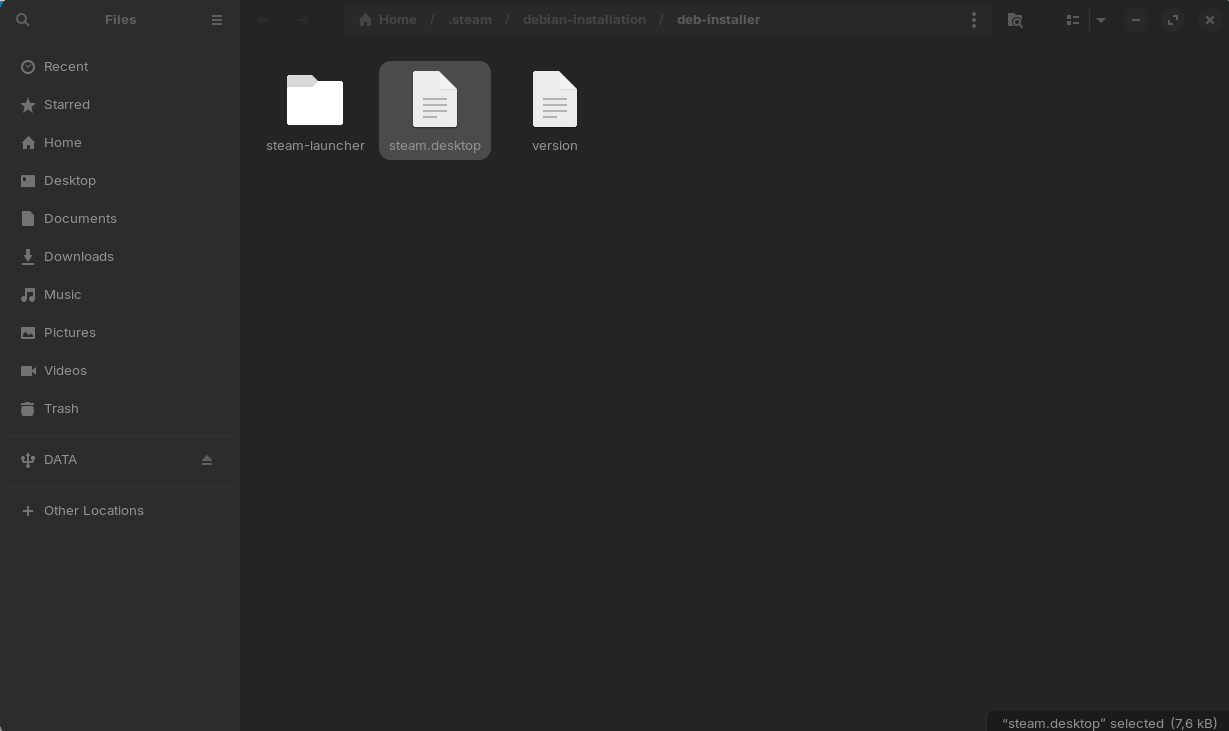
Weirdly enough it is there and it links to this location. And is also slightly different:
[Desktop Entry]
Name=Steam
Comment=Application for managing and playing games on Steam
Comment[pt_BR]=Aplicativo para jogar e gerenciar jogos no Steam
Comment[bg]=Приложение за ръководене и пускане на игри в Steam
Comment[cs]=Aplikace pro spravování a hraní her ve službě Steam
Comment[da]=Applikation til at håndtere og spille spil på Steam
Comment[nl]=Applicatie voor het beheer en het spelen van games op Steam
Comment[fi]=Steamin pelien hallintaan ja pelaamiseen tarkoitettu sovellus
Comment[fr]=Application de gestion et d'utilisation des jeux sur Steam
Comment[de]=Anwendung zum Verwalten und Spielen von Spielen auf Steam
Comment[el]=Εφαρμογή διαχείρισης παιχνιδιών στο Steam
Comment[hu]=Alkalmazás a Steames játékok futtatásához és kezeléséhez
Comment[it]=Applicazione per la gestione e l'esecuzione di giochi su Steam
Comment[ja]=Steam 上でゲームを管理&プレイするためのアプリケーション
Comment[ko]=Steam에 있는 게임을 관리하고 플레이할 수 있는 응용 프로그램
Comment[no]=Program for å administrere og spille spill på Steam
Comment[pt_PT]=Aplicação para organizar e executar jogos no Steam
Comment[pl]=Aplikacja do zarządzania i uruchamiania gier na platformie Steam
Comment[ro]=Aplicație pentru administrarea și jucatul jocurilor pe Steam
Comment[ru]=Приложение для игр и управления играми в Steam
Comment[es]=Aplicación para administrar y ejecutar juegos en Steam
Comment[sv]=Ett program för att hantera samt spela spel på Steam
Comment[zh_CN]=管理和进行 Steam 游戏的应用程序
Comment[zh_TW]=管理並執行 Steam 遊戲的應用程式
Comment[th]=โปรแกรมสำหรับจัดการและเล่นเกมบน Steam
Comment[tr]=Steam üzerinden oyun oynama ve düzenleme uygulaması
Comment[uk]=Програма для керування іграми та запуску ігор у Steam
Comment[vi]=Ứng dụng để quản lý và chơi trò chơi trên Steam
Exec=/usr/bin/steam %U
Icon=steam
Terminal=false
Type=Application
Categories=Network;FileTransfer;Game;
MimeType=x-scheme-handler/steam;x-scheme-handler/steamlink;
Actions=Store;Community;Library;Servers;Screenshots;News;Settings;BigPicture;Friends;
PrefersNonDefaultGPU=true
X-KDE-RunOnDiscreteGpu=true
NoDisplay=false

[Desktop Action Store]
Name=Store
Name[pt_BR]=Loja
Name[bg]=Магазин
Name[cs]=Obchod
Name[da]=Butik
Name[nl]=Winkel
Name[fi]=Kauppa
Name[fr]=Magasin
Name[de]=Shop
Name[el]=ΚΑΤΑΣΤΗΜΑ
Name[hu]=Áruház
Name[it]=Negozio
Name[ja]=ストア
Name[ko]=상점
Name[no]=Butikk
Name[pt_PT]=Loja
Name[pl]=Sklep
Name[ro]=Magazin
Name[ru]=Магазин
Name[es]=Tienda
Name[sv]=Butik
Name[zh_CN]=商店
Name[zh_TW]=商店
Name[th]=ร้านค้า
Name[tr]=Mağaza
Name[uk]=Крамниця
Name[vi]=Cửa hàng
Exec=/usr/bin/steam steam://store

[Desktop Action Community]
Name=Community
Name[pt_BR]=Comunidade
Name[bg]=Общност
Name[cs]=Komunita
Name[da]=Fællesskab
Name[nl]=Community
Name[fi]=Yhteisö
Name[fr]=Communauté
Name[de]=Community
Name[el]=Κοινότητα
Name[hu]=Közösség
Name[it]=Comunità
Name[ja]=コミュニティ
Name[ko]=커뮤니티
Name[no]=Samfunn
Name[pt_PT]=Comunidade
Name[pl]=Społeczność
Name[ro]=Comunitate
Name[ru]=Сообщество
Name[es]=Comunidad
Name[sv]=Gemenskap
Name[zh_CN]=社区
Name[zh_TW]=社群
Name[th]=ชุมชน
Name[tr]=Topluluk
Name[uk]=Спільнота
Name[vi]=Cộng đồng
Exec=/usr/bin/steam steam://url/CommunityHome/

[Desktop Action Library]
Name=Library
Name[pt_BR]=Biblioteca
Name[bg]=Библиотека
Name[cs]=Knihovna
Name[da]=Bibliotek
Name[nl]=Bibliotheek
Name[fi]=Kokoelma
Name[fr]=Bibliothèque
Name[de]=Bibliothek
Name[el]=Συλλογή
Name[hu]=Könyvtár
Name[it]=Libreria
Name[ja]=ライブラリ
Name[ko]=라이브러리
Name[no]=Bibliotek
Name[pt_PT]=Biblioteca
Name[pl]=Biblioteka
Name[ro]=Colecţie
Name[ru]=Библиотека
Name[es]=Biblioteca
Name[sv]=Bibliotek
Name[zh_CN]=库
Name[zh_TW]=收藏庫
Name[th]=คลัง
Name[tr]=Kütüphane
Name[uk]=Бібліотека
Name[vi]=Thư viện
Exec=/usr/bin/steam steam://open/games

[Desktop Action Servers]
Name=Servers
Name[pt_BR]=Servidores
Name[bg]=Сървъри
Name[cs]=Servery
Name[da]=Servere
Name[nl]=Servers
Name[fi]=Palvelimet
Name[fr]=Serveurs
Name[de]=Server
Name[el]=Διακομιστές
Name[hu]=Szerverek
Name[it]=Server
Name[ja]=サーバー
Name[ko]=서버
Name[no]=Tjenere
Name[pt_PT]=Servidores
Name[pl]=Serwery
Name[ro]=Servere
Name[ru]=Серверы
Name[es]=Servidores
Name[sv]=Servrar
Name[zh_CN]=服务器
Name[zh_TW]=伺服器
Name[th]=เซิร์ฟเวอร์
Name[tr]=Sunucular
Name[uk]=Сервери
Name[vi]=Máy chủ
Exec=/usr/bin/steam steam://open/servers

[Desktop Action Screenshots]
Name=Screenshots
Name[pt_BR]=Capturas de tela
Name[bg]=Снимки
Name[cs]=Snímky obrazovky
Name[da]=Skærmbilleder
Name[nl]=Screenshots
Name[fi]=Kuvankaappaukset
Name[fr]=Captures d'écran
Name[de]=Screenshots
Name[el]=Φωτογραφίες
Name[hu]=Képernyőmentések
Name[it]=Screenshot
Name[ja]=スクリーンショット
Name[ko]=스크린샷
Name[no]=Skjermbilder
Name[pt_PT]=Capturas de ecrã
Name[pl]=Zrzuty ekranu
Name[ro]=Capturi de ecran
Name[ru]=Скриншоты
Name[es]=Capturas
Name[sv]=Skärmdumpar
Name[zh_CN]=截图
Name[zh_TW]=螢幕擷圖
Name[th]=ภาพหน้าจอ
Name[tr]=Ekran Görüntüleri
Name[uk]=Скріншоти
Name[vi]=Ảnh chụp
Exec=/usr/bin/steam steam://open/screenshots

[Desktop Action News]
Name=News
Name[pt_BR]=Notícias
Name[bg]=Новини
Name[cs]=Zprávy
Name[da]=Nyheder
Name[nl]=Nieuws
Name[fi]=Uutiset
Name[fr]=Actualités
Name[de]=Neuigkeiten
Name[el]=Νέα
Name[hu]=Hírek
Name[it]=Notizie
Name[ja]=ニュース
Name[ko]=뉴스
Name[no]=Nyheter
Name[pt_PT]=Novidades
Name[pl]=Aktualności
Name[ro]=Știri
Name[ru]=Новости
Name[es]=Noticias
Name[sv]=Nyheter
Name[zh_CN]=新闻
Name[zh_TW]=新聞
Name[th]=ข่าวสาร
Name[tr]=Haberler
Name[uk]=Новини
Name[vi]=Tin tức
Exec=/usr/bin/steam steam://openurl/https://store.steampowered.com/news

[Desktop Action Settings]
Name=Settings
Name[pt_BR]=Configurações
Name[bg]=Настройки
Name[cs]=Nastavení
Name[da]=Indstillinger
Name[nl]=Instellingen
Name[fi]=Asetukset
Name[fr]=Paramètres
Name[de]=Einstellungen
Name[el]=Ρυθμίσεις
Name[hu]=Beállítások
Name[it]=Impostazioni
Name[ja]=設定
Name[ko]=설정
Name[no]=Innstillinger
Name[pt_PT]=Definições
Name[pl]=Ustawienia
Name[ro]=Setări
Name[ru]=Настройки
Name[es]=Parámetros
Name[sv]=Inställningar
Name[zh_CN]=设置
Name[zh_TW]=設定
Name[th]=การตั้งค่า
Name[tr]=Ayarlar
Name[uk]=Налаштування
Name[vi]=Thiết lập
Exec=/usr/bin/steam steam://open/settings

[Desktop Action BigPicture]
Name=Big Picture
Exec=/usr/bin/steam steam://open/bigpicture

[Desktop Action Friends]
Name=Friends
Name[pt_BR]=Amigos
Name[bg]=Приятели
Name[cs]=Přátelé
Name[da]=Venner
Name[nl]=Vrienden
Name[fi]=Kaverit
Name[fr]=Amis
Name[de]=Freunde
Name[el]=Φίλοι
Name[hu]=Barátok
Name[it]=Amici
Name[ja]=フレンド
Name[ko]=친구
Name[no]=Venner
Name[pt_PT]=Amigos
Name[pl]=Znajomi
Name[ro]=Prieteni
Name[ru]=Друзья
Name[es]=Amigos
Name[sv]=Vänner
Name[zh_CN]=好友
Name[zh_TW]=好友
Name[th]=เพื่อน
Name[tr]=Arkadaşlar
Name[uk]=Друзі
Name[vi]=Bạn bè
Exec=/usr/bin/steam steam://open/friends
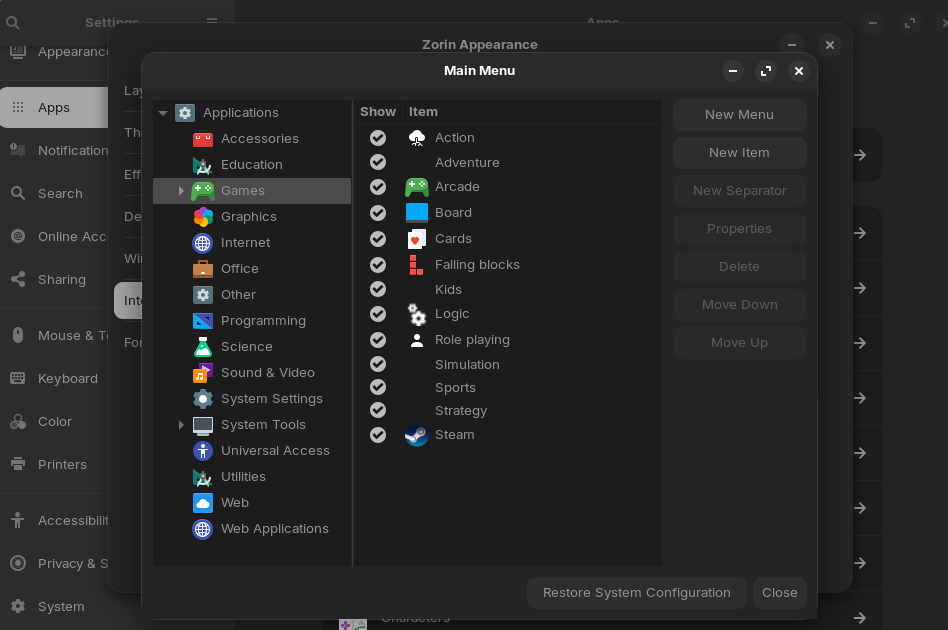
Also steam is visible in the main menu settings.
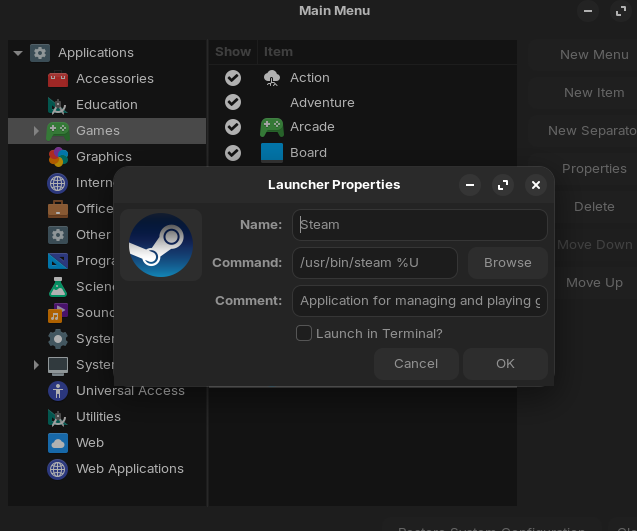
This is the command associated. Do i need to change it for it to work?
No... that should work.
Everything looks in place and correct - yet you are not seeing it in app menu > Games?

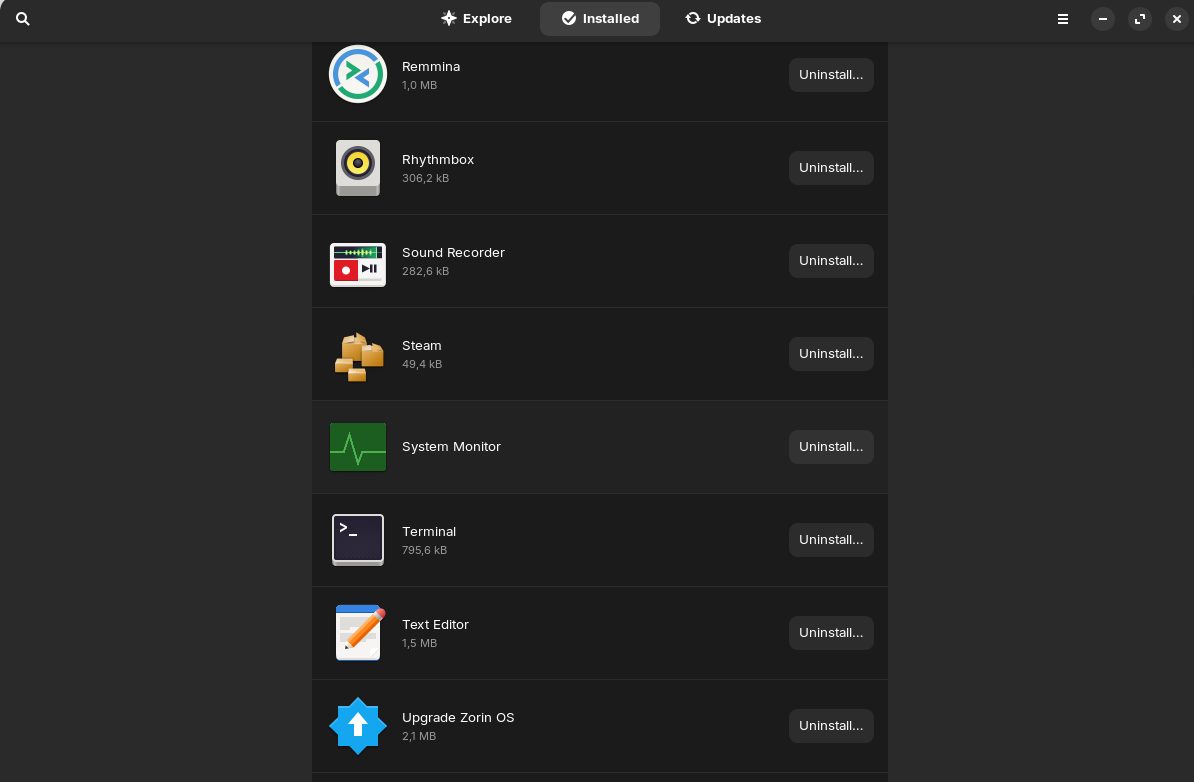
In the zorin menu games is not present since there is no game related app yet (Except steam of course.). But steam isn't inside of the internet tab either. Neither when i search for it or i look for it in here:

I noticed that it is in gnome software and it works no problem.
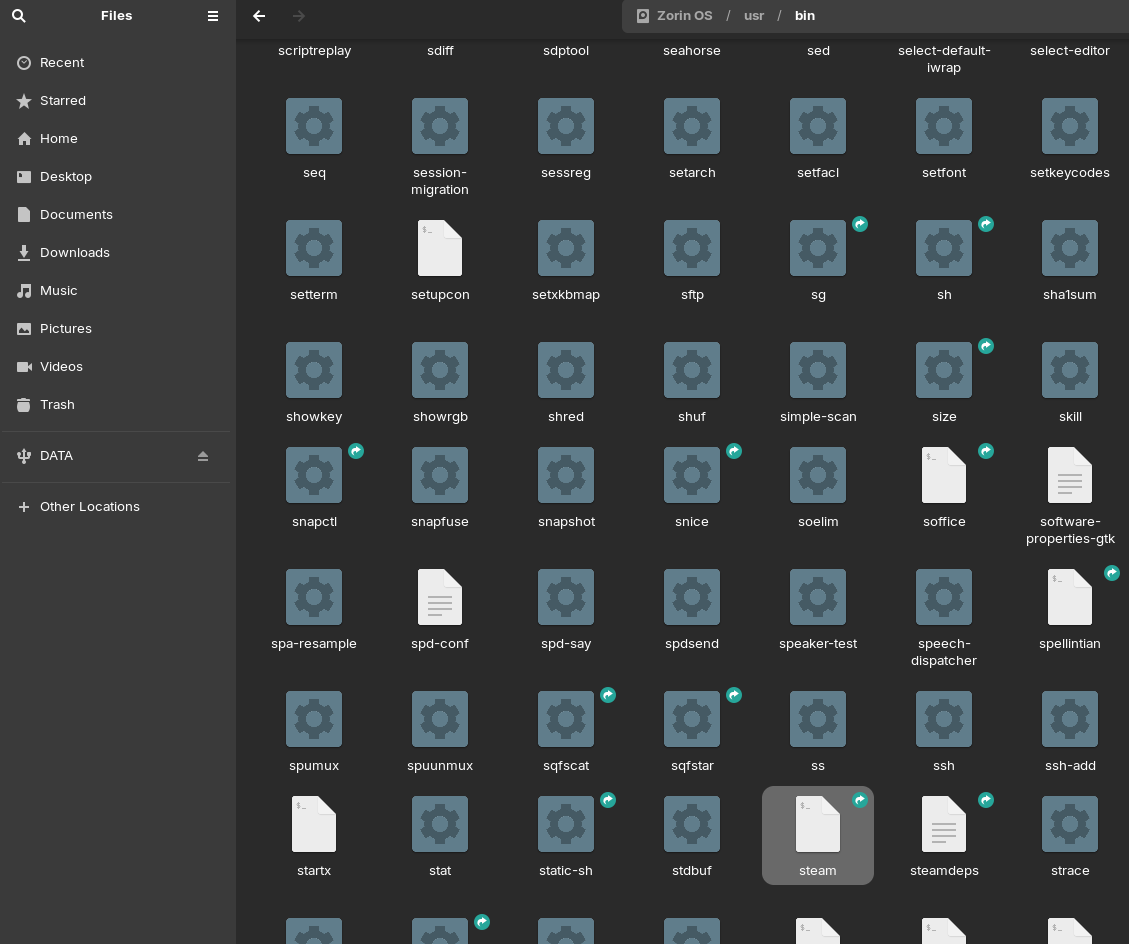
The steam file referenced in the steam.desktop is here so that's good.
#!/usr/bin/env bash
#
# bin_steam.sh - launcher script for Steam on Linux
# Copyright Valve Corporation. All rights reserved
#
# This is the Steam script that typically resides in /usr/bin
# It will create the Steam bootstrap if necessary and then launch steam.

# verbose
#set -x

set -e

# Get the full name of this script
STEAMSCRIPT="$(cd "${0%/*}" && echo "$PWD")/${0##*/}"
export STEAMSCRIPT
bootstrapscript="$(readlink -f "$STEAMSCRIPT")"
bootstrapdir="$(dirname "$bootstrapscript")"
log_opened=

log () {
    echo "bin_steam.sh[$$]: $*" >&2 || :
}

export STEAMSCRIPT_VERSION=1.0.0.85

# Set up domain for script localization
export TEXTDOMAIN=steam

function show_message()
{
	style=$1
	shift

	case "$style" in
	--error)
		title=$"Error"
		;;
	--warning)
		title=$"Warning"
		;;
	*)
		title=$"Note"
		;;
	esac

	log "$title: $*"

	if [ "${XDG_CURRENT_DESKTOP}" == "gamescope" ]; then
		return
	fi

	if ! zenity "$style" --text="$*" 2>/dev/null; then
		# Save the prompt in a temporary file because it can have newlines in it
		tmpfile="$(mktemp || echo "/tmp/steam_message.txt")"
		echo -e "$*" >"$tmpfile"
		xterm -T "$title" -e "cat $tmpfile; echo -n 'Press enter to continue: '; read input"
		rm -f "$tmpfile"
	fi
}

# Keep in sync with the function of the same name in steam.sh
# Usage: maybe_open_log $STEAM_RUNTIME_SCOUT ~/.steam/steam "$*"
# Uses globals: log_opened + environment variables set by srt-logger
function maybe_open_log()
{
	local srt="$1"
	local data="$2"
	local argv="$3"

	case " $argv " in
		(*\ -srt-logger-opened\ *)
			log "Log already open"
			return 0
			;;
	esac

	if [ -n "$log_opened" ]; then
		return 0
	fi

	if [ "${STEAM_RUNTIME_LOGGER-}" = "0" ]; then
		# Interferes with vscode's gdb wrapping for instance
		log "Logging to console-linux.txt disabled via STEAM_RUNTIME_LOGGER"
		return 0
	fi

	if [ "x${DEBUGGER-}" != "x" ]; then
		# Interferes with ncurses (cgdb etc.)
		log "Setting up for debugging, not logging to console-linux.txt"
		return 0
	fi

	local log_folder="${STEAM_CLIENT_LOG_FOLDER:-logs}"

	# Avoid using mkdir -p here: if ~/.steam/steam is somehow missing,
	# we don't want to create it as a real directory
	if [ -d "$data/$log_folder" ] || mkdir "$data/$log_folder"; then
		log_dir="$data/$log_folder"
	else
		log "Couldn't create $data/$log_folder, not logging to console-linux.txt"
		return 0
	fi

	if source "${srt}/usr/libexec/steam-runtime-tools-0/logger-0.bash" \
		--log-directory="$log_dir" \
		--filename=console-linux.txt \
		--parse-level-prefix \
		-t steam \
	; then
		log_opened=1
	else
		log "Couldn't set up srt-logger, not logging to console-linux.txt"
	fi
}

function detect_platform()
{
	# Maybe be smarter someday
	# Right now this is the only platform we have a bootstrap for, so hard-code it.
	echo ubuntu12_32
}

function setup_variables()
{
	# 'steam' or sometimes 'steambeta'
	STEAMPACKAGE="${0##*/}"

	if [ "$STEAMPACKAGE" = bin_steam.sh ]; then
		STEAMPACKAGE=steam
	fi

	STEAMCONFIG=~/.steam
	# ~/.steam/steam or ~/.steam/steambeta
	STEAMDATALINK="$STEAMCONFIG/$STEAMPACKAGE"
	STEAMBOOTSTRAP=steam.sh
	# User-controlled, often ~/.local/share/Steam or ~/Steam
	LAUNCHSTEAMDIR="$(readlink -e -q "$STEAMDATALINK" || true)"
	# Normally 'ubuntu12_32'
	LAUNCHSTEAMPLATFORM="$(detect_platform)"
	# Often in /usr/lib/steam
	LAUNCHSTEAMBOOTSTRAPFILE="$bootstrapdir/bootstraplinux_$LAUNCHSTEAMPLATFORM.tar.xz"
	if [ ! -f "$LAUNCHSTEAMBOOTSTRAPFILE" ]; then
		LAUNCHSTEAMBOOTSTRAPFILE="/usr/lib/$STEAMPACKAGE/bootstraplinux_$LAUNCHSTEAMPLATFORM.tar.xz"
	fi

	# Get the default data path
	STEAM_DATA_HOME="${XDG_DATA_HOME:-$HOME/.local/share}"
	case "$STEAMPACKAGE" in
		steam)
			CLASSICSTEAMDIR="$HOME/Steam"
			DEFAULTSTEAMDIR="$STEAM_DATA_HOME/Steam"
			;;
		steambeta)
			CLASSICSTEAMDIR="$HOME/SteamBeta"
			DEFAULTSTEAMDIR="$STEAM_DATA_HOME/SteamBeta"
			;;
		*)
			log $"Unknown Steam package '$STEAMPACKAGE'"
			exit 1
			;;
	esac

	# Create the config directory if needed
	if [[ ! -d "$STEAMCONFIG" ]]; then
		mkdir "$STEAMCONFIG"
	fi
}

function install_bootstrap()
{
	STEAMDIR="$1"

	# Save the umask and set strong permissions
	omask="$(umask)"
	umask 0077

	log $"Setting up Steam content in $STEAMDIR"
	mkdir -p "$STEAMDIR"
	cd "$STEAMDIR"
	if ! tar xJf "$LAUNCHSTEAMBOOTSTRAPFILE" ; then
		log $"Failed to extract $LAUNCHSTEAMBOOTSTRAPFILE, aborting installation."
		exit 1
	fi
	ln -fns "$STEAMDIR" "$STEAMDATALINK"
	setup_variables

	# put the Steam icon on the user's desktop
	# try to read ~/.config/user-dirs.dirs to get the current desktop configuration
	# http://www.freedesktop.org/wiki/Software/xdg-user-dirs
	# shellcheck source=/dev/null
	test -f "${XDG_CONFIG_HOME:-$HOME/.config}/user-dirs.dirs" && source "${XDG_CONFIG_HOME:-$HOME/.config}/user-dirs.dirs"
	DESKTOP_DIR="${XDG_DESKTOP_DIR:-$HOME/Desktop}"

	if [ -d "$DESKTOP_DIR" ] && [ "$bootstrapdir" = "/usr/lib/$STEAMPACKAGE" ]; then
		# There might be a symlink in place already, in such case we do nothing
		if [ ! -L "$DESKTOP_DIR/$STEAMPACKAGE.desktop" ]; then
			cp "$bootstrapdir/$STEAMPACKAGE.desktop" "$DESKTOP_DIR"
			# Older .desktop implementations used the execute bits as
			# a marker for a .desktop being safe to treat as a shortcut
			chmod a+x "$DESKTOP_DIR/$STEAMPACKAGE.desktop"
			if command -v gio >/dev/null; then
				# Making it executable is not enough in recent
				# (Ubuntu 20.04) versions of
				# https://gitlab.gnome.org/World/ShellExtensions/desktop-icons
				gio set --type=string "$DESKTOP_DIR/$STEAMPACKAGE.desktop" metadata::trusted true || :
				# Generate an inotify event so the desktop
				# implementation reloads it
				touch "$DESKTOP_DIR/$STEAMPACKAGE.desktop"
			fi
		fi
	fi

	# Restore the umask
	umask "$omask"
}

function repair_bootstrap()
{
	ln -fns "$1" "$STEAMDATALINK"
	setup_variables
}

function check_bootstrap()
{
	local data="$1"
	# Normally we would look for ubuntu12_32/steam-runtime in
	# ~/.steam/root rather than ~/.steam/steam if different, but in
	# this script we assume that ~/.steam/steam and ~/.steam/root
	# are the same: they only differ in developer use-cases which
	# also bypass this script
	local srt="${STEAM_RUNTIME_SCOUT:-"$data/ubuntu12_32/steam-runtime"}"
	local argv="$2"

	if [[ -n "$data" && -x "$data/$STEAMBOOTSTRAP" ]]; then
		# Looks good...
		maybe_open_log "$srt" "$data" "$argv"
		return 0
	else
		return 1
	fi
}

function forward_command_line()
{
	if ! [ -p "$STEAMCONFIG/steam.pipe" ]; then
		return 1
	fi

	local runtime="$STEAMCONFIG/root/ubuntu12_32/steam-runtime"
	local remote="$runtime/amd64/usr/bin/steam-runtime-steam-remote"

	if [ -x "$remote" ] && "$remote" "$@" 2>/dev/null; then
		return 0
	else
		return 1
	fi
}

# Don't allow running as root
if [ "$(id -u)" == "0" ]; then
	show_message --error $"Cannot run as root user"
	exit 1
fi

# Look for the Steam data files
setup_variables

# If Steam is already running, try to forward the command-line to it.
# If successful, there's nothing more to do.
if forward_command_line "$@"; then
	exit 0
fi

if ! check_bootstrap "$LAUNCHSTEAMDIR" "$*"; then
	# See if we just need to recreate the data link
	if check_bootstrap "$DEFAULTSTEAMDIR" "$*"; then
		# Usually ~/.steam/steam -> ~/.local/share/Steam
		log $"Repairing installation, linking $STEAMDATALINK to $DEFAULTSTEAMDIR"
		repair_bootstrap "$DEFAULTSTEAMDIR"
	elif check_bootstrap "$CLASSICSTEAMDIR" "$*"; then
		# Legacy: ~/.steam/steam -> ~/Steam
		log $"Repairing installation, linking $STEAMDATALINK to $CLASSICSTEAMDIR"
		repair_bootstrap "$CLASSICSTEAMDIR"
	fi
fi

if [[ ! -L "$STEAMDATALINK" ]] || ( ! check_bootstrap "$LAUNCHSTEAMDIR" "$*" ); then
	install_bootstrap "$DEFAULTSTEAMDIR"
fi

if ! check_bootstrap "$LAUNCHSTEAMDIR" "$*"; then
	show_message --error $"Couldn't set up Steam data - please contact technical support"
	exit 1
fi

# Leave a copy of the bootstrap tarball in ~/.steam so that Steam can
# re-bootstrap itself if required
if ! cmp -s "$LAUNCHSTEAMBOOTSTRAPFILE" "$LAUNCHSTEAMDIR/bootstrap.tar.xz"; then
    cp "$LAUNCHSTEAMBOOTSTRAPFILE" "$LAUNCHSTEAMDIR/bootstrap.tar.xz"
fi

STEAMDEPS="${STEAMSCRIPT%/*}/steamdeps"
if [ -x "$STEAMDEPS" ]; then
	if ! "$STEAMDEPS"; then
		log "Unable to install Steam dependencies by running $STEAMDEPS, trying to continue anyway..."
	fi
fi

# go to the install directory and run the client
cd "$LAUNCHSTEAMDIR"

exec "$LAUNCHSTEAMDIR/$STEAMBOOTSTRAP" ${log_opened+-srt-logger-opened} "$@"
Also you mentioned this earlier but i think i forgot to reply. Download from was set to a national server. I changed it to main after you asked that question.