I thought linux would be more logical than windows with all it's stupid pre-built folders that might be saved anywhere or on any drive.
I created a whole partition just for Zorin and it's mounted. But I can't create any new folders in there, that option is grayed out.
Normally I build folders from a partition and work my way down. This operating system already has some of my drives in windows-like folders such as media/myusername/ and I never use those types of folders. It's one of the things I hate about windows. For now I guess I would just like to know why I can't create folders in that drive? I can do it in other drives.
Thanks
When you speak of creating a whole partition for Zorin. is this the partition the Zorin OS is installed in? or is it a separate data partition you created for your zorin files?
If it is the Zorin OS partition you may have to create your filing system in/below the home folder but you shouldn't have any sort of a problem with it. If it is a separate data partition, how is it formatted? Ext4 is preferable because windows formats can misbehave with permissions (like setting as read only) but if it is Ext4 you should be able to claim ownership then create anything you want.
What file management tool are you using?
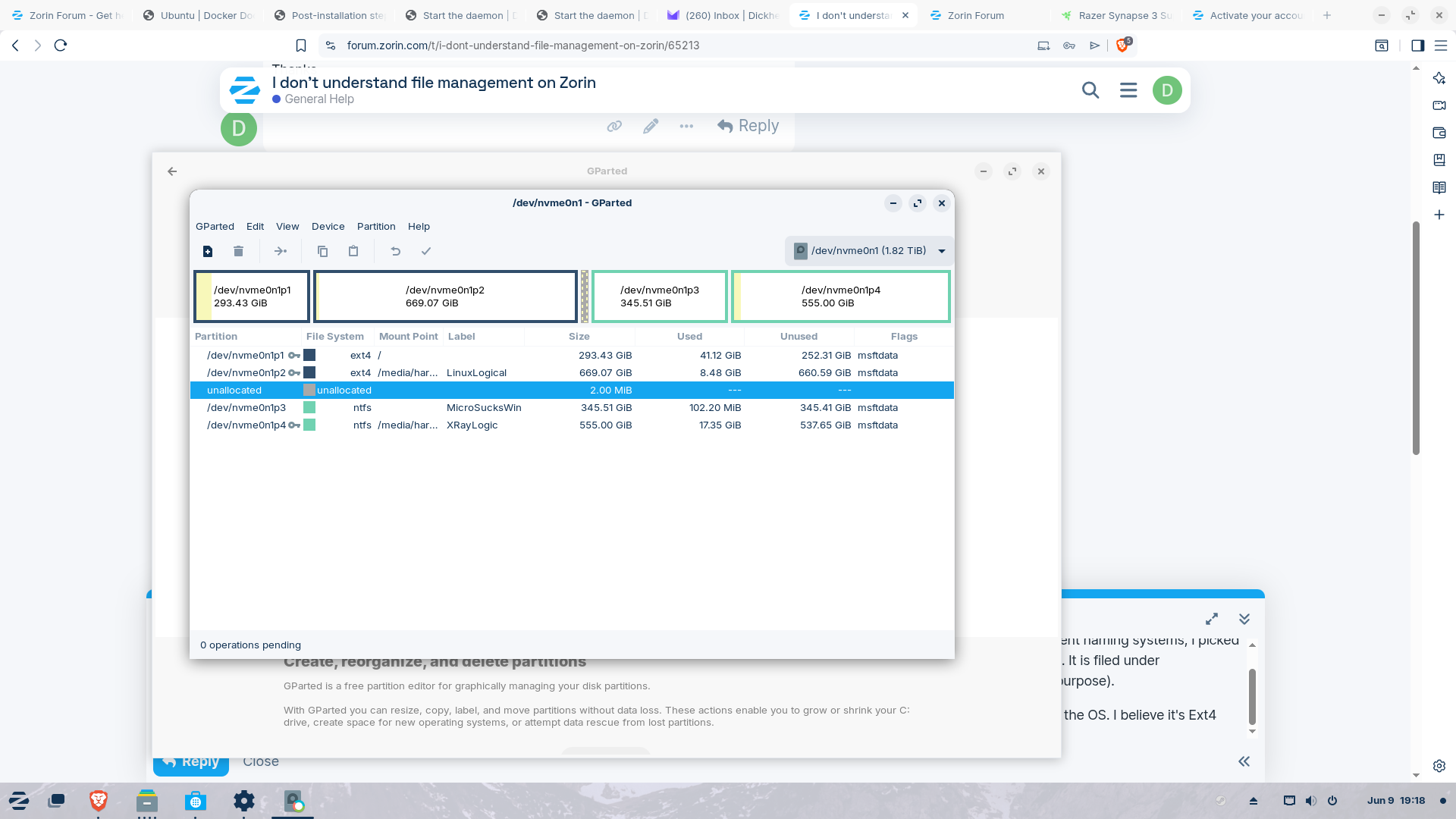
It might help others reading this thread if you were to post a screenshot of your partition in Gparted.
Thanks, That was a fast reply.
I wanted to set up my OS there but because of the different naming systems, I picked the wrong one. It is a logical drive with nothing on it at all. It is filed under media/username/linuxlogical but I didn't put it there (on purpose).
I intended the file system to look like LinuxLogical/InstalledPrograms/Games/Steam/etc
It is formatted in whatever they suggest when you install the OS. I believe it's Ext4.
Just to be sure I understand then, your Zorin OS is on nvme0n1p1 and you are trying to put data files on nvme0n1p2, is that right?
My comment about the home folder was that if you want to create files on that p1 then you probably need to put them below the home folder that Zorin has created for you. You should have things like Documents and Downloads premade there for you in home but you shouldn't be limited.
For p2 I don't see why you can't create anything you want in it. I assume you are the "owner" but if not you can go into the Disks tool and select claim ownership which if I recall is a right click menu.
Does "properties" tell you anything about permissions?
I note you have p2 mounted at /media/har... (can't read the rest) is that where you want it?
Also I noticed the little key icons against the partitions. Do you have bitlocker or something similar in use?
See what others come up with, in different time zones. I'll check the thread again tomorrow.
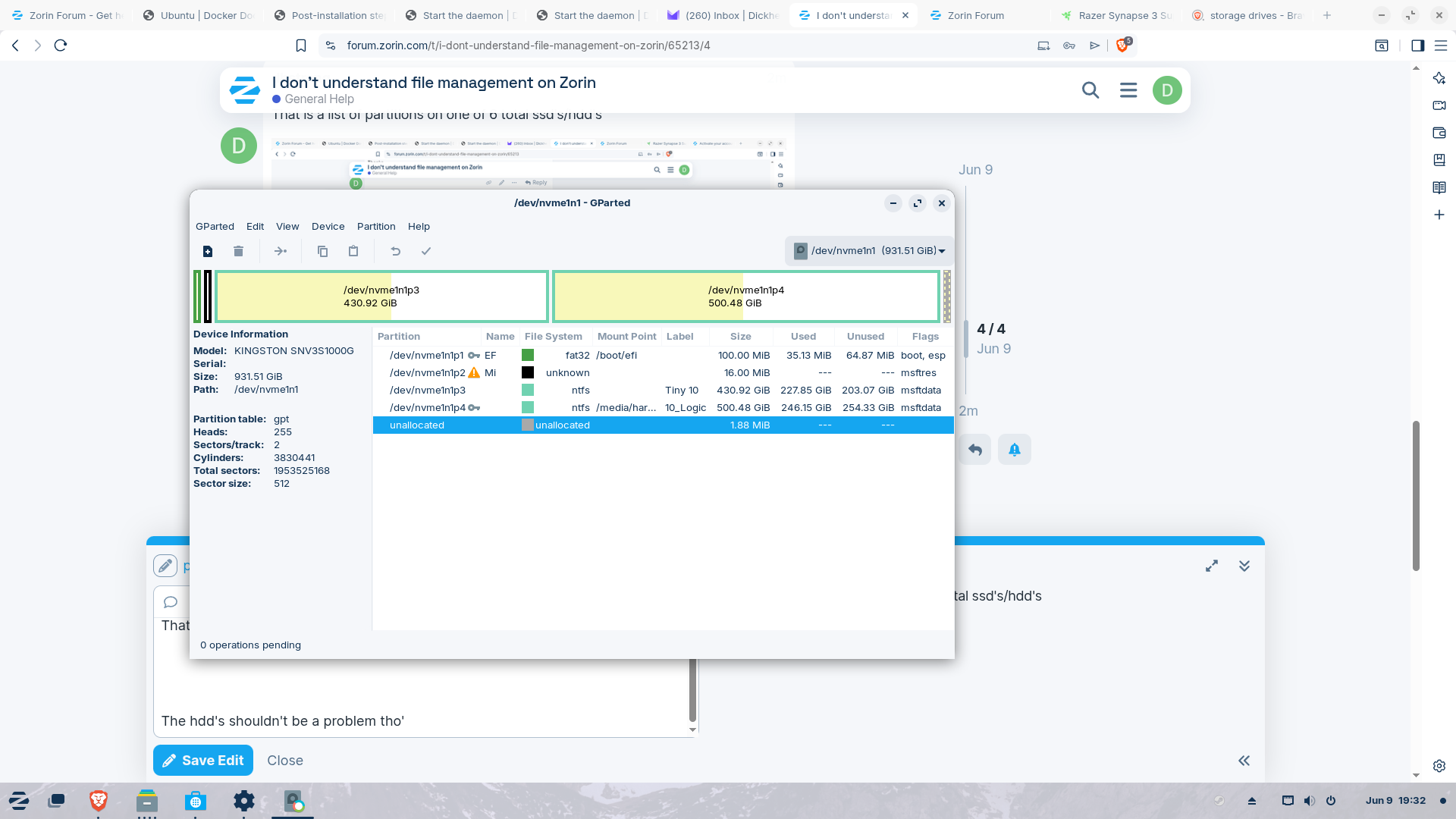
I'm just looking at what you're issue is, but I'm a bit confused by your Gparted screenshots. From what I can tell, your first drive has your Root partition of Zorin, plus another seperate EXT4 partition (your LinuxLogical). What I'm a bit confused by is that they are flagged as msftdata partitions, when, unless I'm misunderstanding, they should not be flagged as such (since they aren't M$ formatted). Your NTFS filesystems being flagged as such makes sense.
And your main problem is your LinuxLogical partition being greyed out and unavailable for use? How did you make this partition?
Thanks for replying. No, I didn't want it mounted in /media/harry... I wanted it mounted on the ssd drive like a normal (windows?) partition.
I don't know what happened but I can't even see the "linux logical" drive anymore. In G-parted it now shows as unmounted. I did try to unflag the Ext4 partitions after reading the comment below by applecheeks, but that was after I could no longer find it in "files" and it also shows up as unmounted and won't let me mount it, either. That's what I thought I might have to do was unmount it and then mount it. But I may have to delete it and start all over again.
Hey,
Thanks for helping. See my response to NickS. I am the owner and I tried to change those flags but by that time, it now shows as unmounted and won't let me mount it. Also now I can't even see that partition so it wont let me look at properties and permissions. I did look in the properties before but maybe not permissions. Thanks for your help, I don't know what's going on.
I was obviously trying to build a dual boot system but somehow it got screwed up. I never did get it truly dual booting (like I think it's supposed to work). I have to go into bios and switch boot drives every time, which still works but may be part of my problem.
I hate to sound paranoid but (I think) MS intentionally causes a lot of the problems. I know they pretend they can't see the linux partitions in the computer and I know damn well they can, or could if they tried.
Anyway, do you think I have to delete the drive, re-create it and remount it?
Thanks for your help.