I’ve broken v17 Pro - yikes!

Hi there, I was trying to find a way of syncing my doc folder to Google drive.

Tried several options, the built-in ‘on-line account’ for google drive was fine for accessing my gdrive but did not provide syncing of changed documents.
I installed rclone from the .deb, through terminal, which installed to /usr/local/man/man1/rclone.1 but no joy with that.
I tried to uninstall rclone but didn’t find the correct command.
I followed the steps in the below YouTube video and everything went well.

But again no automatic syncing.

So decided to remove all traces of rclone, run a few commands (nothing that I can remember > Sudo purge rclone etc ) and rebooted.

Boot failed, stuck on the Zorin splash screen and the hp splash screen.

I rebooted with the installer USB, clicked the try zonin, system tools, fix boot and received this error.
Google Photos

Restarted again, got this error.
Google Photos

Opted for “maintenance”, got this error.
Google Photos

Retried several times,
Google Photos

When it is hung up at the two splash screen, and I hit Ctl+Alt+Del, I get this error for split second.
Google Photos

Restarted again with the usb and got this screen.
Google Photos

Went thru the steps again, restarted and got this.

Google Photos

Needless to say, I need your help.!!
Cheers CD

EDIT - booting to win11, which is on the internal Nvme, is fine.
Zorin is on a second ssd.
Hi, take a look here:

and here:

Thanks the reply.
I have both timeshift and pika backups taken recently, is there a way to access these apps to restore from those archives?

However they are saved on the Nvme, so perhaps not useable!

Q. One of those fixes refers to opening a terminal window, having booted by the live CD. Is that the same thing as booting from the USB installer and choosing the “tryout” option?

Cheers CD

Hi there
I also have a rescuzilla backup of the efi and root and home partitions through the ventoy usb.

BUT one Q.
Will restoring from any of these have the necessary “reach”to unlock the Nvme, if in fact that is the big issue?
Please be aware that the Zorin OS and the efi is on the internal ssd, NOT on the Nvme!!

Also, I have checked the bios settings again. And confirmed that there was no bios password, the Zorin ssd is the boot priority and that ‘safe boot’ was already disabled.

Cheers CD

Do you get a GRUB menu at boot time? I would choose Advanced boot option for Zorin and choose recovery menu. Then choose the last menu item of dropping to terminal as 'root' then see if you can use that unlock command.

Hi there, thanks for your reply.

I don’t reach the grub menu anymore. However when I did, I chose the recovery mode (the second line) and let it fix the problem. Which it didn’t do.
I didn’t see that the fourth option was ‘as root’ or else I would have chosen that instead. but now I know, even though it is too late now.

I would like someone to answer my earlier question, being, would restoring from a rescuezilla image to the Zorin partitions be able to unlock the Nvme, IF that is in fact the problem?

Or should I go straight to a fresh installation!.
Cheers CD

Hi, I have not encountered your issue personally (I have encountered it on my youngest's machine that I dual-booted with Windows 11 but not sorted it out yet - they no longer live here). One of the issues that was baulking me from sorting it out is the Asus BIOS has Secure Boot greyed out ... which means I cannot circumvent Secure Boot. Can you check your BIOS settings? Have you tried seeing if changing anything from UEFI to Legacy mode makes a difference?
Just to add, because you are a user of the Pro version you should be able to get help from Team Zorin directly if you complete the request form from here:

Hi there, thanks for your reply.
I have sent them a request too.
Cheers CD

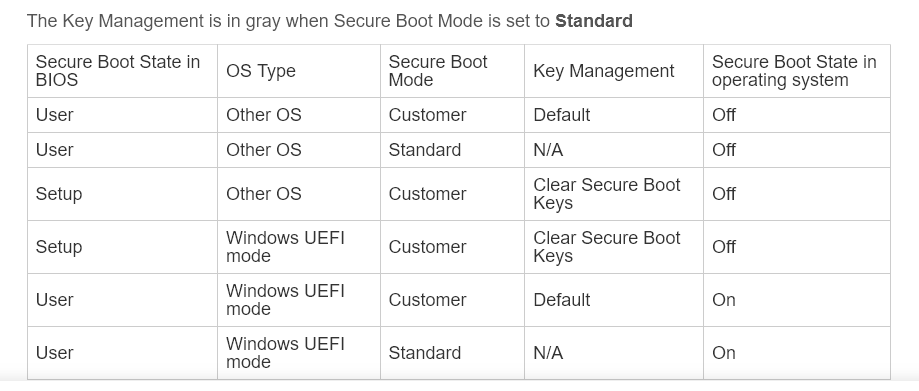
Swarf: I remember another thread with greyed out "Secure Boot" and way round it was to select "Other OS".
Also see this: [Motherboard] How to enable or disable Secure Boot ? | Official Support | ASUS Global

@doobre Sorry this does not help you with your question re rescuezilla and unlock Nvme etc.

Hi @zabadabadoo I have other OS but Secute Boot is still greyed out at the top of the page!

So according to this table (from the ASUS link) Other OS = Secure Boot OFF
regardless of being greyed out.

1 Like

I looked at the Asus website and they talked about a couple of key combinations. Also it was not very clear when I looked at that table. Many thanks. I just need to work out now on youngest's how to inject the Debian .efi shim so it is bootable again as NVRAM is locked.

Hi there
For the record I didn't fix the problem. I resorted to a fresh reinstall of v17 pro.

Now I wonder why none of the many backups did not restore a working system. And the in-built "Boot-Repair" was saying that the "NVME is LOCKED".

I assume that I was not backing up the correct files. And the Nvme couldn't be 'detected', rather than "Locked".

Even a partition image created in 'Rescuezilla' from a bootable USB did not fix the problem. It contained a backup of the efi, root and home partitions.

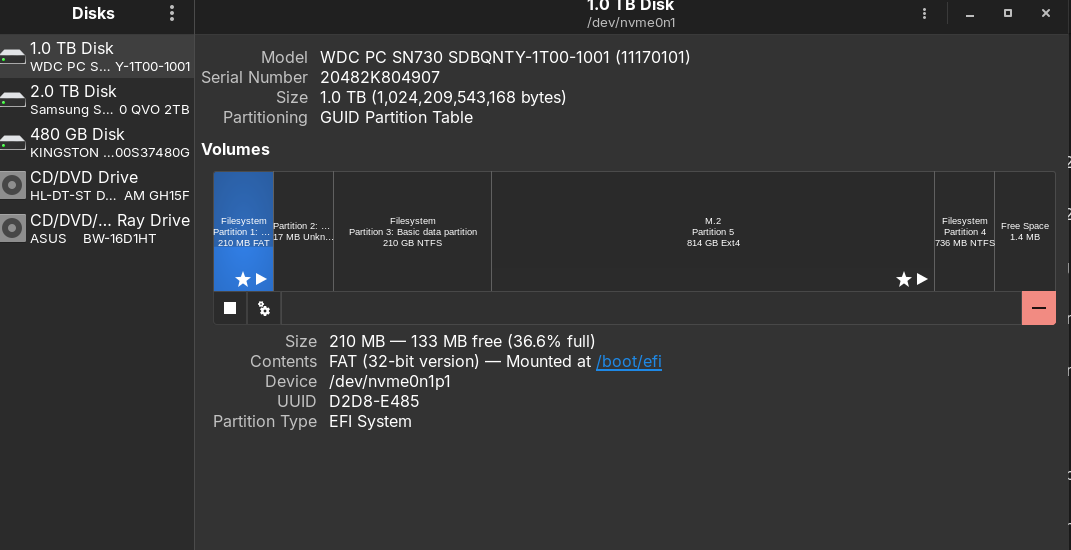
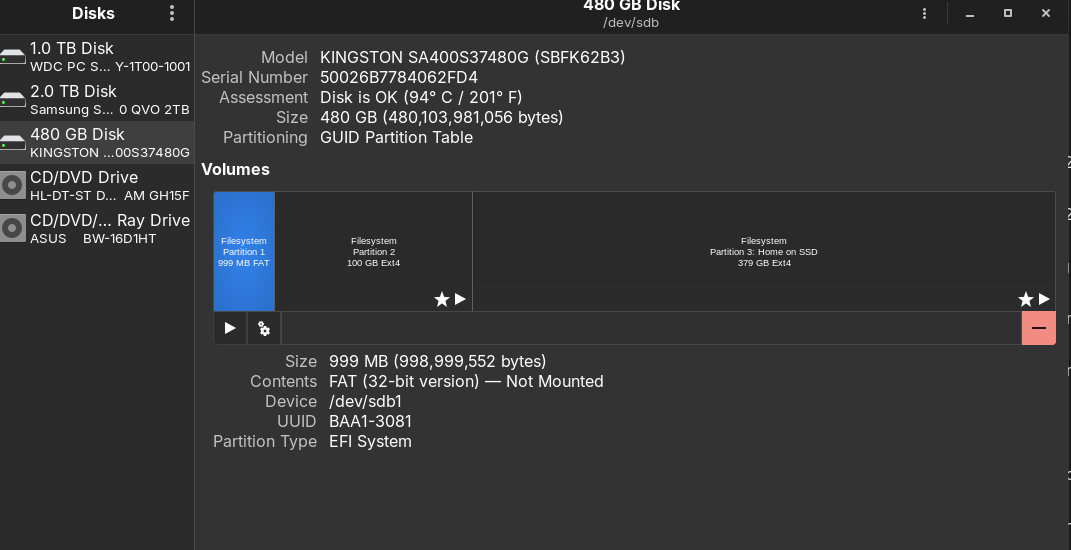
Here are the current 'disks' app entries.

So I am now assuming that the partition used in the Zorin booting process is NOT actually on the 'Kingston' SSD, which is where Zorin is installed.

When I first started looking into using Zorin, I followed the suggestion of splitting the available disk space into three partitions (EFI+ROOT+HOME) to avoid losing personal data in a update or fix process. This approach was recommended by several YouTubers and forums.

But checking in the 'disks' app (screenshots above), it looks to me that the 'EFI' partition created during the "Something Else" installation process is not mounted = not used.

Q1. Am I correct here?
If 'YES', how should the partitioning be done to allow both Z and Win11 to boot independently? [Win11 is on the /dev/nvme0n1p1 and Z is on /dev/sdb1]

Q.2 So, therefore a recovery image taken by 'Rescuezilla', 'pika' and 'timeshift' should actually include the nvme 'EFI' partition??

Q3. BUT if I set the EFI partition on the NVME as the 'efi' partition for Zorin as well as the previously installed Win11. Would that not render Win11 to be unbootable?

Cheers for any ideas or input from you people, to help me understand where I went wrong.
CD

Here is a good thread on it:

Hi there, thanks for your reply.

I had no idea that there were such differences between different distros. Suppose each one thinks their's is the better.

Anyway, I have sorted out my problem.
Turns out that when I made the "Something Else" installation, that even though I
created an 'efi' partition on the SSD that was used for the Zorin OS. The installer used the efi partition of the internal nvme (where win11 was installed).

What I should have done was 'disable' the internal nvme firstly, through the bios, before installing Z.
Then after the Z install, enable the nvme again.
This leaves Win11 unbootable, and that is fixed by booting from the Z installer usb, "Try Zorin", and system tools > boot-repair > automatic settings.
The restart shows the grub with Z and win11, plus other options.

So this means that any of my backups made before today, did not contain the correct boot or efi partition info from the Zorin SSD, but that from the NVME, which was not available. (the boot-repair option had earlier reported that the NVME was "locked" whereas it was not available).

When I managed to break the booting to Z, by uninstalling rclone, I was expecting a restore back to a fully working Z installation, which did not happen since the efi and boot files were not in the backup.

I hope that makes sense, I am still learning all this stuff. But at least I now have a working backup of the 'right stuff'.
And thanks again for your suggestions and advice.
cheers CD

1 Like