Im stuck with 2 instances of rustdesk

hi!

managing my computers mom from another town is a nightmare; shes 75 years old. from time to time i have to check why her email aint "showing up" or why cant she hear a youtube video.

ive installed rustdesk on her computer running zorin os core (latest) from a .deb file provided by the devs. it was v.1.4.3 with not so great wayland support (for my old mother to manage following my instructions alone).

new version 1.4.5 is said to have great improvements and im visiting my mother. decided to check and... i cant remove the old version.

if i run the new deb package, it will install a new instance along with v.1.4.3.

if i decide to install from flathub, ill get a new instance along with v.1.4.3.

removing all listed installed versions on the software app wont remove v.1.4.3.

right-clicking taskbar, settings, apps will show the v.1.4.3 in the list. following app details takes me to the software app page asking to install from flathub.

grabbing the v.1.4.3 deb file and running it with gdebi will prompt me to install the package. installing it will get me 2 instances of the same version. then, removing the package will only remove the new installed version leaving the old behind.

any help?

Could it be that 1.4.3 is uninstalled but the Icons are not removed? When You type in Terminal apt list rustdesk or apt search rustdesk is it shown as installed? And to make sure that it isn't installed as flatpak type flatpak list and check if it is listed in the List.

Should all this be negative, I would think that the 1.4.3 Version isn't installed anymore but the Menu Entries are still there; maybe not deleted. So, you could go in ''Main Menu'' and delete it there and in /usr/share/applications annd look there for the .desktop File and delete it too.

apt list rustdesk and apt search rustdesk:

Listando... Pronto
rustdesk/now 1.4.3 amd64 [configuração-residual]

its in portuguese; it reads [residual-settings/configuration]

flatpak list:

… ID de aplica… Versão                   Ramo        Origem          Instalação
… …dapp.Discord 0.0.119                  stable      flathub         system
… …launcher.hgl v2.18.1                  stable      flathub         system
… …esk.RustDesk                          master      rustdesk-origin system
… …ftware.Steam 1.0.0.84                 stable      flathub         system
… …yproto.zsnes 2.0.12                   stable      flathub         system
… …top.Platform freedesktop-sdk-24.08.28 24.08       flathub         system
… …top.Platform freedesktop-sdk-25.08.6  25.08       flathub         system
… ….Compat.i386                          24.08       flathub         system
… ….Compat.i386                          25.08       flathub         system
… …m.GL.default 25.2.6                   24.08       flathub         system
… …m.GL.default 25.2.6                   24.08extra  flathub         system
… …m.GL.default 25.2.6                   25.08       flathub         system
… …m.GL.default 25.2.6                   25.08-extra flathub         system
… …GL32.default 25.2.6                   24.08       flathub         system
… …GL32.default 25.2.6                   25.08       flathub         system
… …GL32.default 25.2.6                   25.08-extra flathub         system
… …codecs-extra                          25.08-extra flathub         system
… …s_extra.i386                          25.08-extra flathub         system
… …orm.openh264 2.5.1                    2.5.1       flathub         system
… …rinBlue-Dark                          3.22        zorinos         system
… …inBlue-Light                          3.22        zorinos         system
… …inBrown-Dark                          3.22        zorinos         system
… …nBrown-Light                          3.22        zorinos         system
… …inGreen-Dark                          3.22        zorinos         system
… …nGreen-Light                          3.22        zorinos         system
… …rinGrey-Dark                          3.22        zorinos         system
… …inGrey-Light                          3.22        zorinos         system
… …nOrange-Dark                          3.22        zorinos         system
… …Orange-Light                          3.22        zorinos         system
… …nPurple-Dark                          3.22        zorinos         system
… …Purple-Light                          3.22        zorinos         system
… …orinRed-Dark                          3.22        zorinos         system
… …rinRed-Light                          3.22        zorinos         system
… …nYellow-Dark                          3.22        zorinos         system
… …Yellow-Light                          3.22        zorinos         system
… …kde.Platform                          6.10        flathub         system
… …de.kmahjongg 0.9.25121                stable      flathub         system
… …sktopeditors 9.2.1                    stable      flathub         system

well, the thing is functional. its also how i know which version i am dealing with; i go help>about.

First remove this residual:

sudo dpkg --purge rustdesk

That should clear the respective deb entry from the menu.

You also have Rustdesk installed as Flatpak, this one should be more up-to-date and give you the version you are looking for (if not then check for the app updates in the Software store).

So, You have both installed. If You want get rid of both to be blank, try @littlekun's Advice for the .deb Package:

And for the Flatpak type in Terminal flatpak uninstall RustDesk and see if it finds the correct Package. If it shouldn't find it, expand Your Terminal and use the flatpak list Command again until the whole Name is visiable and then copy it to the flatpak uninstall Command.
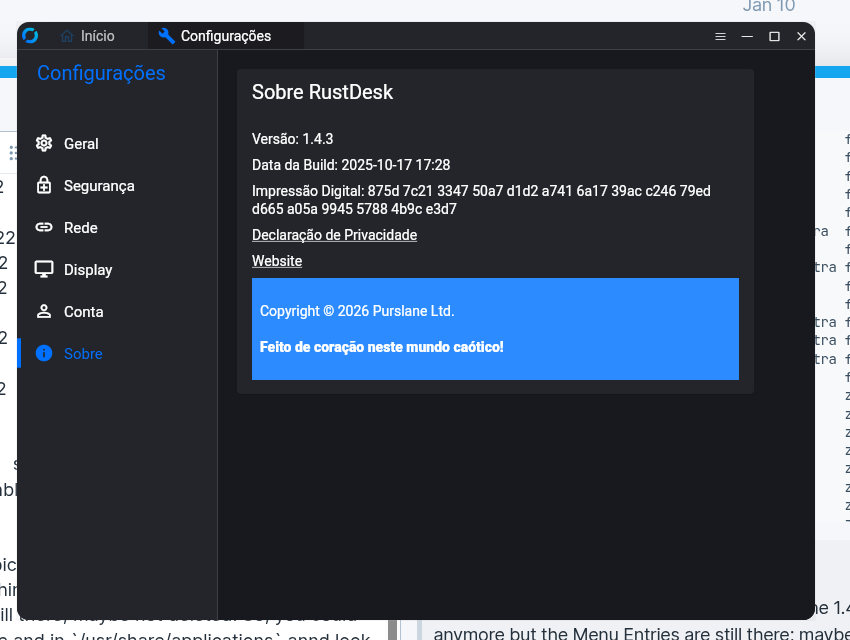
it worked; thank you all for your help!

1 Like