Hello,
When I try to install Zorin via a USB drive, I have a volume (partition) on my HDD that is available and dedicated to Zorin but not visible; I only see the main disk, which contains—among other things—Windows 10, a data partition, and a partition for Zorin.
The installer offers to install Zorin on the /dev/sda disk—which corresponds to my 2TB HDD—but will it detect the empty partition where I want to install Zorin, or will I be able to specify the partition myself?
Thanks for help
Welcome to the Forum!
- Are Secure Boot and Fast Boot in BIOS disabled?
- Is Fast Start-Up in Windows disabled?
- Do You want replace Windows with Zorin or create a Dual-Boot System?
- Is Your BIOS in UEFI or Legacy Mode?
- What Tool did You use the create the Boot Stick?
- Did You checked the Checksum of the ISO?
Beside these Questions, I don't quite understand this Part:
You have a Partition for Zorin that is not visible but You already have another Partition with Zorin on the Drive? Or do You have more than one Drive? Could You please post a Picture of Your Partitions. You can do that in Windows witht he Disk Management or You start the Zorin Bootstick in Live Mode and look for ''GParted'', open it and make a Picture from the Overview of this.
1 Like
Hello Ponce-De-Leon,
I probably didn't express myself clearly.
In the attached screenshot, the disk /dev/sda/ corresponds to my HDD (1 TB), which contains a Windows 10 partition (C:), a DATA partition (D:), and an unallocated partition (F:) that I want to use to install Zorin (in a dual-boot setup). Will I be able to select the unallocated partition (F:) for the Zorin installation after clicking "Install now"?
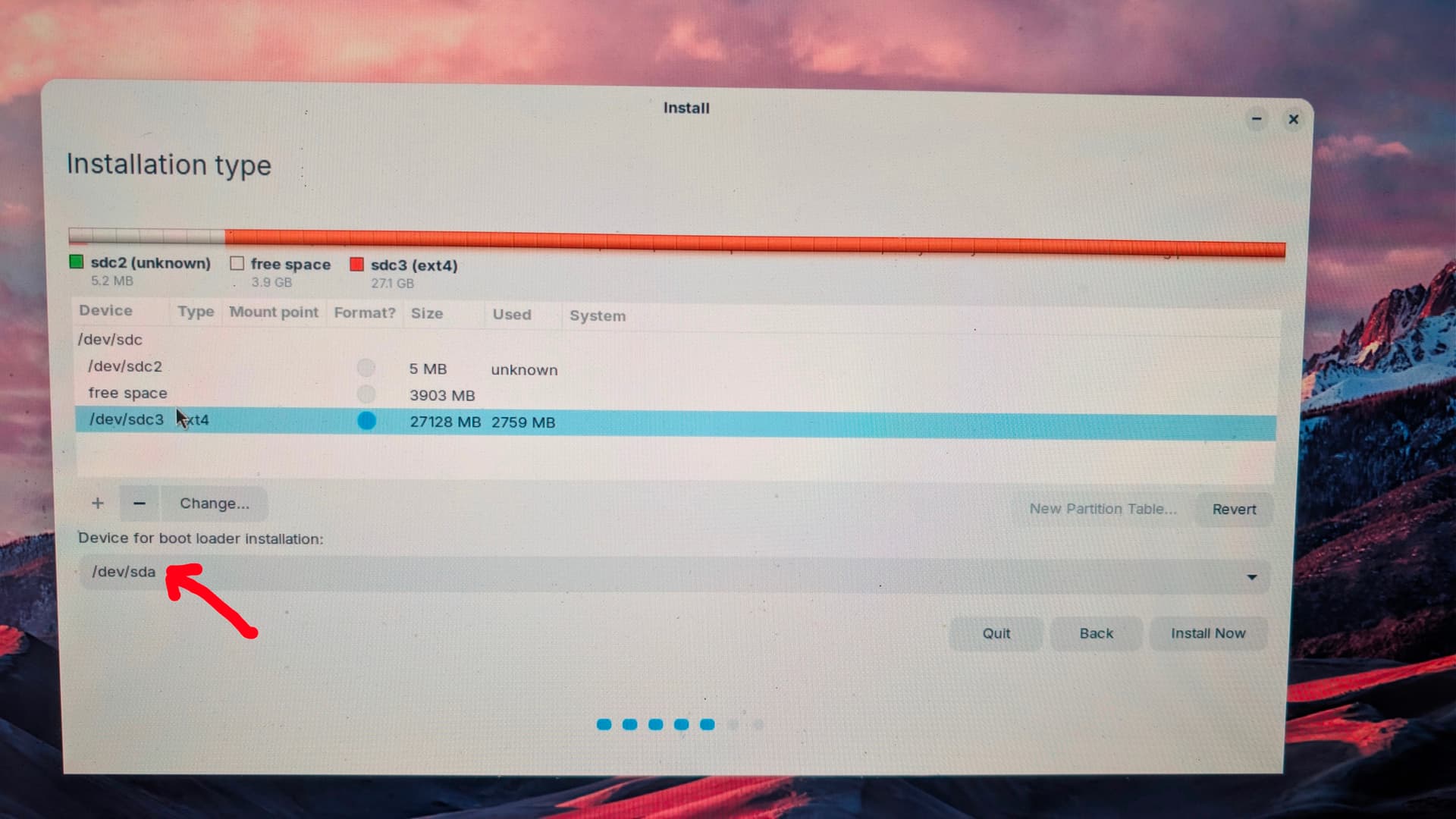
Ah, okay. So, You have already created free Space on Your Drive. And on this free Space You want install Zorin.
What I find a bit weird on Your Picture is: On ''Device for Boot Loader Installation'' is sda chosen. But in the Overview above that is sdc chosen. That doesn't fit together. Do You have more than one Drive?
Could You also answer my Questions from above? Except the Dual-Boot Question. that, You have answered now.
Find the answers to your questions below. :
- Are Secure Boot and Fast Boot in BIOS disabled? > Yes
- Is Fast Start-Up in Windows disabled? > don’t have this
- Do You want replace Windows with Zorin or create a Dual-Boot System? > create a Dual-Boot System
- Is Your BIOS in UEFI or Legacy Mode? > UEFI mode (I tried Legacy mode but I have the same problem)
- What Tool did You use the create the Boot Stick? > BalenaEtcher
- Did You checked the Checksum of the ISO? > Yes, when booting from the USB drive
In the area above, /dev/sdc is the source USB drive containing the Zorin ISO file.
and below /dev/sda is my HDD, where there is a partition available for Zorin that I can't see !
It is in the Power Settings. Here a Video:
Then, Your Drive doesn't seem to be detected right because sda isn't on the above Overview. When You are in Live Mode from the Bootstick, please check there ''GParted'' and post the Partition Overview from this.
When You can boot into Windows, I would suggest to create the Bootstick with Rufus. When creating the Bootstick, choose in Rufus on the ''Partition Sheme'' Option GPT for Your UEFI BIOS. also format the USB Stick in FAT32.
I meant this:
1 Like
We could do with a screen capture of your Windows partitions using Windows Disk Management as @Ponce-De-Leon wrote earlier.
Additionally your USB drive appears to just have 27 Gb formatted to Ext4, the Zorin 18.1 Core .iso is only about 3.4 Gb.
Personally I prefer Ventoy. If Rufus works then fine, but I always avoid Balena Etcher.
Pure guess, but your screenshot looks as if Zorin has tried to install on the USB drive?