Installing 'core' on several PC's

Hi there All
Long explanation and a short Q..

Ok, I have three older HP8200 i5 pc's. They are using win10 at the moment. To upgrade them from their original Win7, I took an image of the C: drive of my main HP pc, with macrium reflect and restored it to the three i5 pc's. There were no issues with drivers etc, just rebooted and away we go!

So Q.
Is there any reason that I cannot do the same with Zorin core. I will be restoring the complete C: (SSD), efi=500m, root=100Gb remaining space=home.??

Ideas please!
Cheers CD

SERVER
Device Name OEM1
Processor Intel(R) Core(TM) i5-2400 CPU @ 3.10GHz 3.10 GHz
Installed RAM 8.00 GB (7.89 GB usable)
Storage 1.82 TB HDD ST2000DM008-2FR102, 447 GB SSD KINGSTON SA400S37480G
Graphics Card Intel(R) HD Graphics (32 MB)
Device ID 5AAD716D-10D0-4589-A901-5B41E68C679C
Product ID 00330-80000-00000-AA672
System Type 64-bit operating system, x64-based processor
Pen and touch No pen or touch input is available for this display
AGENT
Device Name OEM2
Processor Intel(R) Core(TM) i5-3470 CPU @ 3.20GHz 3.20 GHz
Installed RAM 8.00 GB (7.88 GB usable)
Storage 447 GB SSD KINGSTON SA400S37480G, 466 GB HDD ST3500312CS, 1.82 TB HDD WDC WD20EZRX-00D8PB0
Graphics Card Intel(R) HD Graphics (32 MB)
Device ID 7E8964B9-06A7-4784-AC2E-21A3C1C85C2F
Product ID 00330-80000-00000-AA539
System Type 64-bit operating system, x64-based processor
Pen and touch No pen or touch input is available for this display

TORRENT
Device Name OEM3
Processor Intel(R) Core(TM) i3-3220 CPU @ 3.30GHz 3.30 GHz
Installed RAM 8.00 GB (7.88 GB usable)
Storage 1.82 TB HDD WDC WD20EZRX-00D8PB0, 447 GB SSD KINGSTON SA400S37480G
Graphics Card Intel(R) HD Graphics (32 MB)
Device ID C4BC2762-CD87-4EE1-BA6A-9CEE39D40A01
Product ID 00330-80000-00000-AA448
System Type 64-bit operating system, x64-based processor
Pen and touch No pen or touch input is available for this display

MAIN PC
Device Name CDADMIN-HP
Processor Intel(R) Core(TM) i7-2600 CPU @ 3.40GHz 3.40 GHz
Installed RAM 16.0 GB
Storage 894 GB SSD KINGSTON SA400S37960G, 1.82 TB SSD Samsung SSD 870 QVO 2TB, 1.82 TB SSD Samsung SSD 870 QVO 2TB
Graphics Card NVIDIA GeForce GTX 1050 Ti (4 GB)
Device ID 12CA2182-7547-4A3B-BF5F-9EB5B750EF47
Product ID 00330-80000-00000-AA947
System Type 64-bit operating system, x64-based processor
Pen and touch No pen or touch input is available for this display

I haven't done this yet, but it seems to be possible:

I'd recommend Zorin lite. It needs less ressources than Zorin core (if you want to install on all computers the same OS).

1 Like

In theory, you can do this. In practice, there are other considerations like drive partition layout and file systems that will make things more complicated than they need to.

One problem that I see with your current set up the disparity in the number of drives and size of those drives on each computer:

MAIN PC SERVER AGENT TORRENT
894 GB SSD KINGSTON SA400S37960G 447 GB SSD KINGSTON SA400S37480G 447 GB SSD KINGSTON SA400S37480G 447 GB SSD KINGSTON SA400S37480G
1.82 TB SSD Samsung SSD 870 QVO 2TB 1.82 TB HDD ST2000DM008-2FR102 1.82 TB HDD WDC WD20EZRX-00D8PB0 1.82 TB HDD WDC WD20EZRX-00D8PB0
1.82 TB SSD Samsung SSD 870 QVO 2TB - 466 GB HDD ST3500312CS -

However, if your target computers are going to be using the exact same set up, you can install Zorin OS from scratch in one of them, and then use something like Rescuezilla to clone the drive, and restore that image in the other two.

If you intend to use different external drives, like I assume is the case here, you can still do this but you will run into issues if you do things out of order. In other words, you need to do some planning, and decide which drives are going to be used for what purpose.

2 Likes

I just did this recently. I had an old dual core laptop running Windows 11 Pro 23H2 as it could not update to 24H2 because of the PopCnt requirement in Windows versions after 23H2. As 23H2's 2 year support window was about to run out I restored my Zorin Installation on my Desktop to the old Dual Core Laptop...
I simply backed up the Zorin Desktop installation with Rescuezilla Then restored the installation to the old laptop. It booted first time. Then I just went into the Zorin Setup and changed the name from my Zorin Desktop name to a new name for the Zorin laptop. There were very few things that did not work and those that did not (Like Spotify App) most likeley was because the old laptop only has 4 Gigs of memory (Max) (Spotify would not start)... That and another Streaming App was the only things that would not work...Everything else worked.
Both the Desktop PC and the Old Laptop used the same size SSD (128GB) so I didn't even have to resize the partition. If your source PC has a larger HD than the target PC then just resize your partition to match your target PC before backing up with Rescuzilla. Easy Peasy...That's one very nice thing about Linux.

Both Desktop and Laptop were MBR and not UEFI.

Hi there, thanks for your reply.

Regards "Lite" version

Will allow a headless operation once the OS is installed?

Does it have the same networking functions as "core"? RDP, smb shares, afp etc

h265 playback out of the box?

cheers CD

Hi there, thanks for your reply.

Regards the size and number of disks on the receiving pc.

I only have experience in doing this with windows, but since I will only be copying the data on each drive, I don't think the size and number of disks is important. Since a disk that I don't write to will be left as it is. Admittedly still in ntfs, but Z can read those.

My unknown is how the boot process will work when the files have been copied from another installation!

I already have Z 'core' installed and all the apps I require, working on the main pc, so am looking to copy the partitioning pattern and then the data to the second+ pc's

cheers CD

Hi there ZenZen, thanks for your reply.

As I mention in the reply to another user here, regards the size and number of disks on the receiving pc. I only have experience in doing this with windows, but since I will only be copying the data on each drive, I don't think the size and number of disks is important. Since a disk that I don't write to will be left as it is. Admittedly still in ntfs, but Z can read those.
I will be partitioning the C: with the same /efi and /boot setup and the remaining will be for the /home.

My unknown is how the boot process will work when the files have been copied from another installation! Will I need to run through an intallation firstly, then copy over he lamge once the booting process ahs already been established?

One thing I forgot to ask Q>

  1. will Z both 'lite' and 'core' work as headless?
  2. does 'lite' have the same network functionality? RDP' smb shares, afp
  3. does 'lite' playbck x265 'out of the box'?

cheers CD

The only external shares will be those on the windows network already, smb NAS and smb windows PC's (which will become Z pc's) so the network exisitn now will remain just that the PC's on it will change their OS.

cheers CD

I just think it would be cleaner to install Zorin OS normally from scratch in one computer, and make an image out of it. Cloning that image to the other drives would simplify the process, and you still have backup in case you ever need to go back to it.

The only catch is that Rescuezilla needs drives that are of at least the same size, which you have, so it's a nice fit.

If you're planning on simply copying the files as they are, drag & drop style, then you're going to have to edit the /etc/fstab, which defines how drives, including internal drives, are mounted at boot.

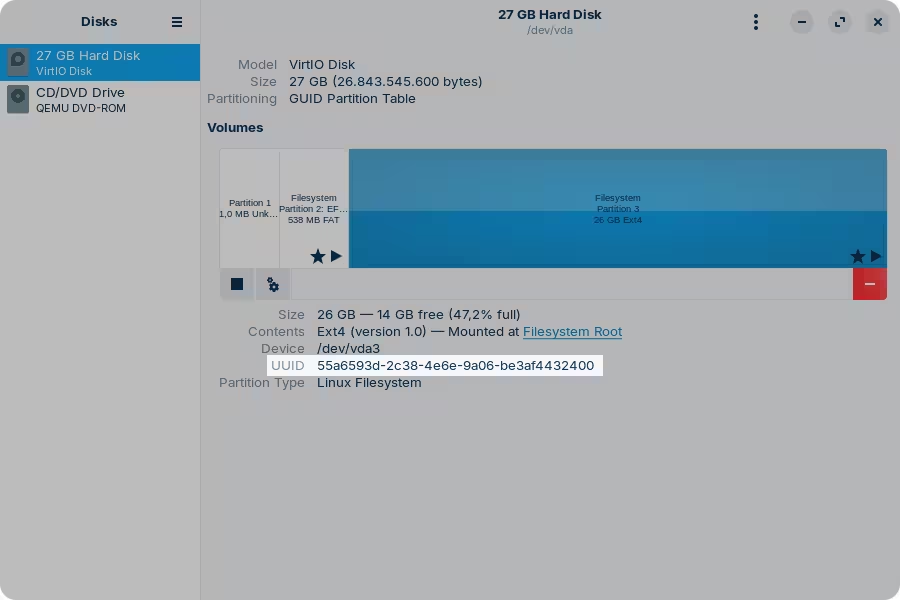
For example, I have two partitions inside /etc/fstab that are mounted at boot:

UUID=55a6593d-2c38-4e6e-9a06-be3af4432400 /               ext4    errors=remount-ro 0       1
UUID=756D-B34B  /boot/efi       vfat    umask=0077      0       1

The most important takeaway from this is the UUID on each line, which is unique to the drive it refers to. If you were to copy and paste this file "as is" in your own computer right now, it won't boot anymore, because it won't be able to find a drive with that identifier. You'd have to edit this file to point to the correct drive partition. To find that out, launch Disks, or run lsblk -f in the command line:

I don't think you have to, just create the partitions and start copying the files from the other drive.

Full disclosure on this, I never tried doing this before. Logically, there's no reason why it shouldn't work but...

It could, but if you're considering this, it's best to go with another distribution better suited for that purpose, like Ubuntu Server or Debian, without any graphical interface installed.

I'm not sure. I think the only difference would be with the file manager. In Zorin OS Core, the file manager has its own implementation to explore network shares, independent from other system libraries.

But you can set this up in either case.

I usually install the VLC player, which comes with a ton of codecs, and I never had an issue with it. But I don't know if it's because of VLC or if it's already supported.

So what are those 1.82 TB drives? Are those internal to each computer?

Hi there, thanks so much for your help and patience with my constant questions.

I understand what you are recommending, has zorin not been tested in a headless config? Or is it a case of each is different?

And yes, the 1.8tb are internals. The external network shares are all smb nas and the other external shares are the windows pc’s which will become the headless servers on the network, accessed by the main pc through RDP.
So network functionality in those is v important.

Thanks again, cheers CD

I thought you were going to use them as servers (being how you labeled them as "Server" and "Agent"). I typically think of headless as in "no graphical interface". But if you're going to control them remotely with the graphical interface and everything, then it's fine.

Hi there, thanks again for your reply.
I haven’t ruled out using ubuntu server version, but I have no experience of that, however it has been recommended by some

Pardon my layman’s understanding of ‘headless’, it just seemed to make sense to me that it meant not to have a monitor.

Regards the control if I was to go with the server version of ubuntu, am I correct in assuming that it can be controlled through RDP all the same, or is it only through a webpage address?

Thank you, cheers CD

This topic was automatically closed 90 days after the last reply. New replies are no longer allowed.