azur01
April 1, 2026, 10:08am
1
Hi all
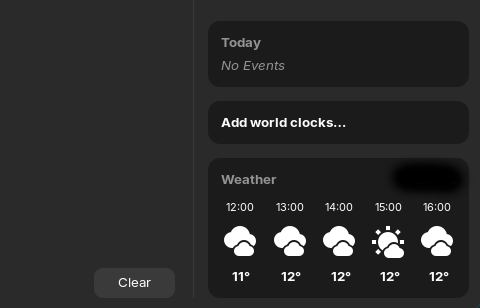
I have uninstalled the Gnome weather app yet it will not remove the widget from my notification area when I click the time at the bottom right:
I have tried sudo apt remove --purge gnome-weather and it has made no difference after restarting a few times, the widget is still stuck there.
Does anyone know how to get rid of it? It doesn't behave like this on my other Zorin system.
Thanks in advance.
could you give me the result of
flatpak list | grep -i "weather"
azur01
April 1, 2026, 10:29am
3
Hello, it just does nothing and goes to a new blank terminal line.
what happen if you click on the weather section ?
azur01
April 1, 2026, 10:34am
5
The spinning wheel animation starts, lasts about 5 seconds or so, then nothing happens.
try to reinstall the weather app and purge it again
azur01
April 1, 2026, 10:43am
7
Unfortunately no success.
I don't like the idea, but the only way I see is to install the extension just perfection, and you will find an option to remove it.
Or maybe someone else have another solution...
1 Like
azur01
April 1, 2026, 10:58am
9
Fantastic thanks, that got rid of it. Something strange happening with my weather app though as the icon is now permanently there, but clicking it does nothing as both flatpak and Zorin packages have been removed...
Not to worry, I will hide the icon. Thanks for your help.
1 Like
you can remove it properly if you want here for flatpak/var/lib/flatpak/exports/share/applications/usr/share/applications
just remove the desktop file
1 Like
system
June 30, 2026, 11:04am
11
This topic was automatically closed 90 days after the last reply. New replies are no longer allowed.