I accidentally deleted my previous post and didn't find a way to restore it - I earned the medal Dumbest User Ever - sorry.
So again:
I own a HP Omnibook X Flip 14 - fk0178ng. It runs Zorin OS Pro 18.1.
My wife, who is a maths teacher discovered that the Germany keyboard layout is missing the "< > |" key - usually located in between the (German) Y and left shift.
For her job she desperately needs these characters (less so the |, but I'm sure Linux Power Users will painfully miss that one).
It turns out, that HP simply reprinted the US layout with the German and added "< > |" to the L key. In Windows there is probably a driver for that. Not so in Linux.
None of the layouts we tested solved the problem.
Using the US layout for < and > on the German , and . keys is not practical for everyday work as this layout misses the Umlaute as well as changes a lot of keys such as Y <-> Z.
There simply has to be direct access to < and > on the keyboard.
Question:
Is there any specific German HP layout for Linux?
Or better: Is it possible to customize the layout of individual keys such as ALT GR + L for <, ALT GR + Ö for > (or even the Copilot key) as it is not needed in Linux.
ß is gone, X squared is also located somewhere else (not acceptable for a maths teacher), interestingly not even < > was on L - didn't find out where.
I tried only one of the 4 Swiss layout options, but I assume, that the changes concerning the @ and X squared and cubed and others will be the same on every single of them.
The printed layout on the laptop is the "German - German" one (not Swiss - German) but HP style unfortunately :-).
Hello,
Brave’s AI gave me the following information (in German).
Das HP OmniBook X Flip 14-fk0178ng (BZ7Z1EA#ABD) wird nicht mit Schweizer (CH) Tastatur ausgeliefert, sondern mit einem deutschen QWERTZ-Layout (DE) . Die Lokalisierung ist auf „Deutsch / Region: Deutschland" festgelegt.
Have you also tested the ‘German – Germany’ layout?
For this @Forpli's Suggestion with Input Remapper might be a good Solution. I use it, too. I have changed my Knob Click to something different. You can download the latest Version from the github Page that @Forpli has linked or You install the Version waht is already in the Repos.
To do that, open gnome Software and look for Input Remapper:
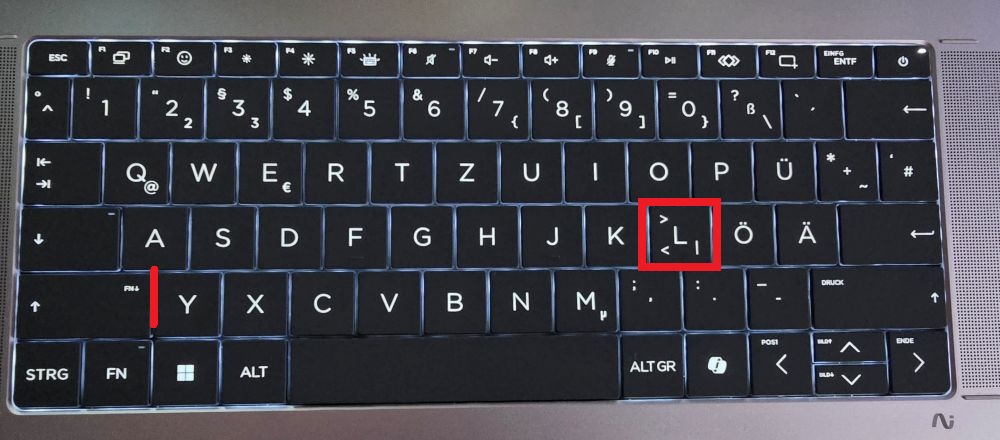

 layout.