They say most leaks done with "infostealer" malware, which from what I get, are not keyloggers but just copy & send out info stored locally by the browser.
Coincidentally, I've been reading about gnome-keyring over the past 1-2 days, concluding that it does not protect the passwords while you're logged in/using the browser. There's also a video showing you can extract your chrome's saved passwords using off the shelf tools https://www.youtube.com/watch?v=CIOsemj3kl4
Should we go back to always memorizing and typing our passwords by hand?
(Until keyloggers become popular )
I guess no solution is really "the" solution, but using a password manager goes a long way in avoiding a lot of these problems. To me, it's the perfect balance between convenience and security.
That, and not storing any sensitive information on the browser — passwords, credit cards, etc.
Well, when you store in a browser (at least chrome, edge), you also store in their password manager...
I'm rather new to these issues so I was surprised to find out that browsers would save such sensitive info locally at all. Why don't they store it only on their servers?
Their servers can be expected to be much more secure than the computers of the average user: at least because there should not be a user browsing the Wild Web and bringing home (knowingly or not) all kinds of questionable programs.
I don't like the idea of browser vendors storing sensitive user data in their own servers. And I'm sure they don't like the idea either: if nothing else, that would make them very high value targets for hackers. Keeping all that data secure is a lot of responsibility... and very costly.
This doesn't seem to have been mentioned in the forums yet.
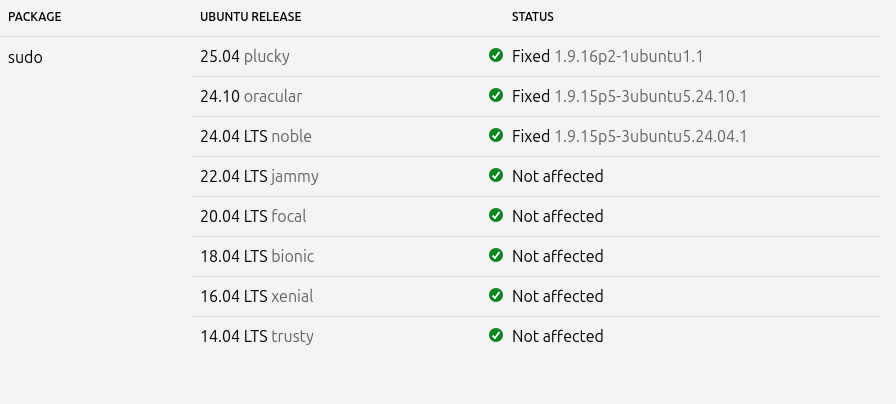
An attacker can leverage sudo’s -R (--chroot) option to run arbitrary commands as root, even if they are not listed in the sudoers file. Sudo versions 1.9.14 to 1.9.17 inclusive are affected.
CVSS 3 Severity Score: 9.3 - Critical
This and another CVE, with low severity, are fixed in 1.9.17p1:
No easy install, must use complicated terminal commands, no GUI, must edit config file manually. Good luck getting the average computer user to use it. When will Linux get out of the dark ages already? I'm techy myself, have more knowledge then an average user, and I myself don't want to mess with LMD!
I have ClamAV GUI on my PC already, and that has found some bad dirty Windows bits, back when I was trying to hang onto Windows software, running through Wine, when I initially switched to Linux. I grew up however, once I learned that Linux had its own APPs, to do the same stuff.
If you want to develop security software to be used by the masses however, you start by making your software with a GUI. Computers only really took off, when Apple invented the first GUI operating system, in Machintosh Classic AIO machines. That should tell you a lot! And nobody wants to edit config files, just to setup their scanning software.
Linux developers need to start getting serious about app development. You can't run off your good looks. We got Windows users switching to Linux, since Windows 10 enters end of life. No Windows user, wants to deal with unnecessary complicated arbitrary BS.
I've been saying this for many years now, but now its more important then ever. Make it GUI, or go home. Don't force people to look up fancy terminal commands ,and force them to edit config files, its freaking 2025.
Hi @StarTreker . You have to remember that GNU/Linux is a form of *nix and most *nix OS's are based primarily around the terminal. Ironically, the introduction of GUI's compared to a traditional Terminal interface led to the vast increase in malware on the GUI (Windows) desktop. That is not to say that *nix based applications are not vulnerable. I remember working in a Social Services IT Department on placement and a virus got fed into ICL's OfficePower, and Office Suite that ran entirely on a green text terminal!
 )
)