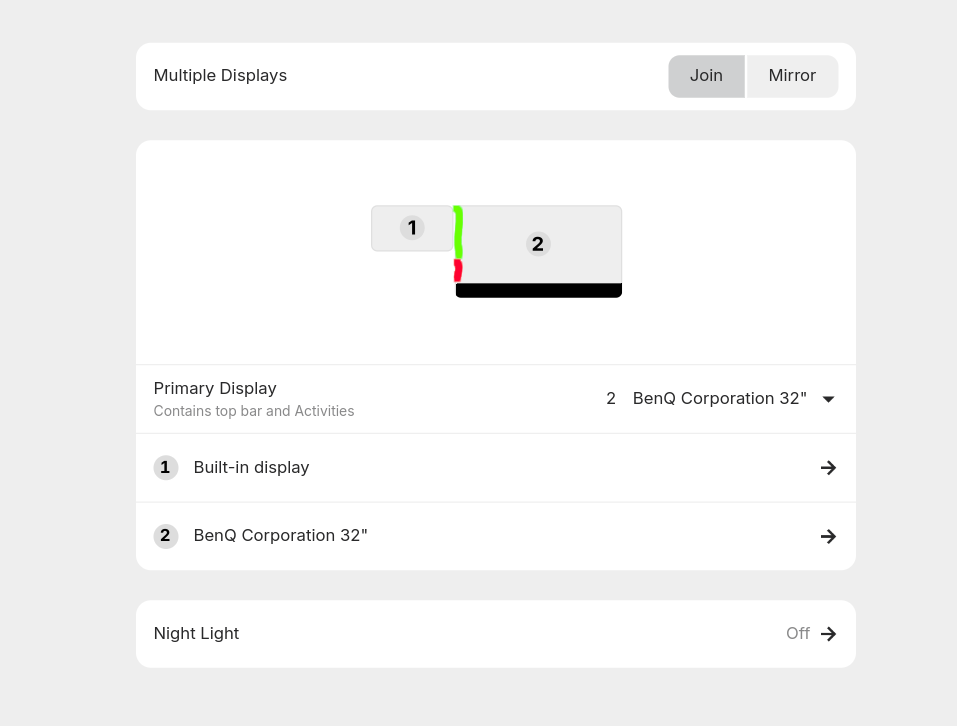
I am using Zorin Pro 18 on a Lenovo X280 Notebook and it runs great. The X280 has an Intel graphic card inside. I plugged in a Benq 32" screen by USB-C, flagged in Displays menu as primary display.
When I want to move between the screens, the notebook screen is on left side (see attached screenshot), the movement is only possible when i move on the upper left side to the notebook screen. When I try to move at the bottom on the primary screen to left, this does not work.
I tried to mark the zones on the screenshot where I can move in green.
How can I achieve to move the second screen independent on the position on left side?
I wish it was possible, as well.
You can see in your image where the pointer cannot logically travel where there is no monitor to move to.
Just as if there is no monitor there, the cursor will bump against the outside edge and stop.
When you cursor is moved up to where the bottom edge of the smaller monitor meets your larger one, it now can travel to the left.
You can drag the notebook computer virtual monitor down or reposition it - but since they are different sizes, the untouched portions of the side where the two meet will always block the cursor until you reach a spot where the two monitors make contact.
Thank you for your fast reply. I moved the smaller window into the middle to have a little bit more comfort. This fits for me. I will mark your answer as solution.