In the file manager, right click a music file, select open with..., select the music player you prefer, the click "Set as Default."
In Thunar, I believe it is "use this as default".
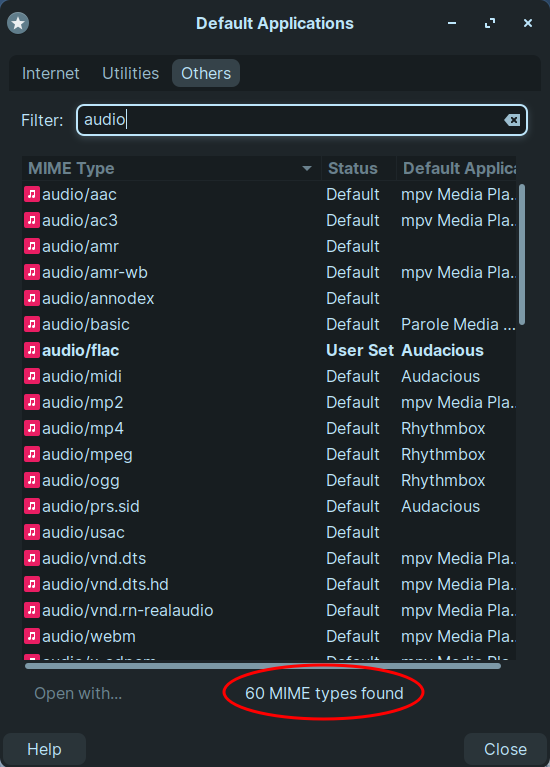
Setting the default for that filetype will set it as default for the filetype not only that file itself. So all 60, if they are the matching filetype, will set to open as Audacious.
A mish-mash: some are Audacious, some are Rhythmbox, some are Parole, some are mpv, some are VLC etc.
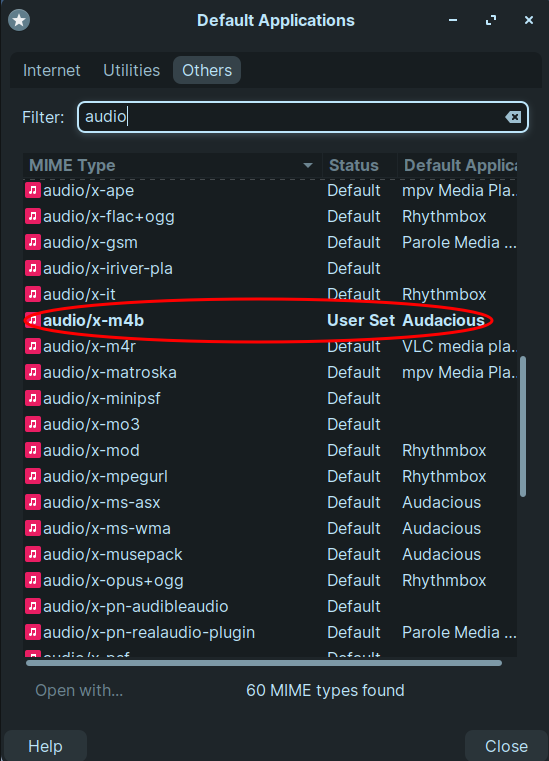
Then I followed your method on an. m4b file. (Well, in Nemo the steps might be a little different to Thunar: right-click on file, "Open with", "Other Application...", choose app from list, "Set as Default".
Looking specifically for the .m4b file type, yes that is now associated with Audacious. But the other 59 file types are still a mish-mash of Audacious, Rhythmbox, Parole, mpv, VLC etc.
So it still looks to me as though that method only changes the default application one file type at a time.
You only have a few Audio Filetypes, so it should only take a moment to ensure mp3, oog, midi are also set.
Some of your types listed are audio for video. So do not set your video files to Audacious by accident.
Oh, I misunderstood the issue here. I thought you were only asking for a GUI to change these associations to not have to have a file for each type already available.
I just tried myself and indeed it seems you can only change one filetype mime at the time.
In that case I don't know of a GUI that do this.
For what it's worth, I found that you can override the default applications using a text file placed at ~/.config/mimeapps.list as described in this thread. It's not what you asked, but at least using this you can just copy and paste and only have to go through the trouble of setting this up once. Hopefully its helps.